About
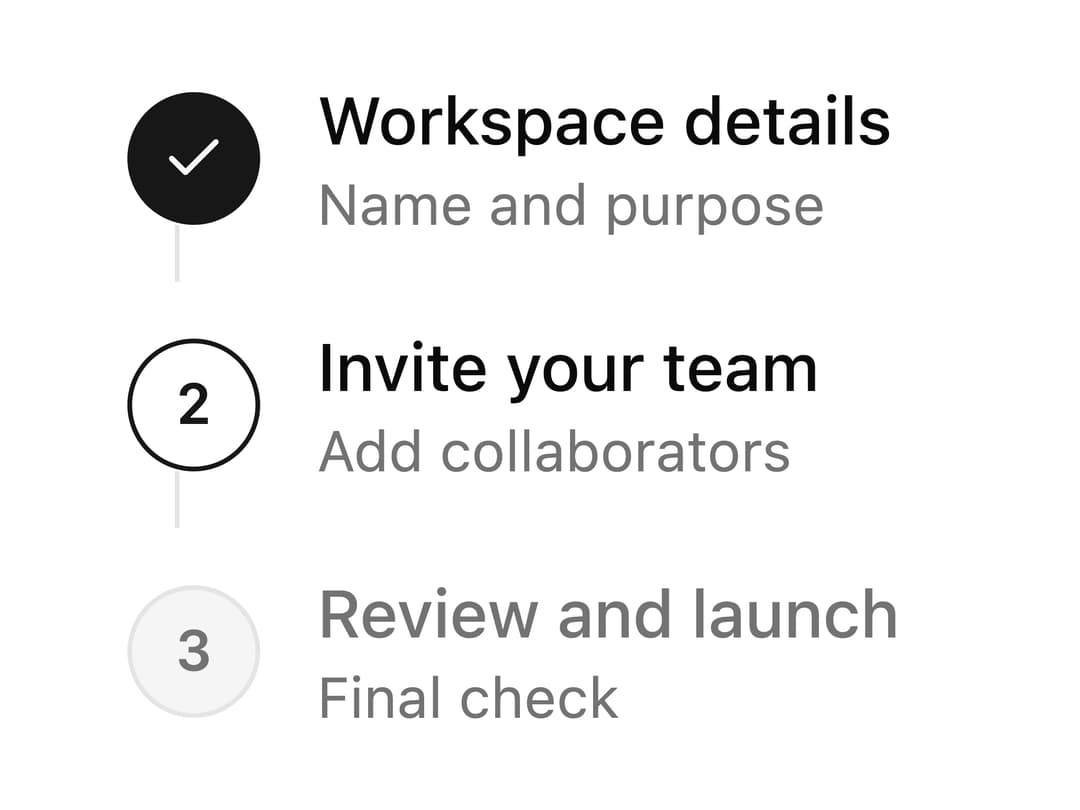
A vertical ordered list of steps for a multi-step flow that marks the current step and lets users click back to any completed step.
Built with React and Tailwind. Copy the prompt and paste it into Claude Code, Cursor or Lovable: your agent adds Progress Steps to your project and fits it to your theme.
Code
How Progress Steps is used: the demo's code. The component's own source comes with a free account.
Usage.tsx
import { ProgressSteps } from "@/components/ui/progress-steps";

const steps = [
  {
    id: "details",
    label: "Workspace details",
    description: "Name and purpose",
  },
  { id: "team", label: "Invite your team", description: "Add collaborators" },
  { id: "finish", label: "Review and launch", description: "Final check" },
];

export default function ProgressStepsDemo() {
  return (
    <ProgressSteps
      className="w-full max-w-xs"
      label="Workspace setup"
      steps={steps}
      defaultActiveIndex={1}
      navigable
    />
  );
}
Dependencies
More by vamsiy78
View all

Segmented Control
8
Animated Beam
7
Agent Roster
5
Table Of Contents
1
API Key Field
1
Toast Stack

Team Portrait Grid

Image Cropper