
About
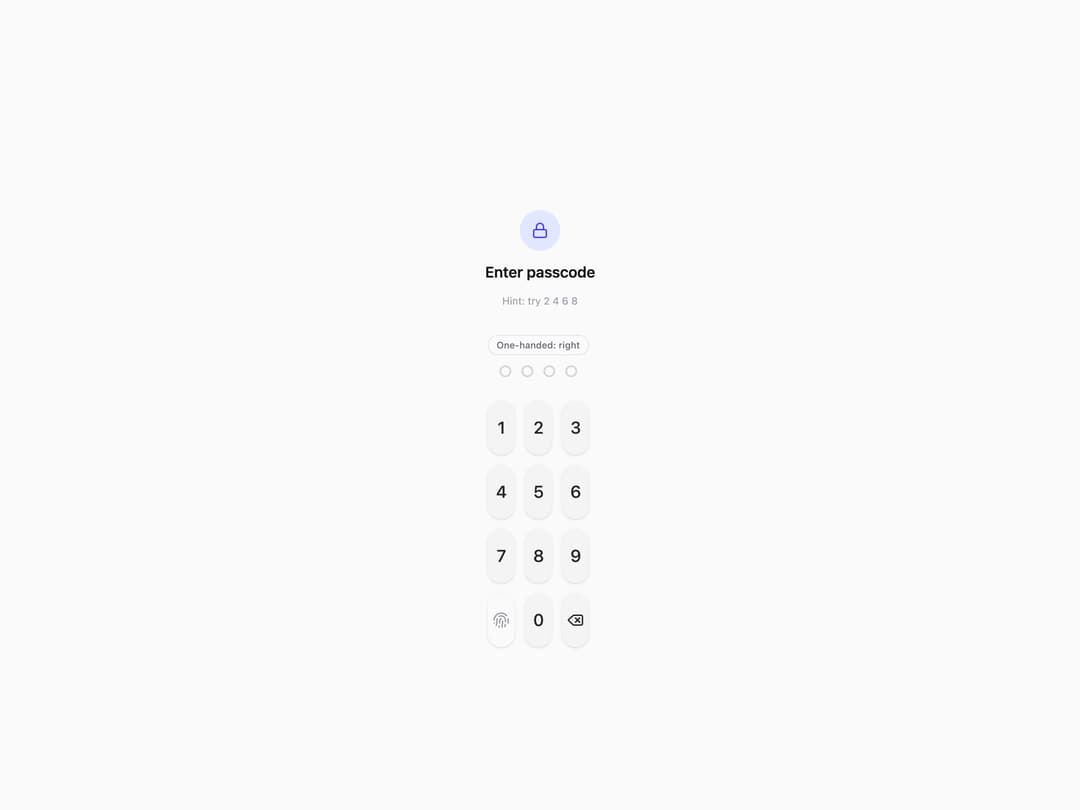
A PIN entry keypad built for one-handed phone use. A toggle shifts the whole grid to sit under the left or right thumb's natural reach zone instead of centering it, which is where most PIN pads put it and where a thumb has to stretch the most. A wrong code shakes the whole pad and flashes the dots red; a correct one settles the dots to green and reveals an "Unlocked" line.
Built with React and Tailwind. Copy the prompt and paste it into Claude Code, Cursor or Lovable: your agent adds Reach Pin Pad to your project and fits it to your theme.
Code
How Reach Pin Pad is used: the demo's code. The component's own source comes with a free account.
Usage.tsx
import * as React from "react";
import { ReachPinPad } from "@/components/ui/reach-pin-pad";
import { Lock } from "lucide-react";

const VALID_CODE = "2468";

export default function ReachPinPadDemo() {
  const [hand, setHand] = React.useState<"left" | "right">("right");

  async function handleComplete(code: string) {
    await new Promise((r) => setTimeout(r, 350));
    return code === VALID_CODE;
  }

  return (
    <div className="flex h-full w-full flex-col items-center bg-zinc-50 px-6 pt-14 dark:bg-zinc-950">
      <div className="mb-8 flex flex-col items-center gap-3">
        <div className="flex h-12 w-12 items-center justify-center rounded-full bg-indigo-100 text-indigo-600 dark:bg-indigo-500/15 dark:text-indigo-400">
          <Lock size={20} />
        </div>
        <h1 className="text-lg font-semibold text-zinc-900 dark:text-zinc-50">
          Enter passcode
        </h1>
        <p className="text-xs text-zinc-400">Hint: try 2 4 6 8</p>
      </div>

      <ReachPinPad hand={hand} onHandChange={setHand} onComplete={handleComplete} />
    </div>
  );
}
Dependencies
More by Holo
View all

Testimonial Coverflow
4
Slot Week Picker
2
Command Palette
2
Pricing Plan Tilt
1
File Drop Physics
1
Story Viewer
Snap Sheet
Liquid Tab Bar