
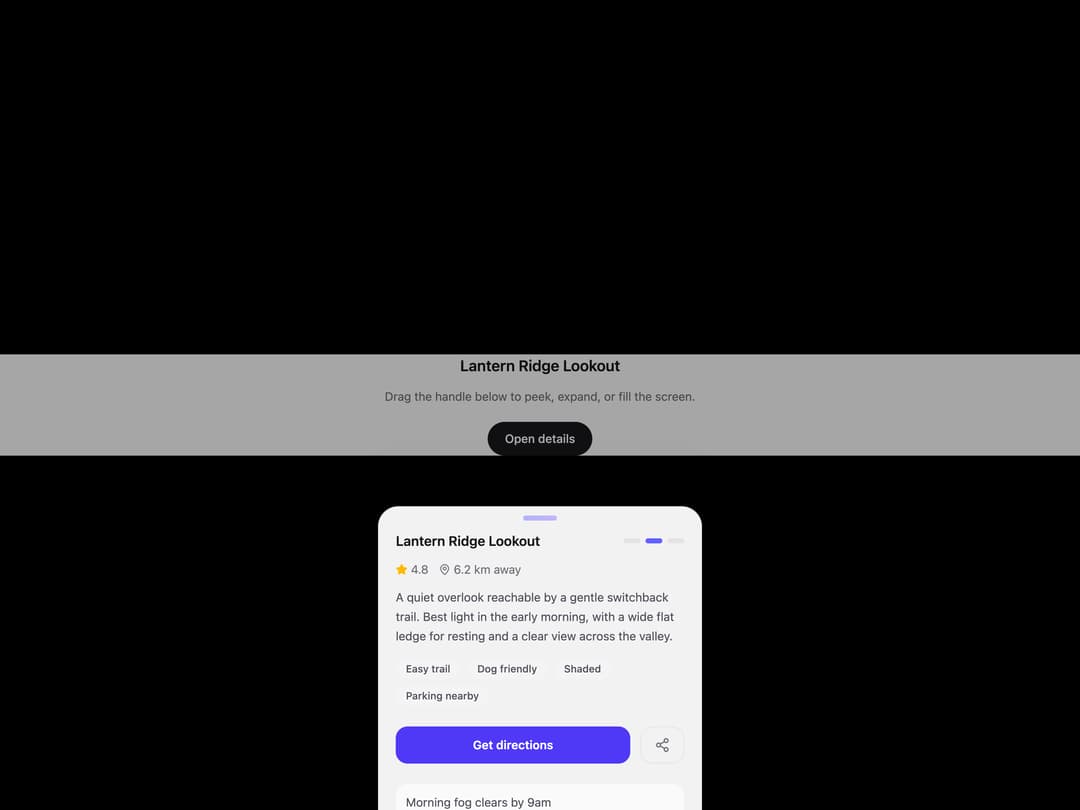
A draggable bottom sheet with three resting heights ("peek," "half," "full") instead of the usual open-or-closed toggle. Drag past the edges and it rubber-bands instead of stopping dead, and on release it reads both the drop position and the flick velocity to decide where to settle, a fast downward flick dismisses it even from "full," a fast upward flick jumps straight to "full" regardless of where the drag ended. The backdrop fades with the sheet instead of switching on and off at a fixed point.
Built with React and Tailwind. Copy the prompt and paste it into Claude Code, Cursor or Lovable: your agent adds Snap Sheet to your project and fits it to your theme.
Code
How Snap Sheet is used: the demo's code. The component's own source comes with a free account.
Usage.tsx
import * as React from "react";
import { SnapSheet } from "@/components/ui/snap-sheet";
import { MapPin, Star, Share2 } from "lucide-react";

// Small deterministic placeholder generators so demos never depend on the
// network. Everything is an inline SVG data URI with abstract shapes -
// no real photos, no brand marks, nothing identifiable.

function svgToDataUri(svg: string) {
  return `data:image/svg+xml,${encodeURIComponent(svg)}`;
}

function gradientPhoto(seed: number, w = 780, h = 1386) {
  const palettes = [
    ["#6366f1", "#a855f7", "#ec4899"],
    ["#0ea5e9", "#6366f1", "#8b5cf6"],
    ["#f59e0b", "#ef4444", "#ec4899"],
    ["#10b981", "#06b6d4", "#6366f1"],
    ["#f43f5e", "#f59e0b", "#eab308"],
    ["#8b5cf6", "#ec4899", "#f43f5e"],
  ];
  const [c1, c2, c3] = palettes[seed % palettes.length];
  const cx = 20 + ((seed * 37) % 60);
  const cy = 20 + ((seed * 53) % 60);
  const svg = `
  <svg xmlns="http://www.w3.org/2000/svg" width="${w}" height="${h}" viewBox="0 0 ${w} ${h}">
    <defs>
      <linearGradient id="g" x1="0" y1="0" x2="1" y2="1">
        <stop offset="0%" stop-color="${c1}"/>
        <stop offset="55%" stop-color="${c2}"/>
        <stop offset="100%" stop-color="${c3}"/>
      </linearGradient>
      <radialGradient id="r" cx="${cx}%" cy="${cy}%" r="70%">
        <stop offset="0%" stop-color="white" stop-opacity="0.35"/>
        <stop offset="100%" stop-color="white" stop-opacity="0"/>
      </radialGradient>
    </defs>
    <rect width="${w}" height="${h}" fill="url(#g)"/>
    <rect width="${w}" height="${h}" fill="url(#r)"/>
    <circle cx="${(cx / 100) * w}" cy="${(cy / 100) * h}" r="${w * 0.42}" fill="white" opacity="0.07"/>
  </svg>`;
  return svgToDataUri(svg);
}

function avatarPlaceholder(seed: number, size = 96) {
  const palettes = ["#6366f1", "#0ea5e9", "#f59e0b", "#10b981", "#f43f5e", "#8b5cf6"];
  const bg = palettes[seed % palettes.length];
  const letters = ["A", "J", "K", "M", "R", "S", "T", "W"];
  const letter = letters[seed % letters.length];
  const svg = `
  <svg xmlns="http://www.w3.org/2000/svg" width="${size}" height="${size}" viewBox="0 0 ${size} ${size}">
    <rect width="${size}" height="${size}" rx="${size}" fill="${bg}"/>
    <text x="50%" y="54%" text-anchor="middle" dominant-baseline="middle"
      font-family="system-ui, sans-serif" font-size="${size * 0.42}" fill="white" font-weight="600">${letter}</text>
  </svg>`;
  return svgToDataUri(svg);
}


export default function SnapSheetDemo() {
  const [open, setOpen] = React.useState(true);

  return (
    <div className="relative flex h-full w-full flex-col bg-zinc-50 dark:bg-zinc-950">
      <div
        className="h-1/2 w-full bg-cover bg-center"
        style={{ backgroundImage: `url("${gradientPhoto(2)}")` }}
      />
      <div className="flex flex-1 flex-col items-center justify-center gap-3 px-6 text-center">
        <h1 className="text-lg font-semibold text-zinc-900 dark:text-zinc-50">
          Lantern Ridge Lookout
        </h1>
        <p className="text-sm text-zinc-500 dark:text-zinc-400">
          Drag the handle below to peek, expand, or fill the screen.
        </p>
        <button
          onClick={() => setOpen(true)}
          className="mt-2 rounded-full bg-zinc-900 px-5 py-2.5 text-sm font-medium text-white dark:bg-white dark:text-zinc-900"
        >
          Open details
        </button>
      </div>

      <SnapSheet open={open} onOpenChange={setOpen} title="Lantern Ridge Lookout">
        <div className="flex items-center gap-3 text-sm text-zinc-500 dark:text-zinc-400">
          <span className="flex items-center gap-1">
            <Star size={14} className="fill-amber-400 text-amber-400" /> 4.8
          </span>
          <span className="flex items-center gap-1">
            <MapPin size={14} /> 6.2 km away
          </span>
        </div>
        <p className="mt-3 text-sm leading-relaxed text-zinc-600 dark:text-zinc-300">
          A quiet overlook reachable by a gentle switchback trail. Best light
          in the early morning, with a wide flat ledge for resting and a
          clear view across the valley.
        </p>
        <div className="mt-4 flex flex-wrap gap-2">
          {["Easy trail", "Dog friendly", "Shaded", "Parking nearby"].map((t) => (
            <span
              key={t}
              className="rounded-full bg-zinc-100 px-3 py-1 text-xs font-medium text-zinc-600 dark:bg-zinc-800 dark:text-zinc-300"
            >
              {t}
            </span>
          ))}
        </div>
        <div className="mt-6 flex gap-3">
          <button className="flex-1 rounded-xl bg-indigo-600 py-3 text-sm font-semibold text-white">
            Get directions
          </button>
          <button className="flex items-center justify-center rounded-xl border border-zinc-200 px-4 dark:border-zinc-700">
            <Share2 size={18} className="text-zinc-500 dark:text-zinc-300" />
          </button>
        </div>
        <div className="mt-6 space-y-3 pb-4">
          {["Morning fog clears by 9am", "Best for sunrise photos", "Watch for loose gravel near the top"].map(
            (note) => (
              <div
                key={note}
                className="rounded-xl bg-zinc-50 p-3 text-sm text-zinc-600 dark:bg-zinc-800/60 dark:text-zinc-300"
              >
                {note}
              </div>
            ),
          )}
        </div>
      </SnapSheet>
    </div>
  );
}
Dependencies
More by Holo
View all

Testimonial Coverflow
4
Slot Week Picker
2
Command Palette
2
Pricing Plan Tilt
1
File Drop Physics
1
Story Viewer
Reach Pin Pad
Liquid Tab Bar