
About
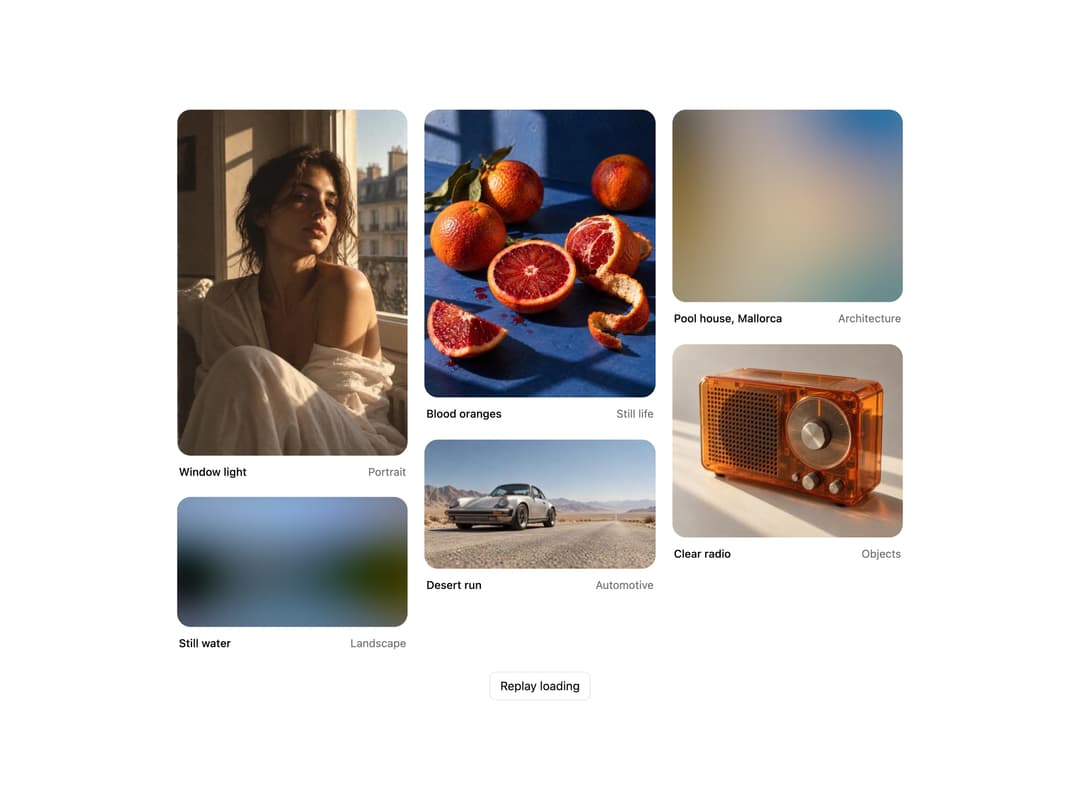
Images that develop from a BlurHash blur, a main color fill or a shimmer placeholder. The frame holds the aspect ratio, so nothing shifts as the photo lands.
Built with React and Tailwind. Copy the prompt and paste it into Claude Code, Cursor or Lovable: your agent adds Progressive Image Loading to your project and fits it to your theme.
Code
How Progressive Image Loading is used: the demo's code. The component's own source comes with a free account.
Usage.tsx
"use client";

import * as React from "react";
import { ProgressiveImageLoading, type ProgressiveImagePlaceholder } from "@/components/ui/progressive-image-loading";

const settings = {
  placeholder: "blur",
  firstDelay: 900,
  stepDelay: 420,
  duration: 700,
};

interface Photo {
  src: string;
  title: string;
  meta: string;
  width: number;
  height: number;
  blurhash: string;
  color: string;
}

const PHOTOS: Photo[] = [
  {
    src: "https://cdn.21st.dev/assets/mirror/df/dfe7b0dd2311f018a33d00076802569f64d4928f4d0d135450f893ca401c2b12.webp",
    title: "Window light",
    meta: "Portrait",
    width: 1024,
    height: 1536,
    blurhash: "TJEB{Q0LtRx]RO%Mx^ROX9-pE1xt",
    color: "#7b6754",
  },
  {
    src: "https://cdn.21st.dev/assets/mirror/92/92a251c940d9c98cff5418fbf020d107270599849001a5b1690c380263c5b063.webp",
    title: "Still water",
    meta: "Landscape",
    width: 1672,
    height: 941,
    blurhash: "LVBE5lkYR3Rk.AtRWAa$.Aoznhog",
    color: "#617385",
  },
  {
    src: "https://cdn.21st.dev/assets/mirror/da/da4cb5ce9bc6a4322cd80d9eff697f086e27490dd2c7a9cf948c9264dd3ebe24.webp",
    title: "Blood oranges",
    meta: "Still life",
    width: 1122,
    height: 1402,
    blurhash: "TMDH:V%3xtt6kqWU1%oynhkXW@SN",
    color: "#734c59",
  },
  {
    src: "https://cdn.21st.dev/assets/mirror/98/980aa272836b8af6a05e21601bf2c5e0ac8a0d9195422abbba81dd86eccce09e.webp",
    title: "Desert run",
    meta: "Automotive",
    width: 1672,
    height: 941,
    blurhash: "LZIE|kD%t6xaPXRiWCa#Nft7WVRj",
    color: "#9e9ea2",
  },
  {
    src: "https://cdn.21st.dev/assets/mirror/c6/c6e4559cc4df7efd2689a247de86cd024d4419a80f3f710f9d85b9fa58cd041a.webp",
    title: "Pool house, Mallorca",
    meta: "Architecture",
    width: 1371,
    height: 1148,
    blurhash: "LLHeg[+=0LIUD=NENGM|5Y=_%0I=",
    color: "#98948c",
  },
  {
    src: "https://cdn.21st.dev/assets/mirror/56/562b3e69a9b741b8261e843c1ff0368177faac98e53fe6ec6e87e5da1519e776.webp",
    title: "Clear radio",
    meta: "Objects",
    width: 1370,
    height: 1148,
    blurhash: "LKJZ}C~p~p%MM{RPt7xt_Nt74:Io",
    color: "#a98d7b",
  },
];

/** Order the images land in, so the feed fills in unevenly like a real one. */
const ARRIVAL = [1, 4, 0, 3, 5, 2];

export default function Demo(props: Partial<typeof settings>) {
  const s = { ...settings, ...props };
  const [replay, setReplay] = React.useState(0);
  const [arrived, setArrived] = React.useState<boolean[]>(() => PHOTOS.map(() => false));

  React.useEffect(() => {
    const timers: number[] = [window.setTimeout(() => setArrived(PHOTOS.map(() => false)), 0)];
    ARRIVAL.forEach((index, order) => {
      timers.push(
        window.setTimeout(
          () => setArrived((current) => current.map((value, i) => (i === index ? true : value))),
          s.firstDelay + order * s.stepDelay,
        ),
      );
    });
    return () => timers.forEach((t) => window.clearTimeout(t));
  }, [replay, s.firstDelay, s.stepDelay]);

  return (
    <div className="flex min-h-[440px] w-full flex-col items-center justify-center gap-6 bg-background px-5 py-10 sm:px-10">
      <div className="w-full max-w-[860px] columns-2 gap-4 sm:columns-3 sm:gap-5">
        {PHOTOS.map((photo, i) => (
          <figure key={photo.src} className="mb-4 break-inside-avoid sm:mb-5">
            <ProgressiveImageLoading
              key={`${replay}-${s.placeholder}`}
              src={arrived[i] ? `${photo.src}?r=${replay}` : undefined}
              alt={photo.title}
              width={photo.width}
              height={photo.height}
              placeholder={s.placeholder as ProgressiveImagePlaceholder}
              blurhash={photo.blurhash}
              color={photo.color}
              duration={s.duration}
              className="rounded-2xl"
            />
            <figcaption className="mt-2.5 flex items-baseline justify-between gap-3 px-0.5 text-[13px]">
              <span className="truncate font-medium text-foreground">{photo.title}</span>
              <span className="shrink-0 text-muted-foreground">{photo.meta}</span>
            </figcaption>
          </figure>
        ))}
      </div>
      <button
        type="button"
        onClick={() => setReplay((r) => r + 1)}
        className="rounded-md border border-border bg-card px-3 py-1.5 text-sm text-foreground hover:bg-muted"
      >
        Replay loading
      </button>
    </div>
  );
}
Dependencies
More by Wensity Labs
View all

Sidebar
364
Calendar
259
Button
117
Color Picker
93
Image Comparison Slider
79
AI Prompt Input
74
Text Morphing
54
Carousel
50