About
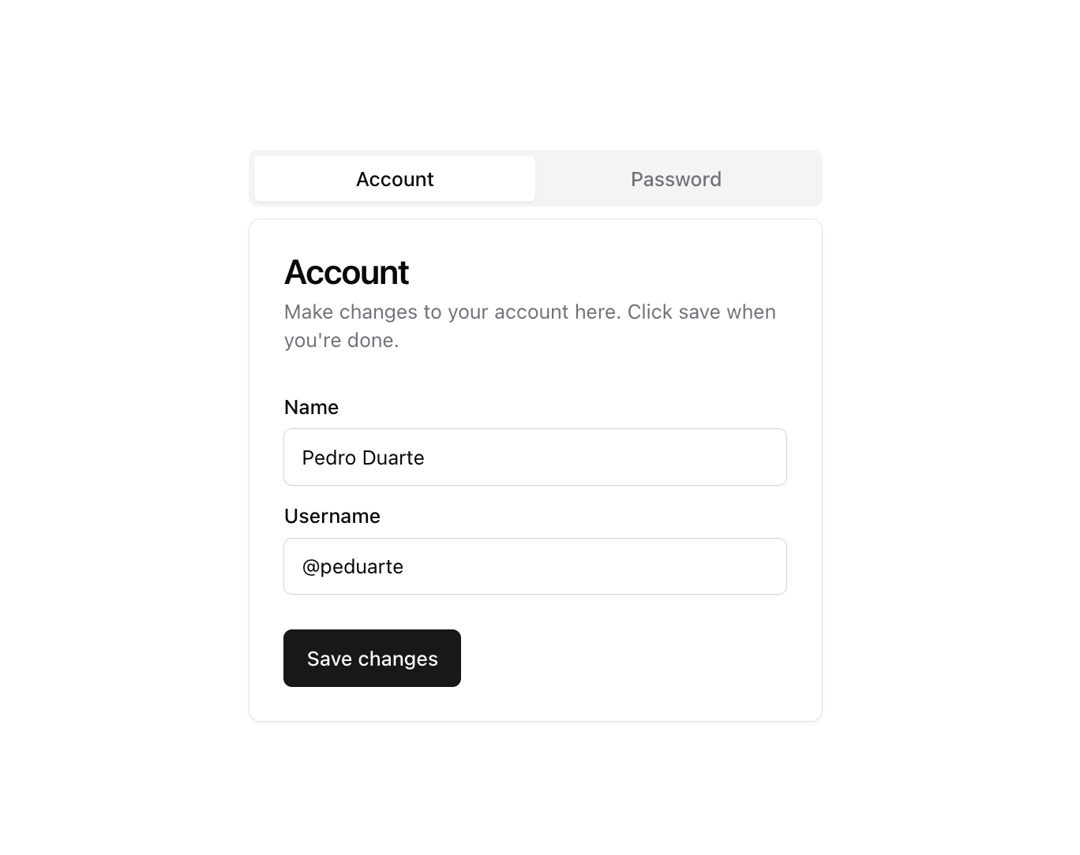
A set of layered sections of content—known as tab panels—that are displayed one at a time.
Built with React and Tailwind. Copy the prompt and paste it into Claude Code, Cursor or Lovable: your agent adds Tabs to your project and fits it to your theme.
Code
How Tabs is used: the demo's code. The component's own source comes with a free account.
Usage.tsx
import { Button } from "@/components/ui/button"
import {
  Card,
  CardContent,
  CardDescription,
  CardFooter,
  CardHeader,
  CardTitle,
} from "@/components/ui/card"
import { Input } from "@/components/ui/input"
import { Label } from "@/components/ui/label"
import {
  Tabs,
  TabsContent,
  TabsList,
  TabsTrigger,
} from "@/components/ui/tabs"

export function TabsDemo() {
  return (
    <Tabs defaultValue="account" className="w-[400px]">
      <TabsList className="grid w-full grid-cols-2">
        <TabsTrigger value="account">Account</TabsTrigger>
        <TabsTrigger value="password">Password</TabsTrigger>
      </TabsList>
      <TabsContent value="account">
        <Card>
          <CardHeader>
            <CardTitle>Account</CardTitle>
            <CardDescription>
              Make changes to your account here. Click save when you're done.
            </CardDescription>
          </CardHeader>
          <CardContent className="space-y-2">
            <div className="space-y-1">
              <Label htmlFor="name">Name</Label>
              <Input id="name" defaultValue="Pedro Duarte" />
            </div>
            <div className="space-y-1">
              <Label htmlFor="username">Username</Label>
              <Input id="username" defaultValue="@peduarte" />
            </div>
          </CardContent>
          <CardFooter>
            <Button>Save changes</Button>
          </CardFooter>
        </Card>
      </TabsContent>
      <TabsContent value="password">
        <Card>
          <CardHeader>
            <CardTitle>Password</CardTitle>
            <CardDescription>
              Change your password here. After saving, you'll be logged out.
            </CardDescription>
          </CardHeader>
          <CardContent className="space-y-2">
            <div className="space-y-1">
              <Label htmlFor="current">Current password</Label>
              <Input id="current" type="password" />
            </div>
            <div className="space-y-1">
              <Label htmlFor="new">New password</Label>
              <Input id="new" type="password" />
            </div>
          </CardContent>
          <CardFooter>
            <Button>Save password</Button>
          </CardFooter>
        </Card>
      </TabsContent>
    </Tabs>
  )
}
Dependencies
More by shadcn
View all

Navigation menu
770
Calendar with time pressets
504
Sidebar
339
Sonner
230
Chart
214
Icons
176
Dropdown Menu
149
Calendar with event slots
116
More in Cards
View all

Course Design Cards
1.1K
Stats cards with links
79

Statistics Card 2
259
Card
56

Card Studio
9
The Item one
3
Statistics Card 7
289

Weather Card
54
