
About
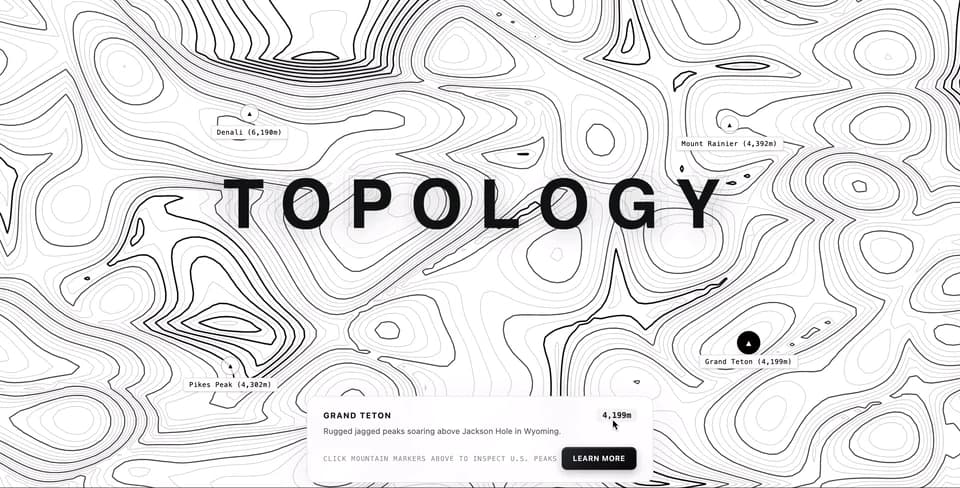
Efect contour line mountain area
Built with React and Tailwind. Copy the prompt and paste it into Claude Code, Cursor or Lovable: your agent adds Contour line Mountain to your project and fits it to your theme.
Code
How Contour line Mountain is used: the demo's code. The component's own source comes with a free account.
Usage.tsx
import React, { useEffect, useRef, useState } from 'react';
/**
* Fast 2D Simplex Noise generator for procedural mountain elevation
*/
class SimplexNoise {
p: Uint8Array;
perm: Uint8Array;
permMod12: Uint8Array;
grad3: Float32Array;
constructor(seed = 52914) {
this.p = new Uint8Array(256);
for (let i = 0; i < 256; i++) this.p[i] = i;
let s = seed;
for (let i = 255; i > 0; i--) {
s = (s * 16807) % 2147483647;
const j = s % (i + 1);
const t = this.p[i];
this.p[i] = this.p[j];
this.p[j] = t;
}
this.perm = new Uint8Array(512);
this.permMod12 = new Uint8Array(512);
for (let i = 0; i < 512; i++) {
this.perm[i] = this.p[i & 255];
this.permMod12[i] = this.perm[i] % 12;
}
this.grad3 = new Float32Array([
1, 1, 0, -1, 1, 0, 1, -1, 0, -1, -1, 0,
1, 0, 1, -1, 0, 1, 1, 0, -1, -1, 0, -1,
0, 1, 1, 0, -1, 1, 0, 1, -1, 0, -1, -1
]);
}
noise2D(xin: number, yin: number): number {
const F2 = 0.5 * (Math.sqrt(3.0) - 1.0);
const G2 = (3.0 - Math.sqrt(3.0)) / 6.0;
let n0 = 0, n1 = 0, n2 = 0;
const s = (xin + yin) * F2;
const i = Math.floor(xin + s);
const j = Math.floor(yin + s);
const t = (i + j) * G2;
const X0 = i - t;
const Y0 = j - t;
const x0 = xin - X0;
const y0 = yin - Y0;
let i1, j1;
if (x0 > y0) { i1 = 1; j1 = 0; }
else { i1 = 0; j1 = 1; }
const x1 = x0 - i1 + G2;
const y1 = y0 - j1 + G2;
const x2 = x0 - 1.0 + 2.0 * G2;
const y2 = y0 - 1.0 + 2.0 * G2;
const ii = i & 255;
const jj = j & 255;
const gi0 = this.permMod12[ii + this.perm[jj]] * 3;
const gi1 = this.permMod12[ii + i1 + this.perm[jj + j1]] * 3;
const gi2 = this.permMod12[ii + 1 + this.perm[jj + 1]] * 3;
let t0 = 0.5 - x0 * x0 - y0 * y0;
if (t0 >= 0) {
t0 *= t0;
n0 = t0 * t0 * (this.grad3[gi0] * x0 + this.grad3[gi0 + 1] * y0);
}
let t1 = 0.5 - x1 * x1 - y1 * y1;
if (t1 >= 0) {
t1 *= t1;
n1 = t1 * t1 * (this.grad3[gi1] * x1 + this.grad3[gi1 + 1] * y1);
}
let t2 = 0.5 - x2 * x2 - y2 * y2;
if (t2 >= 0) {
t2 *= t2;
n2 = t2 * t2 * (this.grad3[gi2] * x2 + this.grad3[gi2 + 1] * y2);
}
return 70.0 * (n0 + n1 + n2);
}
}
interface MountainPeak {
id: string;
name: string;
elevation: string;
relX: number; // percentage from left
relY: number; // percentage from top
description: string;
}
const PEAKS: MountainPeak[] = [
{ id: 'peak-1', name: 'Denali', elevation: '6,190m', relX: 0.26, relY: 0.30, description: 'The highest mountain peak in North America, located in the Alaska Range.' },
{ id: 'peak-2', name: 'Mount Rainier', elevation: '4,392m', relX: 0.76, relY: 0.32, description: 'A massive active stratovolcanic glacier icon in Washington State.' },
{ id: 'peak-3', name: 'Pikes Peak', elevation: '4,302m', relX: 0.24, relY: 0.74, description: 'Famous Rocky Mountain summit in Colorado inspiring America the Beautiful.' },
{ id: 'peak-4', name: 'Grand Teton', elevation: '4,199m', relX: 0.78, relY: 0.70, description: 'Rugged jagged peaks soaring above Jackson Hole in Wyoming.' }
];
export default function App() {
const canvasRef = useRef<HTMLCanvasElement | null>(null);
const [hasInteracted, setHasInteracted] = useState(false);
const [selectedPeak, setSelectedPeak] = useState<MountainPeak | null>(PEAKS[0]);
useEffect(() => {
const canvas = canvasRef.current;
if (!canvas) return;
const ctx = canvas.getContext('2d', { alpha: false, desynchronized: true });
if (!ctx) return;
const noise = new SimplexNoise(61928);
let animationFrameId: number;
let width = window.innerWidth;
let height = window.innerHeight;
let dpr = Math.min(window.devicePixelRatio || 1, 2);
const pointer = {
x: -2000,
y: -2000,
targetX: -2000,
targetY: -2000,
active: false
};
const CELL_SIZE = 11;
let gridCols = Math.ceil(width / CELL_SIZE) + 1;
let gridRows = Math.ceil(height / CELL_SIZE) + 1;
let heightGrid = new Float32Array(gridCols * gridRows);
const handleResize = () => {
dpr = Math.min(window.devicePixelRatio || 1, 2);
width = window.innerWidth || document.documentElement.clientWidth || 800;
height = window.innerHeight || document.documentElement.clientHeight || 600;
canvas.width = Math.floor(width * dpr);
canvas.height = Math.floor(height * dpr);
ctx.setTransform(1, 0, 0, 1, 0, 0);
ctx.scale(dpr, dpr);
gridCols = Math.ceil(width / CELL_SIZE) + 1;
gridRows = Math.ceil(height / CELL_SIZE) + 1;
heightGrid = new Float32Array(gridCols * gridRows);
};
window.addEventListener('resize', handleResize);
handleResize();
const registerInteraction = (x: number, y: number) => {
pointer.targetX = x;
pointer.targetY = y;
pointer.active = true;
if (!hasInteracted) {
setHasInteracted(true);
}
};
const onMouseMove = (e: MouseEvent) => registerInteraction(e.clientX, e.clientY);
const onTouchMove = (e: TouchEvent) => {
if (e.touches.length > 0) registerInteraction(e.touches[0].clientX, e.touches[0].clientY);
};
const onMouseLeave = () => { pointer.active = false; };
window.addEventListener('mousemove', onMouseMove);
window.addEventListener('touchmove', onTouchMove, { passive: true });
window.addEventListener('mouseleave', onMouseLeave);
let time = 0;
const getElevation = (px: number, py: number, t: number) => {
const nx = px / width;
const ny = py / height;
const leftShift = t * 0.16;
const rightShift = -t * 0.16;
const wLeft = Math.max(0, Math.min(1, 1.25 - nx * 1.4));
const wRight = Math.max(0, Math.min(1, nx * 1.4 - 0.25));
const scaleX = 2.4;
const scaleY = 2.4 * (height / width);
const sx1 = (nx * scaleX) - leftShift;
const sy1 = (ny * scaleY);
const nLeft1 = noise.noise2D(sx1, sy1);
const nLeft2 = noise.noise2D(sx1 * 2.1 + 2.5, sy1 * 2.1 - 1.1) * 0.42;
const sx2 = (nx * scaleX) - rightShift;
const sy2 = (ny * scaleY) + 3.7;
const nRight1 = noise.noise2D(sx2, sy2);
const nRight2 = noise.noise2D(sx2 * 2.1 - 3.1, sy2 * 2.1 + 2.8) * 0.42;
const terrainBase = (nLeft1 + nLeft2) * wLeft + (nRight1 + nRight2) * wRight;
const ridgeNoise = 1.0 - Math.abs(noise.noise2D(nx * 3.4 + t * 0.04, ny * 3.4 - t * 0.04));
const ridges = Math.pow(ridgeNoise, 2.0) * 0.5;
let totalElevation = terrainBase * 0.75 + ridges;
if (pointer.active) {
const dx = px - pointer.x;
const dy = py - pointer.y;
const d2 = dx * dx + dy * dy;
const radius = 280;
if (d2 < radius * radius) {
const factor = 1 - Math.sqrt(d2) / radius;
totalElevation += Math.sin(factor * Math.PI) * 0.72;
}
}
return totalElevation;
};
const interpolate = (x1: number, y1: number, v1: number, x2: number, y2: number, v2: number, iso: number) => {
if (Math.abs(v2 - v1) < 1e-6) return { x: x1, y: y1 };
const mu = (iso - v1) / (v2 - v1);
return {
x: x1 + mu * (x2 - x1),
y: y1 + mu * (y2 - y1)
};
};
const renderIsoLevel = (isoValue: number, isIndexContour: boolean, isHighPeak: boolean) => {
ctx.beginPath();
if (isHighPeak) {
ctx.lineWidth = 2.2;
ctx.strokeStyle = 'rgba(0, 0, 0, 0.95)';
} else if (isIndexContour) {
ctx.lineWidth = 1.6;
ctx.strokeStyle = 'rgba(0, 0, 0, 0.72)';
} else {
ctx.lineWidth = 0.8;
ctx.strokeStyle = 'rgba(0, 0, 0, 0.22)';
}
for (let r = 0; r < gridRows - 1; r++) {
const rOffset = r * gridCols;
const nextROffset = (r + 1) * gridCols;
const y0 = r * CELL_SIZE;
for (let c = 0; c < gridCols - 1; c++) {
const x0 = c * CELL_SIZE;
const x1 = x0 + CELL_SIZE;
const y1 = y0 + CELL_SIZE;
const v0 = heightGrid[rOffset + c];
const v1 = heightGrid[rOffset + c + 1];
const v2 = heightGrid[nextROffset + c + 1];
const v3 = heightGrid[nextROffset + c];
let cellIndex = 0;
if (v0 >= isoValue) cellIndex |= 1;
if (v1 >= isoValue) cellIndex |= 2;
if (v2 >= isoValue) cellIndex |= 4;
if (v3 >= isoValue) cellIndex |= 8;
if (cellIndex === 0 || cellIndex === 15) continue;
let e0: any, e1: any, e2: any, e3: any;
if (cellIndex & 1 || cellIndex & 2) e0 = interpolate(x0, y0, v0, x1, y0, v1, isoValue);
if (cellIndex & 2 || cellIndex & 4) e1 = interpolate(x1, y0, v1, x1, y1, v2, isoValue);
if (cellIndex & 4 || cellIndex & 8) e2 = interpolate(x0, y1, v3, x1, y1, v2, isoValue);
if (cellIndex & 8 || cellIndex & 1) e3 = interpolate(x0, y0, v0, x0, y1, v3, isoValue);
switch (cellIndex) {
case 1: case 14:
ctx.moveTo(e0.x, e0.y); ctx.lineTo(e3.x, e3.y); break;
case 2: case 13:
ctx.moveTo(e0.x, e0.y); ctx.lineTo(e1.x, e1.y); break;
case 3: case 12:
ctx.moveTo(e3.x, e3.y); ctx.lineTo(e1.x, e1.y); break;
case 4: case 11:
ctx.moveTo(e1.x, e1.y); ctx.lineTo(e2.x, e2.y); break;
case 5:
ctx.moveTo(e0.x, e0.y); ctx.lineTo(e1.x, e1.y);
ctx.moveTo(e3.x, e3.y); ctx.lineTo(e2.x, e2.y); break;
case 6: case 9:
ctx.moveTo(e0.x, e0.y); ctx.lineTo(e2.x, e2.y); break;
case 7: case 8:
ctx.moveTo(e3.x, e3.y); ctx.lineTo(e2.x, e2.y); break;
case 10:
ctx.moveTo(e0.x, e0.y); ctx.lineTo(e3.x, e3.y);
ctx.moveTo(e1.x, e1.y); ctx.lineTo(e2.x, e2.y); break;
}
}
}
ctx.stroke();
};
const render = () => {
if (pointer.active) {
pointer.x += (pointer.targetX - pointer.x) * 0.08;
pointer.y += (pointer.targetY - pointer.y) * 0.08;
}
time += 0.0075;
ctx.fillStyle = '#ffffff';
ctx.fillRect(0, 0, width, height);
let minH = Infinity;
let maxH = -Infinity;
for (let r = 0; r < gridRows; r++) {
const y = r * CELL_SIZE;
const rOffset = r * gridCols;
for (let c = 0; c < gridCols; c++) {
const x = c * CELL_SIZE;
const h = getElevation(x, y, time);
heightGrid[rOffset + c] = h;
if (h < minH) minH = h;
if (h > maxH) maxH = h;
}
}
const NUM_CONTOURS = 38;
const step = (maxH - minH) / (NUM_CONTOURS + 1);
for (let i = 1; i <= NUM_CONTOURS; i++) {
const iso = minH + i * step;
const isIndex = (i % 4 === 0);
const isPeak = i > (NUM_CONTOURS * 0.65) && (i % 2 === 0);
renderIsoLevel(iso, isIndex, isPeak);
}
animationFrameId = requestAnimationFrame(render);
};
render();
return () => {
cancelAnimationFrame(animationFrameId);
window.removeEventListener('resize', handleResize);
window.removeEventListener('mousemove', onMouseMove);
window.removeEventListener('touchmove', onTouchMove);
window.removeEventListener('mouseleave', onMouseLeave);
};
}, []);
return (
<div className="relative w-full h-screen overflow-hidden bg-white select-none font-sans">
<div className="absolute inset-0 z-0">
<canvas ref={canvasRef} className="block w-full h-full" />
</div>
{/* Standalone Roboto Typography with 3 Outward Contour Trails */}
<div
className="absolute z-20 text-center pointer-events-none"
style={{
top: 'calc(50% - 110px)',
left: '50%',
transform: 'translateX(-50%)',
fontFamily: "'Roboto', sans-serif",
fontWeight: 900,
fontSize: 'clamp(2.5rem, 7vw, 6.5rem)',
letterSpacing: '0.25em',
color: '#0f1115',
textShadow: '0 10px 30px rgba(0, 0, 0, 0.08)'
}}
>
TOPOLOGY
<div
className="absolute top-0 left-0 w-full h-full pointer-events-none"
style={{
letterSpacing: '0.25em',
fontFamily: "'Roboto', sans-serif",
fontWeight: 900,
color: 'transparent',
WebkitTextStroke: '1px rgba(0, 0, 0, 0.18)',
transform: 'scale(1.04) translateY(-4px)',
opacity: 0.7,
zIndex: -1
}}
>
TOPOLOGY
</div>
<div
className="absolute top-0 left-0 w-full h-full pointer-events-none"
style={{
letterSpacing: '0.25em',
fontFamily: "'Roboto', sans-serif",
fontWeight: 900,
color: 'transparent',
WebkitTextStroke: '1px rgba(0, 0, 0, 0.18)',
transform: 'scale(1.08) translateY(-8px)',
opacity: 0.35,
zIndex: -1
}}
>
TOPOLOGY
</div>
<div
className="absolute top-0 left-0 w-full h-full pointer-events-none"
style={{
letterSpacing: '0.25em',
fontFamily: "'Roboto', sans-serif",
fontWeight: 900,
color: 'transparent',
WebkitTextStroke: '0.8px rgba(0, 0, 0, 0.12)',
transform: 'scale(1.12) translateY(-12px)',
opacity: 0.15,
zIndex: -2
}}
>
TOPOLOGY
</div>
</div>
{/* Mountain Peak Interactive Nodes on Canvas */}
{PEAKS.map((peak) => {
const isSelected = selectedPeak?.id === peak.id;
return (
<div
key={peak.id}
onClick={() => setSelectedPeak(peak)}
className="absolute z-20 cursor-pointer group -translate-x-1/2 -translate-y-1/2"
style={{ left: `${peak.relX * 100}%`, top: `${peak.relY * 100}%` }}
>
<div className={`relative flex items-center justify-center w-7 h-7 rounded-full transition-all duration-300 ${isSelected ? 'scale-125 bg-black text-white shadow-lg' : 'bg-white/80 text-black border border-black/30 hover:scale-110 hover:bg-black hover:text-white'}`}>
<span className="text-[10px] font-bold font-mono">▲</span>
</div>
<div className="absolute top-full left-1/2 -translate-x-1/2 mt-1 px-2 py-0.5 bg-white/90 backdrop-blur-sm border border-black/10 rounded text-[10px] font-mono tracking-wider text-black whitespace-nowrap shadow-sm pointer-events-none">
{peak.name} ({peak.elevation})
</div>
</div>
);
})}
{/* Separated Information Panel with Selected Peak Info & Metallic Button */}
<div
className="absolute z-20 text-center pointer-events-auto"
style={{
bottom: '48px',
left: '50%',
transform: 'translateX(-50%)',
width: 'min(92%, 520px)',
padding: '18px 24px',
background: 'rgba(255, 255, 255, 0.9)',
backdropFilter: 'blur(14px)',
WebkitBackdropFilter: 'blur(14px)',
border: '1px solid rgba(0, 0, 0, 0.08)',
borderRadius: '14px',
boxShadow: '0 16px 48px rgba(0, 0, 0, 0.06)'
}}
>
<div className="flex items-center justify-between mb-1">
<h3 className="text-xs font-bold tracking-widest uppercase text-neutral-900">
{selectedPeak ? selectedPeak.name : 'Topography & Cartography'}
</h3>
<span className="text-xs font-mono font-semibold px-2 py-0.5 bg-neutral-100 rounded text-neutral-800">
{selectedPeak ? selectedPeak.elevation : '6,190m Max'}
</span>
</div>
<p className="text-xs leading-relaxed text-neutral-700/80 mb-3.5 text-left">
{selectedPeak ? selectedPeak.description : 'Topography maps relief and elevation using contour lines (isocontours). Closely spaced lines indicate steep mountain slopes.'}
</p>
<div className="flex items-center justify-between">
<span className="text-[10px] font-mono tracking-widest text-neutral-400 uppercase">
Click mountain markers above to inspect U.S. peaks
</span>
<a
href="#learn-more"
onClick={(e) => e.preventDefault()}
className="inline-block px-4 py-2 text-[11px] font-semibold uppercase tracking-wider text-white rounded-md transition-all duration-200 cursor-pointer"
style={{
background: 'linear-gradient(135deg, #2b2e36 0%, #111215 50%, #050608 100%)',
border: '1px solid rgba(255, 255, 255, 0.15)',
boxShadow: '0 4px 12px rgba(0, 0, 0, 0.25), inset 0 1px 0 rgba(255, 255, 255, 0.2)'
}}
>
Learn More
</a>
</div>
</div>
{/* Interactive Hint */}
<div
className={`absolute top-6 left-1/2 -translate-x-1/2 font-mono text-[10px] tracking-[0.28em] uppercase text-black/40 pointer-events-none transition-opacity duration-1000 z-10 ${hasInteracted ? 'opacity-0' : 'opacity-100'}`}
>
Drag cursor to deform terrain & contours
</div>
</div>
);
}More by pstzx
View all
Contour Land Map
11
Sign In Water Effect Glass
4
Button New & Search
2
21 st Contour Line
1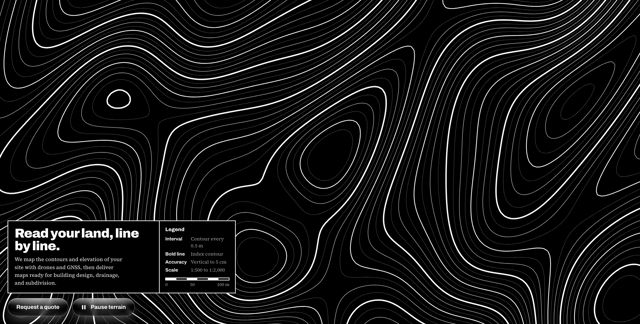
Contour line map
1
hole gradient
1
More in Shaders
View all
Glass Fold
394

Shader Animation
3.8K
Wave
708

Illos Webhook Setup
17
Shader Lines
2.4K
Illos Knowledge Sources
27
Stripe like gradient-shader
271

Paper design shader Background
689
