
About
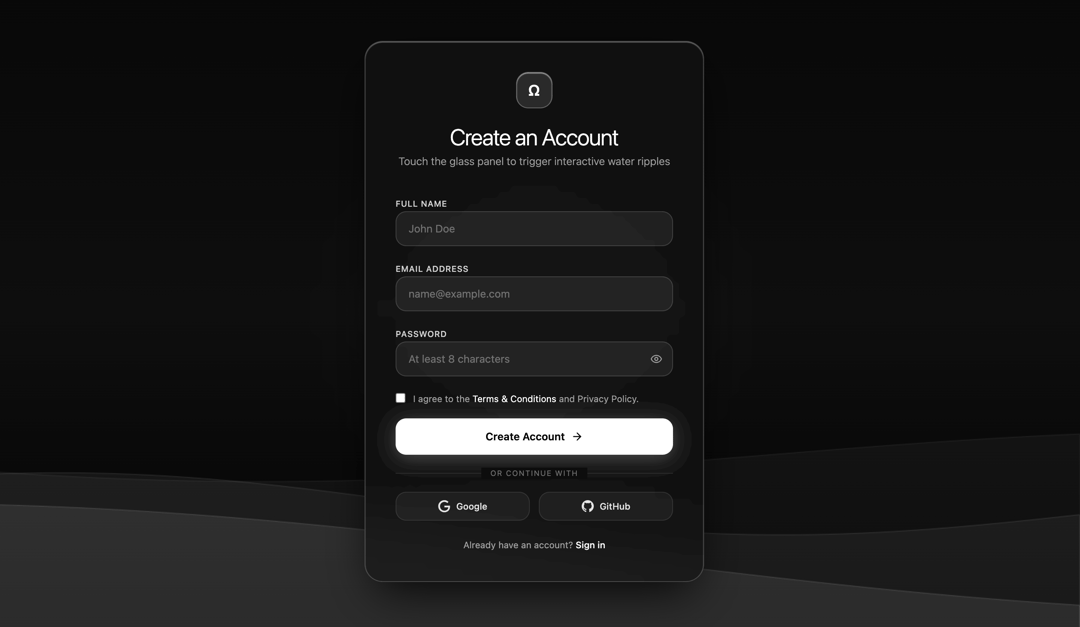
Water effect panel liquid glass for sign up
Built with React and Tailwind. Copy the prompt and paste it into Claude Code, Cursor or Lovable: your agent adds Sign In Water Effect Glass to your project and fits it to your theme.
Code
How Sign In Water Effect Glass is used: the demo's code. The component's own source comes with a free account.
Usage.tsx
import React, { useState, useEffect, useRef } from "react";
import { Eye, EyeOff, Check, ArrowRight } from "lucide-react";

/**
 * LiquidGlassSignUp Component
 * - Professional Designer Edition
 * - Pure Black & White Luxury Minimalist aesthetic with English UI copy
 * - Physics-based SVG water wobble / displacement on touch & drag
 * - Specular concentric water ripple canvas simulation
 * - Fluid grayscale ambient background wave animation
 */
export const LiquidGlassSignUp: React.FC = () => {
  // Form States
  const [fullName, setFullName] = useState("");
  const [email, setEmail] = useState("");
  const [password, setPassword] = useState("");
  const [agreeTerms, setAgreeTerms] = useState(false);
  const [showPassword, setShowPassword] = useState(false);
  const [isSubmitting, setIsSubmitting] = useState(false);
  const [submitted, setSubmitted] = useState(false);

  // Password strength calculation
  const getPasswordStrength = (pass: string) => {
    let score = 0;
    if (pass.length >= 8) score++;
    if (/[A-Z]/.test(pass)) score++;
    if (/[0-9]/.test(pass)) score++;
    if (/[^A-Za-z0-9]/.test(pass)) score++;
    return score; // 0 to 4
  };

  const strength = getPasswordStrength(password);
  const strengthLabels = ["Very Weak", "Weak", "Fair", "Strong", "Very Strong"];

  // Canvas Refs
  const bgCanvasRef = useRef<HTMLCanvasElement | null>(null);
  const rippleCanvasRef = useRef<HTMLCanvasElement | null>(null);
  const panelRef = useRef<HTMLDivElement | null>(null);

  // SVG Filter Ripple Physics State
  const turbulenceRef = useRef<SVGFETurbulenceElement | null>(null);
  const displacementRef = useRef<SVGFEDisplacementMapElement | null>(null);
  const waveState = useRef({
    intensity: 0,
    targetIntensity: 0,
    frequency: 0.015,
    isDamping: true,
  });

  // Background Ambient Wave Animation
  useEffect(() => {
    const canvas = bgCanvasRef.current;
    if (!canvas) return;
    const ctx = canvas.getContext("2d");
    if (!ctx) return;

    let animId: number;
    let step = 0;

    const resize = () => {
      if (typeof window !== "undefined") {
        canvas.width = window.innerWidth;
        canvas.height = window.innerHeight;
      }
    };
    resize();
    window.addEventListener("resize", resize);

    const render = () => {
      ctx.clearRect(0, 0, canvas.width, canvas.height);

      const bgGrad = ctx.createLinearGradient(0, 0, 0, canvas.height);
      bgGrad.addColorStop(0, "#080808");
      bgGrad.addColorStop(0.5, "#0e0e0e");
      bgGrad.addColorStop(1, "#040404");
      ctx.fillStyle = bgGrad;
      ctx.fillRect(0, 0, canvas.width, canvas.height);

      const waves = [
        { yOffset: 0.72, length: 0.0022, amp: 45, speed: 0.015, fill: "rgba(255, 255, 255, 0.035)" },
        { yOffset: 0.80, length: 0.0035, amp: 35, speed: 0.022, fill: "rgba(255, 255, 255, 0.05)" },
        { yOffset: 0.88, length: 0.0018, amp: 55, speed: 0.010, fill: "rgba(255, 255, 255, 0.08)" },
      ];

      waves.forEach((w, idx) => {
        ctx.beginPath();
        ctx.moveTo(0, canvas.height);
        const baseline = canvas.height * w.yOffset;

        for (let x = 0; x <= canvas.width; x += 6) {
          const y =
            baseline +
            Math.sin(x * w.length + step * w.speed) * w.amp +
            Math.cos(x * 0.001 + step * 0.008) * (w.amp * 0.4);
          ctx.lineTo(x, y);
        }

        ctx.lineTo(canvas.width, canvas.height);
        ctx.closePath();
        ctx.fillStyle = w.fill;
        ctx.fill();

        ctx.lineWidth = 1;
        ctx.strokeStyle = `rgba(255, 255, 255, ${0.08 + idx * 0.04})`;
        ctx.stroke();
      });

      step += 1;
      animId = requestAnimationFrame(render);
    };

    render();

    return () => {
      cancelAnimationFrame(animId);
      window.removeEventListener("resize", resize);
    };
  }, []);

  // Specular Ripple Canvas & SVG Liquid Distortion Loop
  useEffect(() => {
    const canvas = rippleCanvasRef.current;
    const panel = panelRef.current;
    if (!canvas || !panel) return;
    const ctx = canvas.getContext("2d");
    if (!ctx) return;

    interface Ripple {
      x: number;
      y: number;
      radius: number;
      maxRadius: number;
      opacity: number;
      speed: number;
    }

    const activeRipples: Ripple[] = [];
    let rippleAnimId: number;

    const resizeRippleCanvas = () => {
      if (panel) {
        canvas.width = panel.clientWidth;
        canvas.height = panel.clientHeight;
      }
    };
    resizeRippleCanvas();
    window.addEventListener("resize", resizeRippleCanvas);

    const loop = () => {
      const ws = waveState.current;
      ws.intensity += (ws.targetIntensity - ws.intensity) * 0.12;

      if (ws.isDamping) {
        ws.targetIntensity *= 0.94;
        if (ws.targetIntensity < 0.05) ws.targetIntensity = 0;
      }

      if (displacementRef.current) {
        displacementRef.current.setAttribute("scale", ws.intensity.toFixed(2));
      }
      if (turbulenceRef.current) {
        turbulenceRef.current.setAttribute(
          "baseFrequency",
          `${ws.frequency} ${ws.frequency * 1.5}`
        );
      }

      ctx.clearRect(0, 0, canvas.width, canvas.height);

      for (let i = activeRipples.length - 1; i >= 0; i--) {
        const r = activeRipples[i];
        r.radius += r.speed;
        r.opacity *= 0.96;

        ctx.beginPath();
        ctx.arc(r.x, r.y, r.radius, 0, Math.PI * 2);
        ctx.strokeStyle = `rgba(255, 255, 255, ${r.opacity.toFixed(3)})`;
        ctx.lineWidth = 1.5;
        ctx.stroke();

        if (r.radius > 15) {
          ctx.beginPath();
          ctx.arc(r.x, r.y, r.radius * 0.65, 0, Math.PI * 2);
          ctx.strokeStyle = `rgba(255, 255, 255, ${(r.opacity * 0.45).toFixed(3)})`;
          ctx.lineWidth = 1;
          ctx.stroke();
        }

        if (r.opacity < 0.005 || r.radius > r.maxRadius) {
          activeRipples.splice(i, 1);
        }
      }

      rippleAnimId = requestAnimationFrame(loop);
    };

    loop();

    const triggerWaterDistortion = (x: number, y: number, isStrong = false) => {
      waveState.current.targetIntensity = isStrong ? 24 : 14;
      waveState.current.isDamping = true;

      activeRipples.push({
        x,
        y,
        radius: 4,
        maxRadius: Math.max(canvas.width, canvas.height) * 0.85,
        opacity: isStrong ? 0.6 : 0.35,
        speed: 3.5,
      });
    };

    const handlePointerDown = (e: MouseEvent | TouchEvent) => {
      const rect = panel.getBoundingClientRect();
      const clientX = "touches" in e ? e.touches[0].clientX : e.clientX;
      const clientY = "touches" in e ? e.touches[0].clientY : e.clientY;
      const x = clientX - rect.left;
      const y = clientY - rect.top;

      triggerWaterDistortion(x, y, true);
    };

    const handlePointerMove = (e: MouseEvent | TouchEvent) => {
      if ("buttons" in e && e.buttons !== 1) return;
      const rect = panel.getBoundingClientRect();
      const clientX = "touches" in e ? e.touches[0].clientX : e.clientX;
      const clientY = "touches" in e ? e.touches[0].clientY : e.clientY;
      const x = clientX - rect.left;
      const y = clientY - rect.top;

      if (Math.random() > 0.4) {
        triggerWaterDistortion(x, y, false);
      }
    };

    panel.addEventListener("mousedown", handlePointerDown);
    panel.addEventListener("mousemove", handlePointerMove);
    panel.addEventListener("touchstart", handlePointerDown, { passive: true });
    panel.addEventListener("touchmove", handlePointerMove, { passive: true });

    return () => {
      cancelAnimationFrame(rippleAnimId);
      window.removeEventListener("resize", resizeRippleCanvas);
      panel.removeEventListener("mousedown", handlePointerDown);
      panel.removeEventListener("mousemove", handlePointerMove);
      panel.removeEventListener("touchstart", handlePointerDown);
      panel.removeEventListener("touchmove", handlePointerMove);
    };
  }, []);

  const handleSubmit = (e: React.FormEvent) => {
    e.preventDefault();
    if (!fullName || !email || !password || !agreeTerms) return;

    setIsSubmitting(true);
    setTimeout(() => {
      setIsSubmitting(false);
      setSubmitted(true);
    }, 1200);
  };

  return (
    <div className="relative min-h-screen w-full flex items-center justify-center bg-[#070707] text-white font-sans overflow-hidden p-4 sm:p-6">
      {/* Background Animated Grayscale Waves */}
      <canvas
        ref={bgCanvasRef}
        className="absolute inset-0 w-full h-full pointer-events-none z-0"
      />

      {/* SVG Liquid Distortion Filter Definition */}
      <svg
        className="absolute -top-[9999px] -left-[9999px] w-0 h-0 pointer-events-none opacity-0"
        aria-hidden="true"
      >
        <defs>
          <filter id="liquidWaterFilter" x="-20%" y="-20%" width="140%" height="140%">
            <feTurbulence
              ref={turbulenceRef}
              type="fractalNoise"
              baseFrequency="0.015 0.022"
              numOctaves="2"
              result="noise"
            />
            <feDisplacementMap
              ref={displacementRef}
              in="SourceGraphic"
              in2="noise"
              scale="0"
              xChannelSelector="R"
              yChannelSelector="G"
            />
          </filter>
        </defs>
      </svg>

      {/* Outer Ambient Glow */}
      <div className="absolute w-96 h-96 rounded-full bg-white/[0.04] blur-3xl pointer-events-none" />

      {/* Liquid Glass Card */}
      <div
        ref={panelRef}
        style={{
          filter: "url(#liquidWaterFilter)",
          willChange: "filter",
        }}
        className="relative z-10 w-full max-w-md rounded-3xl p-8 sm:p-10 bg-neutral-900/60 backdrop-blur-xl border border-white/20 shadow-[0_25px_60px_-15px_rgba(0,0,0,0.9),inset_0_1px_1px_rgba(255,255,255,0.4)] overflow-hidden transition-all duration-300"
      >
        {/* Specular Water Ripple Canvas */}
        <canvas
          ref={rippleCanvasRef}
          className="absolute inset-0 w-full h-full pointer-events-none z-0"
        />

        {/* Content Container */}
        <div className="relative z-10 flex flex-col items-center text-center">
          <div className="w-12 h-12 rounded-2xl bg-white/10 border border-white/30 flex items-center justify-center mb-5 shadow-[inset_0_1px_1px_rgba(255,255,255,0.6)]">
            <span className="text-xl font-semibold tracking-wider">Ω</span>
          </div>
          <h1 className="text-2xl sm:text-3xl font-light tracking-tight text-white mb-1">
            Create an Account
          </h1>
          <p className="text-xs sm:text-sm text-neutral-400 font-light mb-8">
            Touch the glass panel to trigger interactive water ripples
          </p>

          {submitted ? (
            <div className="w-full py-10 flex flex-col items-center animate-fadeIn">
              <div className="w-14 h-14 rounded-full bg-white text-black flex items-center justify-center mb-4 shadow-[0_0_25px_rgba(255,255,255,0.4)]">
                <Check className="w-7 h-7 stroke-[2.5]" />
              </div>
              <h3 className="text-xl font-medium text-white mb-2">Registration Successful</h3>
              <p className="text-xs text-neutral-400 text-center max-w-xs mb-6">
                Welcome aboard. We have sent a verification link to your email address.
              </p>
              <button
                type="button"
                onClick={() => setSubmitted(false)}
                className="text-xs text-neutral-300 underline underline-offset-4 hover:text-white transition-colors"
              >
                Back to registration
              </button>
            </div>
          ) : (
            <form onSubmit={handleSubmit} className="w-full space-y-4 text-left">
              {/* Full Name */}
              <div className="space-y-1.5">
                <label className="text-[11px] font-medium tracking-wider text-neutral-300 uppercase">
                  Full Name
                </label>
                <input
                  type="text"
                  required
                  value={fullName}
                  onChange={(e) => setFullName(e.target.value)}
                  placeholder="John Doe"
                  className="w-full px-4 py-3 rounded-xl bg-white/[0.06] border border-white/15 text-white placeholder-neutral-500 text-sm focus:outline-none focus:border-white/60 focus:bg-white/[0.1] transition-all"
                />
              </div>

              {/* Email */}
              <div className="space-y-1.5">
                <label className="text-[11px] font-medium tracking-wider text-neutral-300 uppercase">
                  Email Address
                </label>
                <input
                  type="email"
                  required
                  value={email}
                  onChange={(e) => setEmail(e.target.value)}
                  placeholder="name@example.com"
                  className="w-full px-4 py-3 rounded-xl bg-white/[0.06] border border-white/15 text-white placeholder-neutral-500 text-sm focus:outline-none focus:border-white/60 focus:bg-white/[0.1] transition-all"
                />
              </div>

              {/* Password */}
              <div className="space-y-1.5">
                <label className="text-[11px] font-medium tracking-wider text-neutral-300 uppercase">
                  Password
                </label>
                <div className="relative">
                  <input
                    type={showPassword ? "text" : "password"}
                    required
                    value={password}
                    onChange={(e) => setPassword(e.target.value)}
                    placeholder="At least 8 characters"
                    className="w-full px-4 py-3 pr-11 rounded-xl bg-white/[0.06] border border-white/15 text-white placeholder-neutral-500 text-sm focus:outline-none focus:border-white/60 focus:bg-white/[0.1] transition-all"
                  />
                  <button
                    type="button"
                    onClick={() => setShowPassword(!showPassword)}
                    className="absolute right-3.5 top-1/2 -translate-y-1/2 text-neutral-400 hover:text-white transition-colors"
                  >
                    {showPassword ? <EyeOff className="w-4 h-4" /> : <Eye className="w-4 h-4" />}
                  </button>
                </div>

                {password.length > 0 && (
                  <div className="pt-1.5 space-y-1">
                    <div className="flex gap-1.5">
                      {[0, 1, 2, 3].map((step) => (
                        <div
                          key={step}
                          className={`h-1 flex-1 rounded-full transition-all duration-300 ${
                            step < strength ? "bg-white" : "bg-white/15"
                          }`}
                        />
                      ))}
                    </div>
                    <div className="flex justify-between items-center text-[10px] text-neutral-400">
                      <span>Password strength</span>
                      <span className="text-white font-medium">{strengthLabels[strength]}</span>
                    </div>
                  </div>
                )}
              </div>

              {/* Terms Checkbox */}
              <label className="flex items-start gap-2.5 pt-1 cursor-pointer">
                <input
                  type="checkbox"
                  checked={agreeTerms}
                  onChange={(e) => setAgreeTerms(e.target.checked)}
                  className="mt-0.5 rounded border-white/30 bg-black/40 text-white focus:ring-0 focus:ring-offset-0 cursor-pointer accent-white"
                />
                <span className="text-xs text-neutral-400 leading-relaxed">
                  I agree to the{" "}
                  <a href="#terms" className="text-white hover:underline underline-offset-2">
                    Terms & Conditions
                  </a>{" "}
                  and Privacy Policy.
                </span>
              </label>

              {/* Primary Submit Button */}
              <button
                type="submit"
                disabled={isSubmitting}
                className="w-full mt-4 py-3.5 px-4 rounded-xl bg-white text-black text-sm font-semibold hover:bg-neutral-200 active:scale-[0.98] transition-all flex items-center justify-center gap-2 shadow-[0_4px_25px_rgba(255,255,255,0.25)] disabled:opacity-50 disabled:cursor-not-allowed cursor-pointer"
              >
                {isSubmitting ? (
                  <div className="w-5 h-5 border-2 border-black border-t-transparent rounded-full animate-spin" />
                ) : (
                  <>
                    <span>Create Account</span>
                    <ArrowRight className="w-4 h-4" />
                  </>
                )}
              </button>

              {/* Divider */}
              <div className="relative py-2 flex items-center justify-center">
                <div className="w-full border-t border-white/10" />
                <span className="absolute bg-[#0f0f0f] px-3 text-[10px] uppercase tracking-widest text-neutral-500">
                  or continue with
                </span>
              </div>

              {/* Social Login Options */}
              <div className="grid grid-cols-2 gap-3">
                <button
                  type="button"
                  className="py-2.5 px-3 rounded-xl bg-white/[0.04] border border-white/10 hover:border-white/30 hover:bg-white/[0.08] transition-all text-xs font-medium text-neutral-200 flex items-center justify-center gap-2"
                >
                  <svg className="w-4 h-4 fill-current" viewBox="0 0 24 24">
                    <path d="M12.48 10.92v3.28h7.84c-.24 1.84-.853 3.187-1.787 4.133-1.147 1.147-2.933 2.4-6.053 2.4-4.827 0-8.6-3.893-8.6-8.72s3.773-8.72 8.6-8.72c2.6 0 4.507 1.027 5.907 2.347l2.307-2.307C18.747 1.44 16.133 0 12.48 0 5.867 0 .307 5.387.307 12s5.56 12 12.173 12c3.573 0 6.267-1.173 8.373-3.36 2.16-2.16 2.84-5.213 2.84-7.667 0-.76-.053-1.467-.173-2.053H12.48z" />
                  </svg>
                  Google
                </button>
                <button
                  type="button"
                  className="py-2.5 px-3 rounded-xl bg-white/[0.04] border border-white/10 hover:border-white/30 hover:bg-white/[0.08] transition-all text-xs font-medium text-neutral-200 flex items-center justify-center gap-2"
                >
                  <svg className="w-4 h-4 fill-current" viewBox="0 0 24 24">
                    <path d="M12 0C5.37 0 0 5.37 0 12c0 5.31 3.435 9.795 8.205 11.385.6.105.825-.255.825-.57 0-.285-.015-1.23-.015-2.235-3.015.555-3.795-.735-4.035-1.41-.135-.345-.72-1.41-1.23-1.695-.42-.225-1.02-.78-.015-.795.945-.015 1.62.87 1.845 1.23 1.08 1.815 2.805 1.305 3.495.99.105-.78.42-1.305.765-1.605-2.67-.3-5.46-1.335-5.46-5.925 0-1.305.465-2.385 1.23-3.225-.12-.3-.54-1.53.12-3.18 0 0 1.005-.315 3.3 1.23.96-.27 1.98-.405 3-.405s2.04.135 3 .405c2.295-1.56 3.3-1.23 3.3-1.23.66 1.65.24 2.88.12 3.18.765.84 1.23 1.905 1.23 3.225 0 4.605-2.805 5.625-5.475 5.925.435.375.81 1.095.81 2.22 0 1.605-.015 2.895-.015 3.3 0 .315.225.69.825.57A12.02 12.02 0 0024 12c0-6.63-5.37-12-12-12z" />
                  </svg>
                  GitHub
                </button>
              </div>

              {/* Sign In link */}
              <p className="text-center text-xs text-neutral-400 pt-2">
                Already have an account?{" "}
                <a href="#signin" className="text-white font-medium hover:underline underline-offset-4">
                  Sign in
                </a>
              </p>
            </form>
          )}
        </div>
      </div>
    </div>
  );
};

export default LiquidGlassSignUp;More by pstzx
View all
Contour Land Map
11
Contour line Mountain
5
Button New & Search
2
21 st Contour Line
1
Contour line map
1
hole gradient
1