
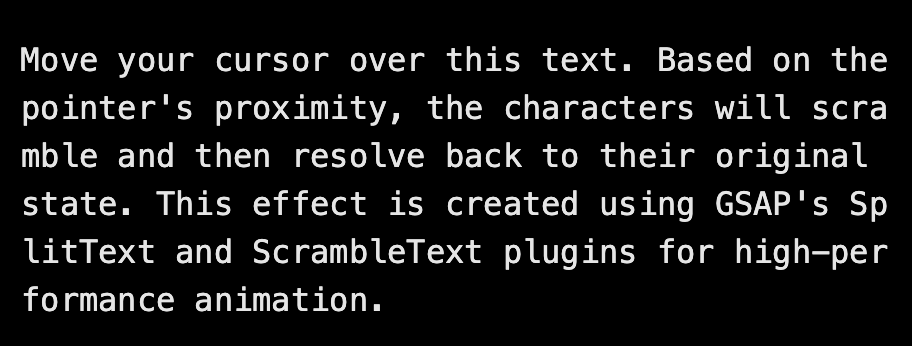
About
Here is interactive-scrambled-text component
Built with React and Tailwind. Copy the prompt and paste it into Claude Code, Cursor or Lovable: your agent adds interactive-scrambled-text to your project and fits it to your theme.
Code
How interactive-scrambled-text is used: the demo's code. The component's own source comes with a free account.
Usage.tsx
import React from 'react';
import InteractiveScrambledText from '@/components/ui/interactive-scrambled-text';


function InteractiveScrambledTextDemo() {
  return (
    <main className="flex min-h-screen flex-col items-center justify-center bg-white p-8 dark:bg-black transition-colors duration-300">
      <div className="w-full max-w-4xl">
        <InteractiveScrambledText
          radius={120}
          duration={1.5}
          speed={0.4}
          scrambleChars={'.:'}
        >
          Move your cursor over this text. Based on the pointer's proximity,
          the characters will scramble and then resolve back to their original
          state. This effect is created using GSAP's SplitText and
          ScrambleText plugins for high-performance animation.
        </InteractiveScrambledText>
      </div>
    </main>
  );
}

export default InteractiveScrambledTextDemo;
Dependencies
More by deleted
View all

Splash Cursor
1.3K
Star Border
728
Tilted Scroll
433
Waves Background
362
Squares Background
326
Prism
218
Grid Motion
183
Circular Gallery
173
More in Text
View all

Vertical Cut Reveal Characters
103

Rainbow Text Effect
47
Motion Blur Text
36
Text Loop
308
Text Reveal
27

Animated Text
8
Apple Hello Effect
610
Typography
4

