
About
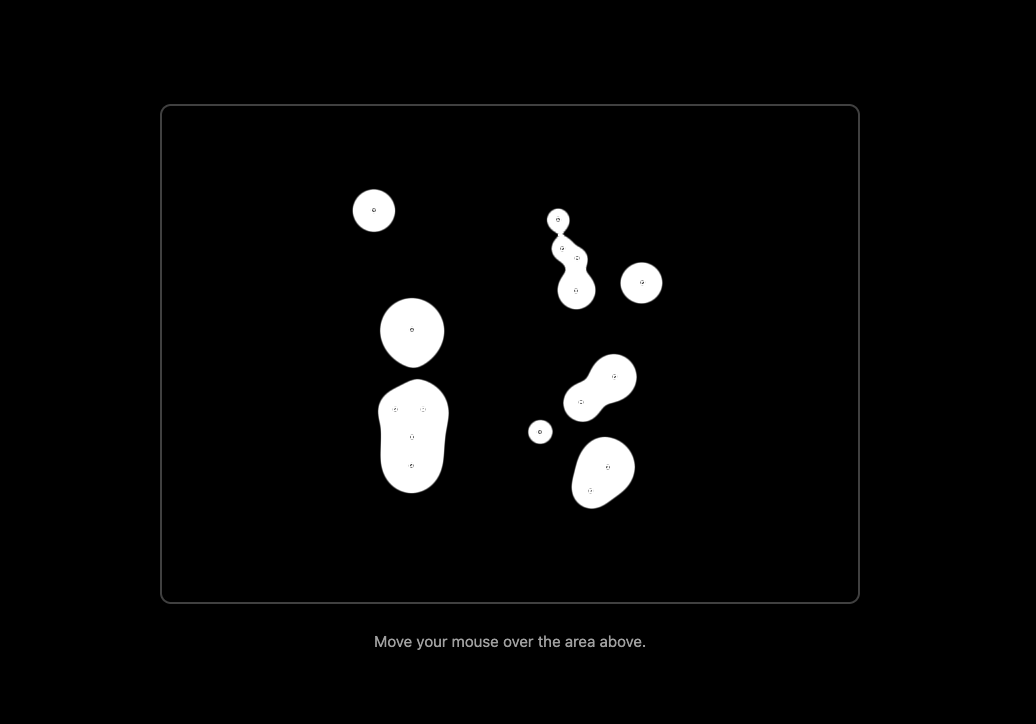
Meta balls component
Built with React and Tailwind. Copy the prompt and paste it into Claude Code, Cursor or Lovable: your agent adds Meta Balls to your project and fits it to your theme.
Code
How Meta Balls is used: the demo's code. The component's own source comes with a free account.
Usage.tsx
// File: src/app/DemoOne.tsx (from the previous response)

import { useState, useEffect, FC } from 'react';
import { MetaBalls } from "@/components/ui/meta-balls"; // Adjust path if needed

const DemoOne: FC = () => {
  const [isDarkMode, setIsDarkMode] = useState(true);

  useEffect(() => {
    const mediaQuery = window.matchMedia('(prefers-color-scheme: dark)');
    const handleChange = () => {
      const darkMode = mediaQuery.matches;
      setIsDarkMode(darkMode);
      // This toggles the 'dark' class on the <html> element
      // Tailwind CSS uses this class to apply its dark: variants
      document.documentElement.classList.toggle('dark', darkMode);
    };
    handleChange();
    mediaQuery.addEventListener('change', handleChange);
    return () => mediaQuery.removeEventListener('change', handleChange);
  }, []);

  // --- Option 1: Metaballs are ALWAYS white (as per your explicit usage example) ---
  const metaballPrimaryColor = "#ffffff";
  const metaballCursorColor = "#ffffff";

  // --- Option 2: Metaballs INVERT color with theme (black on light, white on dark) ---
  // Uncomment these lines and comment out Option 1 if you want this behavior:
  // const metaballPrimaryColor = isDarkMode ? "#FFFFFF" : "#000000";
  // const metaballCursorColor = isDarkMode ? "#FFFFFF" : "#000000";

  // Props from your usage example:
  const ballCountProp: number = 15;
  const animationSizeProp: number = 30;
  const speedProp: number = 0.3;
  const enableMouseInteractionProp: boolean = true;
  const enableTransparencyProp: boolean = true; // CRUCIAL for page background to show
  const hoverSmoothnessProp: number = 0.05;
  const clumpFactorProp: number = 1;
  const cursorBallSizeProp: number = 2;

  return (
    // Main page container:
    // Light Mode: bg-white (default)
    // Dark Mode: dark:bg-black (when <html> has 'dark' class)
    <div className={`flex flex-col w-full min-h-screen justify-center items-center
                   p-4
                   bg-white text-black
                   dark:bg-black dark:text-white
                   transition-colors duration-300`}>

      <div
        style={{
          width: 'clamp(300px, 80vmin, 700px)',
          height: '500px',
          position: 'relative',
          overflow: 'hidden'
        }}
        // Container for MetaBalls. Its background is transparent by default.
        // The border inverts to be visible against the page background.
        className="border-2 border-neutral-300 dark:border-neutral-700 rounded-lg shadow-xl bg-transparent"
      >
        <MetaBalls
          color={metaballPrimaryColor}
          cursorBallColor={metaballCursorColor}
          cursorBallSize={cursorBallSizeProp}
          ballCount={ballCountProp}
          animationSize={animationSizeProp}
          enableMouseInteraction={enableMouseInteractionProp}
          enableTransparency={enableTransparencyProp}
          hoverSmoothness={hoverSmoothnessProp}
          clumpFactor={clumpFactorProp}
          speed={speedProp}
        />
      </div>

       <p className={`text-center text-sm mt-6 ${isDarkMode ? 'text-neutral-400' : 'text-neutral-600'}`}>
        Move your mouse over the area above.
      </p>
    </div>
  );
};

export { DemoOne };
Dependencies
More by deleted
View all

Splash Cursor
1.3K
Star Border
728
Tilted Scroll
433
Waves Background
362
Squares Background
326
Prism
218
Grid Motion
183
Circular Gallery
173