
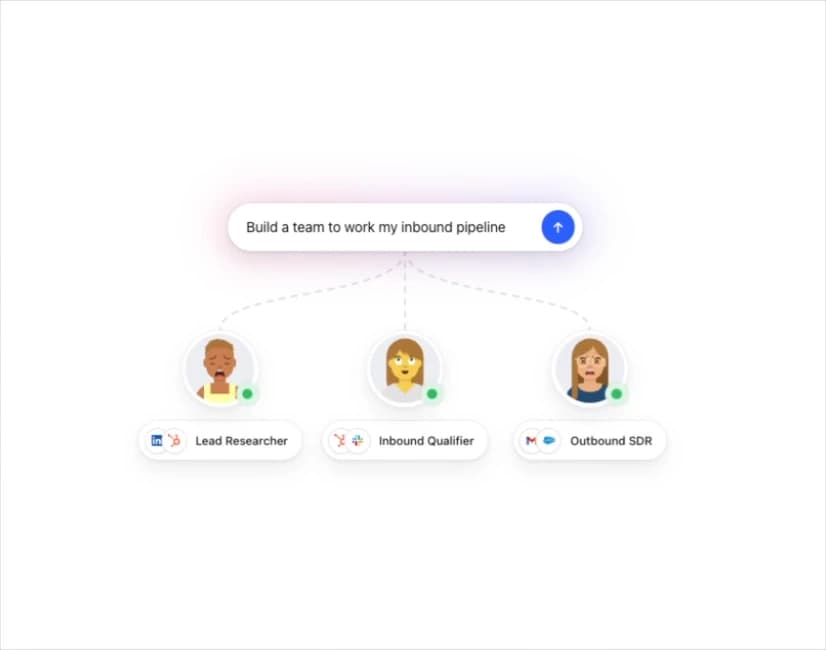
About
An animated illustration card where a typed prompt branches into three AI agent avatars, each shown with a role label and the tool logos they use.
Built with React and Tailwind. Copy the prompt and paste it into Claude Code, Cursor or Lovable: your agent adds Agent Team to your project and fits it to your theme.
Code
How Agent Team is used: the demo's code. The component's own source comes with a free account.
Usage.tsx
import { AgentTeam } from "@/components/ui/agent-team";

export default function AgentTeamDemo() {
  return (
    <div className="flex w-full h-screen items-center justify-center bg-background p-8">
      <article style={{ maxWidth: 560, width: "100%" }}>
        <AgentTeam
          prompt="Build a team to work my inbound pipeline"
          members={[
            {
              role: "Lead Researcher",
              avatar: "https://cdn.21st.dev/assets/mirror/4e/4ee5a69e6d9b1c628293fc8d7c8e6934ceb31cb42b129fe48f5944a6bae2c85b.svg",
              tools: ["linkedin", "hubspot"],
            },
            {
              role: "Inbound Qualifier",
              avatar: "https://cdn.21st.dev/assets/mirror/c9/c9c8b4f2b30f15901f2462680d1001480d490092d553ba931769f134bd523bd1.svg",
              tools: ["hubspot", "slack"],
            },
            {
              role: "Outbound SDR",
              avatar: "https://cdn.21st.dev/assets/mirror/3e/3e72b504e48c650af325732f32b05a46f19e1db9ee264c958af420e385a1788f.svg",
              tools: ["gmail", "salesforce"],
            },
          ]}
        />
      </article>
    </div>
  );
}
More by flohoeller
View all
Tab Overload
6
Side Folder
5
Comment Thread
5
Filter Menu
4
Progress Tracker
3
Team Invite
2
Tips Panel
2
Reaction Bar
2