
About
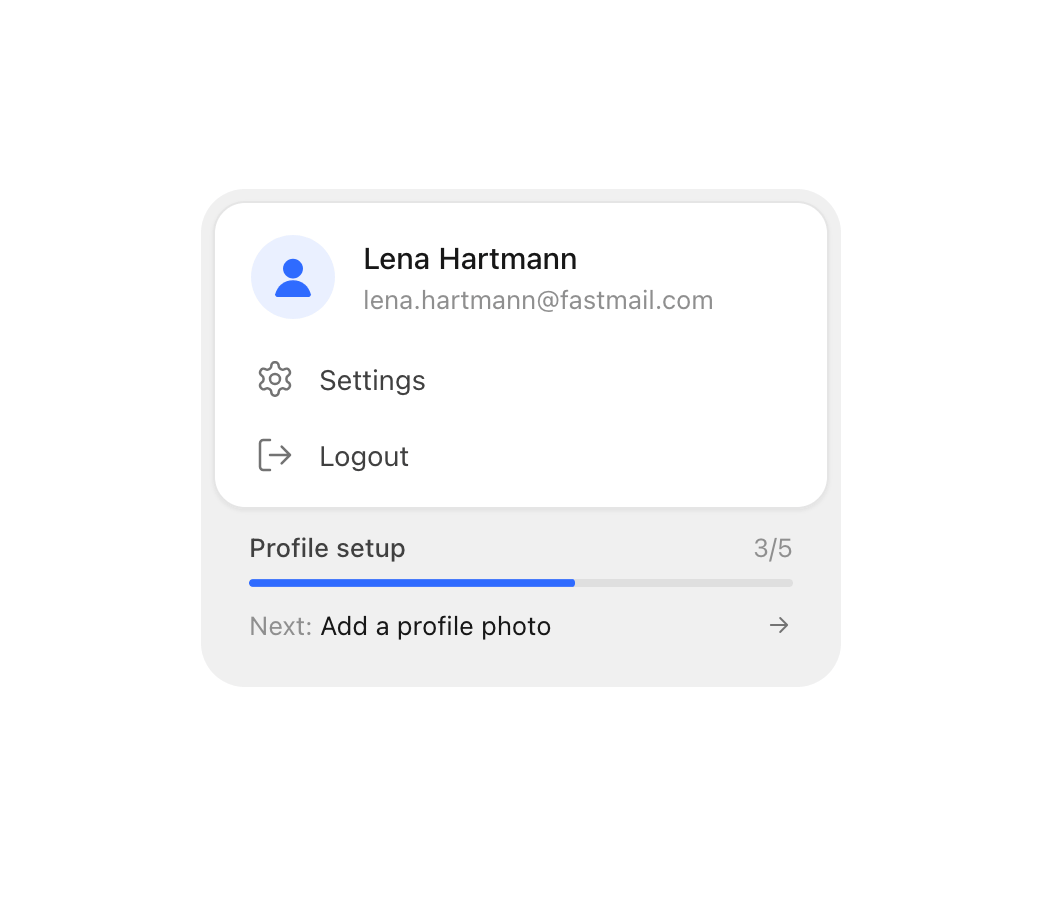
An account card showing the signed-in user's name, email and avatar, a keyboard-navigable menu of account actions, and an optional profile setup progress bar.
Built with React and Tailwind. Copy the prompt and paste it into Claude Code, Cursor or Lovable: your agent adds Profile Menu to your project and fits it to your theme.
Code
How Profile Menu is used: the demo's code. The component's own source comes with a free account.
Usage.tsx
import {
  ProfileMenu,
  SettingsIcon,
  LogoutIcon,
} from "@/components/ui/profile-menu";

export default function ProfileMenuDemo() {
  const openSettings = () => console.log("open settings");
  const signOut = () => console.log("sign out");
  const openProfile = () => console.log("continue profile setup");

  return (
    <div className="flex min-h-[420px] w-full items-center justify-center bg-background p-8 text-foreground">
      <ProfileMenu
        name="Lena Hartmann"
        email="lena.hartmann@fastmail.com"
        items={[
          {
            id: "settings",
            label: "Settings",
            icon: <SettingsIcon />,
            onSelect: openSettings,
          },
          {
            id: "logout",
            label: "Logout",
            icon: <LogoutIcon />,
            onSelect: signOut,
          },
        ]}
        setup={{
          done: 3,
          total: 5,
          next: "Add a profile photo",
          onContinue: openProfile,
        }}
      />
    </div>
  );
}
More by flohoeller
View all
Tab Overload
16
Comment Thread
12
Filter Menu
12
Side Folder
11
Agent Team
10
Progress Tracker
8
Tips Panel
6
Team Invite
5