
About
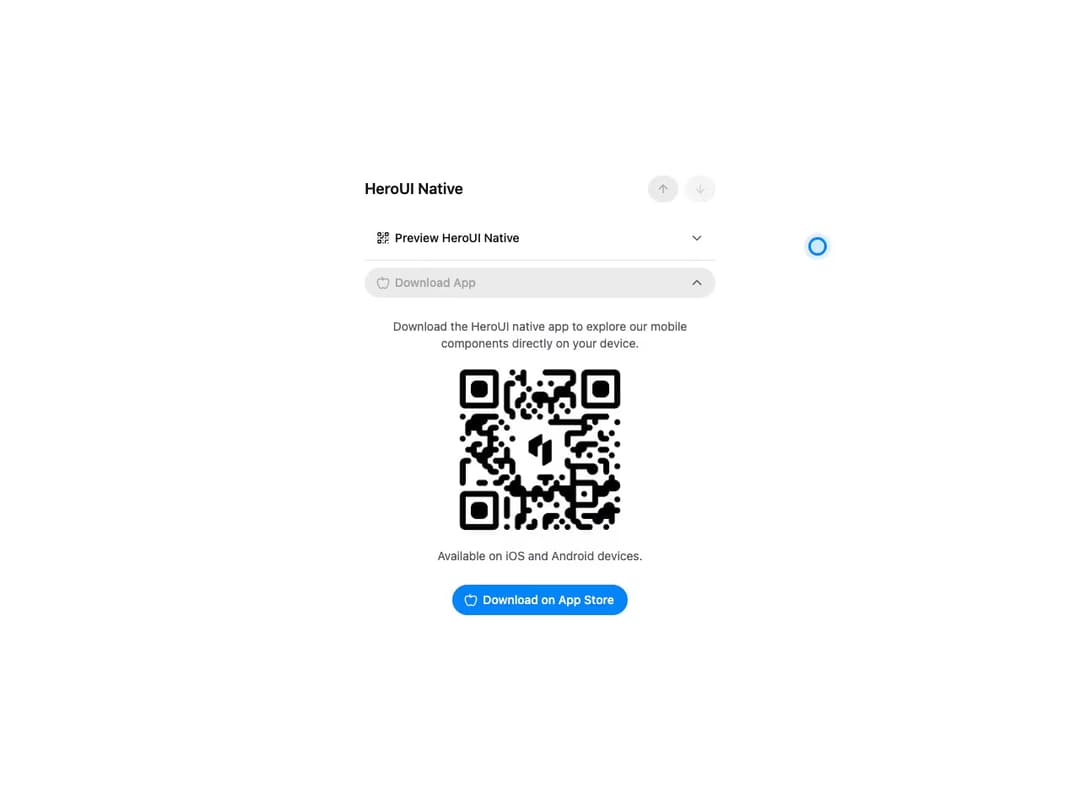
Container from HeroUI v3 that coordinates Disclosure items and manages their expanded state. Includes default and controlled examples with accessible triggers and panels built on React Aria.
Built with React and Tailwind. Copy the prompt and paste it into Claude Code, Cursor or Lovable: your agent adds HeroUI Disclosure Group to your project and fits it to your theme.
Code
How HeroUI Disclosure Group is used: the demo's code. The component's own source comes with a free account.
Usage.tsx
"use client"

import type { CSSProperties } from "react"
import { useState } from "react"
import { ArrowDown, ArrowUp, Apple, QrCode } from "lucide-react"
import { Button, Separator } from "@heroui/react"
import {
  DisclosureGroup,
  Disclosure,
  useDisclosureGroupNavigation,
} from "@/components/ui/heroui-disclosure-group"

const disclosureColors = {
  "--accent": "oklch(62.04% 0.195 253.83)",
  "--accent-hover": "oklch(55.6% 0.205 253.83)",
  "--accent-foreground": "oklch(99.11% 0 0)",
  "--heroui-disclosure-muted": "oklch(55.2% 0.016 285.938)",
  "--heroui-disclosure-border": "oklch(89.4% 0.004 286.32)",
  "--heroui-disclosure-surface": "oklch(100% 0 0)",
} as CSSProperties

const mutedText = {
  color: "oklch(45.2% 0.016 285.938)",
} as CSSProperties

export default function Controlled() {
  const [expandedKeys, setExpandedKeys] = useState<Set<string | number>>(new Set(["preview"]))
  const itemIds = ["preview", "download"]
  const qrCodeUrl =
    "https://cdn.21st.dev/assets/mirror/4b/4b5f6e9f007d19d8c00dd42389505309ae3619e4756d669340d91cf6eb5f4448.png"

  const { isNextDisabled, isPrevDisabled, onNext, onPrevious } = useDisclosureGroupNavigation({
    expandedKeys,
    itemIds,
    onExpandedChange: setExpandedKeys,
  })

  return (
    <div className="heroui-disclosure-demo w-full max-w-md" style={disclosureColors}>
      <div className="flex flex-col gap-4 rounded-3xl p-4">
        <div className="mb-2 flex items-center justify-between">
          <h3 className="text-lg font-semibold">HeroUI Native</h3>
          <div className="flex gap-2">
            <Button aria-label="Previous disclosure" isDisabled={isPrevDisabled} size="sm" variant="secondary" onPress={onPrevious}>
              <ArrowUp className="size-4" />
            </Button>
            <Button aria-label="Next disclosure" isDisabled={isNextDisabled} size="sm" variant="secondary" onPress={onNext}>
              <ArrowDown className="size-4" />
            </Button>
          </div>
        </div>
        <DisclosureGroup expandedKeys={expandedKeys} onExpandedChange={setExpandedKeys}>
          <Disclosure aria-label="Preview HeroUI Native" id="preview">
            <Disclosure.Heading>
              <Button
                slot="trigger"
                variant={expandedKeys.has("preview") ? "secondary" : "tertiary"}
                className={`w-full border-none ${expandedKeys.has("preview") ? "" : "bg-transparent"}`}
              >
                <div className="flex w-full items-center justify-start gap-2">
                  <QrCode className="size-4" />
                  Preview HeroUI Native
                </div>
                <Disclosure.Indicator style={mutedText} />
              </Button>
            </Disclosure.Heading>
            <Disclosure.Content>
              <Disclosure.Body className="mx-2 flex flex-col items-center gap-2 p-4 text-center">
                <p className="text-sm" style={mutedText}>
                  Scan this QR code with your camera app to preview the HeroUI native components.
                </p>
                <img alt="Expo Go QR Code" className="aspect-square w-full max-w-54 object-cover" src={qrCodeUrl} />
                <p className="text-sm" style={mutedText}>Expo must be installed on your device.</p>
                <Button className="mt-4" variant="primary">
                  Preview on Expo Go
                </Button>
              </Disclosure.Body>
            </Disclosure.Content>
          </Disclosure>
          <Separator className="my-2" />
          <Disclosure id="download">
            <Disclosure.Heading aria-label="Download HeroUI Native">
              <Button
                slot="trigger"
                variant={expandedKeys.has("download") ? "secondary" : "tertiary"}
                className={`w-full border-none ${expandedKeys.has("download") ? "" : "bg-transparent"}`}
              >
                <div className="flex w-full items-center justify-start gap-2">
                  <Apple className="size-4" />
                  Download App
                </div>
                <Disclosure.Indicator style={mutedText} />
              </Button>
            </Disclosure.Heading>
            <Disclosure.Content>
              <Disclosure.Body className="mx-2 flex flex-col items-center gap-2 p-4 text-center">
                <p className="text-sm" style={mutedText}>
                  Download the HeroUI native app to explore our mobile components directly on your device.
                </p>
                <img alt="App Store QR Code" className="aspect-square w-full max-w-54 object-cover" src={qrCodeUrl} />
                <p className="text-sm" style={mutedText}>Available on iOS and Android devices.</p>
                <Button className="mt-4" variant="primary">
                  <Apple className="size-4" />
                  Download on App Store
                </Button>
              </Disclosure.Body>
            </Disclosure.Content>
          </Disclosure>
        </DisclosureGroup>
      </div>
    </div>
  )
}
Dependencies
More by Hero Ui
View all

DatePicker
466
Chip
440
The Pagination
361
HeroUI Color Picker
105
Skeleton
104
HeroUI Table
99
HeroUI AlertDialog
79
ComboBox
75