
About
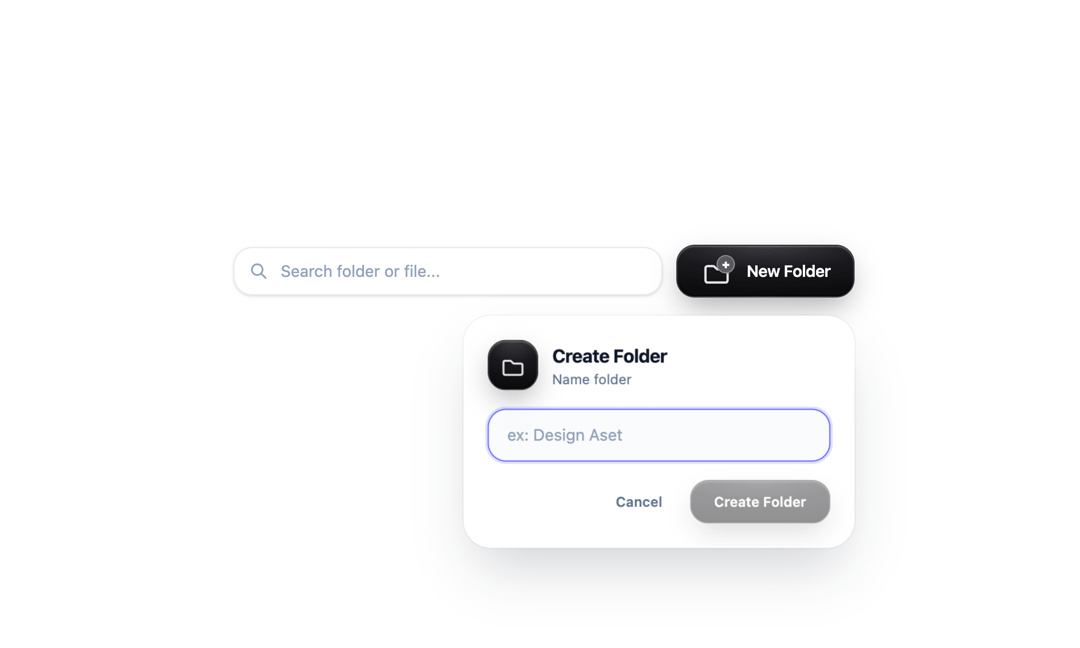
A compact, centered toolbar made of two elements: a search field and a “New Folder” button. Together they form a single 540px-wide row, placed in the middle of the screen both horizontally and vertically.
Built with React and Tailwind. Copy the prompt and paste it into Claude Code, Cursor or Lovable: your agent adds Button New & Search to your project and fits it to your theme.
Code
How Button New & Search is used: the demo's code. The component's own source comes with a free account.
Usage.tsx
import React, { useEffect, useRef, useState } from "react";

/**
 * FolderToolbar
 * - Kolom pencarian "Cari folder atau file..."
 * - Tombol "New Folder" (metalik / glass)
 * - Saat tombol ditekan, panel "Create Folder" muncul mengambang dengan animasi
 *
 * Membutuhkan Tailwind CSS. Font disarankan: Manrope.
 */

export interface FolderToolbarProps {
  searchQuery: string;
  onSearchChange: (value: string) => void;
  /** Dipanggil saat tombol New Folder ditekan (opsional). */
  onNewFolder?: () => void;
  /** Dipanggil saat "Create Folder" dikonfirmasi dengan nama folder. */
  onCreateFolder?: (name: string) => void;
  placeholder?: string;
  buttonLabel?: string;
}

type PanelState = "closed" | "open" | "closing";

export default function FolderToolbar({
  searchQuery,
  onSearchChange,
  onNewFolder,
  onCreateFolder,
  placeholder = "Search folder or file...",
  buttonLabel = "New Folder",
}: FolderToolbarProps) {
  const [panel, setPanel] = useState<PanelState>("closed");
  const [folderName, setFolderName] = useState("");
  const wrapRef = useRef<HTMLDivElement>(null);
  const inputRef = useRef<HTMLInputElement>(null);
  const triggerRef = useRef<HTMLButtonElement>(null);

  const isVisible = panel !== "closed";

  const openPanel = () => {
    onNewFolder?.();
    setPanel("open");
  };

  const closePanel = () => {
    setPanel((p) => (p === "open" ? "closing" : p));
    triggerRef.current?.focus();
  };

  // Fokus ke input saat panel terbuka
  useEffect(() => {
    if (panel === "open") {
      const t = window.setTimeout(() => inputRef.current?.focus(), 80);
      return () => window.clearTimeout(t);
    }
  }, [panel]);

  // Escape & klik di luar untuk menutup
  useEffect(() => {
    if (panel !== "open") return;
    const onKey = (e: KeyboardEvent) => {
      if (e.key === "Escape") closePanel();
    };
    const onDown = (e: PointerEvent) => {
      if (!wrapRef.current?.contains(e.target as Node)) closePanel();
    };
    document.addEventListener("keydown", onKey);
    document.addEventListener("pointerdown", onDown);
    return () => {
      document.removeEventListener("keydown", onKey);
      document.removeEventListener("pointerdown", onDown);
    };
  }, [panel]);

  const submit = (e: React.FormEvent) => {
    e.preventDefault();
    const name = folderName.trim();
    if (!name) return;
    onCreateFolder?.(name);
    setFolderName("");
    setPanel("closing");
  };

  return (
    <>
      <style>{`
        .gf-metal-folder-btn {
          background: radial-gradient(120% 90% at 50% 0%, #3a3a3f 0%, #1a1a1e 50%, #0d0d0f 100%);
          border: 1px solid rgba(255, 255, 255, 0.15);
          box-shadow:
            inset 0 1px 1px rgba(255, 255, 255, 0.25),
            inset 0 -1px 2px rgba(0, 0, 0, 0.6),
            0 10px 25px -5px rgba(0, 0, 0, 0.35);
          backdrop-filter: blur(16px);
          -webkit-backdrop-filter: blur(16px);
        }
        .gf-metal-folder-btn:hover {
          background: radial-gradient(120% 90% at 50% 0%, #4a4a50 0%, #222226 50%, #121215 100%);
          box-shadow:
            inset 0 1px 2px rgba(255, 255, 255, 0.35),
            inset 0 -1px 2px rgba(0, 0, 0, 0.6),
            0 14px 30px -5px rgba(0, 0, 0, 0.45);
        }
        .gf-metal-folder-btn:disabled { opacity: .45; cursor: not-allowed; }

        /* Panel mengambang: muncul dari tombol (pojok kanan atas) */
        .gf-float-panel { transform-origin: 100% 0%; }
        .gf-float-panel[data-state="open"]    { animation: gf-float-in .55s cubic-bezier(.34,1.36,.5,1) both; }
        .gf-float-panel[data-state="closing"] { animation: gf-float-out .22s cubic-bezier(.4,0,1,1) both; }
        @keyframes gf-float-in {
          from { opacity: 0; transform: translateY(-14px) scale(.86); filter: blur(8px); }
          60%  { filter: blur(0); }
          to   { opacity: 1; transform: translateY(0) scale(1); filter: blur(0); }
        }
        @keyframes gf-float-out {
          from { opacity: 1; transform: translateY(0) scale(1); }
          to   { opacity: 0; transform: translateY(-10px) scale(.92); }
        }
        /* Gerak mengambang halus setelah muncul */
        .gf-float-bob { animation: gf-bob 5s ease-in-out .6s infinite; }
        @keyframes gf-bob {
          0%, 100% { transform: translateY(0); }
          50%      { transform: translateY(-4px); }
        }
        .gf-float-icon { animation: gf-icon-pop .6s cubic-bezier(.34,1.56,.64,1) .15s both; }
        @keyframes gf-icon-pop {
          from { opacity: 0; transform: scale(.4) rotate(-12deg); }
          to   { opacity: 1; transform: scale(1) rotate(0); }
        }
        @media (prefers-reduced-motion: reduce) {
          .gf-float-panel, .gf-float-bob, .gf-float-icon { animation-duration: .01s !important; animation-iteration-count: 1 !important; }
        }
      `}</style>

      <div className="flex min-h-screen w-full items-center justify-center px-4">
        <div
          ref={wrapRef}
          className="relative flex w-[540px] max-w-full items-center gap-3"
          style={{
            fontFamily:
              "'Manrope', 'Inter', ui-sans-serif, system-ui, -apple-system, 'Segoe UI', Roboto, 'Helvetica Neue', Arial, sans-serif",
          }}
        >
          {/* ===== Pencarian ===== */}
          <div className="relative min-w-0 flex-1">
            <span className="pointer-events-none absolute inset-y-0 left-0 z-10 flex items-center pl-3.5 text-slate-400">
              <svg
                className="h-4 w-4"
                fill="none"
                stroke="currentColor"
                viewBox="0 0 24 24"
                aria-hidden="true"
              >
                <path
                  strokeLinecap="round"
                  strokeLinejoin="round"
                  strokeWidth="2.2"
                  d="M21 21l-6-6m2-5a7 7 0 11-14 0 7 7 0 0114 0z"
                />
              </svg>
            </span>

            <input
              type="text"
              placeholder={placeholder}
              value={searchQuery}
              onChange={(e) => onSearchChange(e.target.value)}
              className="w-full rounded-2xl border border-slate-200/90 bg-white/80 py-2.5 pl-10 pr-4 text-sm text-slate-800 placeholder-slate-400 shadow-sm backdrop-blur-xl transition hover:bg-white focus:border-indigo-500 focus:bg-white focus:outline-none focus:ring-2 focus:ring-indigo-500/20"
            />

            {searchQuery && (
              <button
                type="button"
                aria-label="Hapus pencarian"
                onClick={() => onSearchChange("")}
                className="absolute inset-y-0 right-0 flex items-center pr-3 font-mono text-xs text-slate-400 hover:text-slate-700"
              >
                ✕
              </button>
            )}
          </div>

          {/* ===== Tombol New Folder ===== */}
          <button
            ref={triggerRef}
            type="button"
            onClick={() => (panel === "open" ? closePanel() : openPanel())}
            aria-haspopup="dialog"
            aria-expanded={panel === "open"}
            className="gf-metal-folder-btn group flex shrink-0 items-center justify-center gap-3 rounded-2xl px-5 py-2.5 text-sm font-semibold text-white transition-all duration-300 active:scale-[0.98]"
          >
            <div className="relative flex h-6 w-7 shrink-0 items-center justify-center">
              <svg
                className="h-7 w-7 text-white/90 drop-shadow-sm transition-transform duration-300 group-hover:scale-105"
                fill="none"
                stroke="currentColor"
                strokeWidth="1.7"
                viewBox="0 0 24 24"
                aria-hidden="true"
              >
                <path
                  strokeLinecap="round"
                  strokeLinejoin="round"
                  d="M3.75 9.75A1.5 1.5 0 015.25 8.25h4.19a1.5 1.5 0 011.06.44l1.56 1.56A1.5 1.5 0 0013.12 10.75h5.63a1.5 1.5 0 011.5 1.5v6.75a1.5 1.5 0 01-1.5 1.5H5.25a1.5 1.5 0 01-1.5-1.5v-9.25z"
                />
              </svg>
              <span className="absolute -right-0.5 -top-0.5 flex h-4 w-4 items-center justify-center rounded-full border border-white/30 bg-white/20 text-[10px] font-black text-white shadow-sm backdrop-blur-md">
                +
              </span>
            </div>
            <span className="tracking-tight text-white transition-colors group-hover:text-slate-200">
              {buttonLabel}
            </span>
          </button>

          {/* ===== Panel mengambang: Create Folder ===== */}
          {isVisible && (
            <div
              className="gf-float-panel absolute right-0 top-full z-50 mt-4 w-[340px] max-w-full"
              data-state={panel}
              onAnimationEnd={(e) => {
                if (panel === "closing" && e.currentTarget === e.target) setPanel("closed");
              }}
            >
              <div className="gf-float-bob">
                <form
                  role="dialog"
                  aria-modal="false"
                  aria-labelledby="gf-create-title"
                  onSubmit={submit}
                  className="relative overflow-hidden rounded-3xl border border-white/80 bg-white/85 p-5 shadow-2xl shadow-slate-900/20 ring-1 ring-slate-900/5 backdrop-blur-2xl"
                >
                  {/* Kilap kaca di sisi atas */}
                  <span
                    aria-hidden="true"
                    className="pointer-events-none absolute inset-x-0 top-0 h-1/2 bg-gradient-to-b from-white/70 to-transparent"
                  />

                  <div className="relative flex items-center gap-3">
                    <div className="gf-float-icon gf-metal-folder-btn flex h-11 w-11 shrink-0 items-center justify-center rounded-2xl">
                      <svg
                        className="h-6 w-6 text-white/90"
                        fill="none"
                        stroke="currentColor"
                        strokeWidth="1.7"
                        viewBox="0 0 24 24"
                        aria-hidden="true"
                      >
                        <path
                          strokeLinecap="round"
                          strokeLinejoin="round"
                          d="M3.75 9.75A1.5 1.5 0 015.25 8.25h4.19a1.5 1.5 0 011.06.44l1.56 1.56A1.5 1.5 0 0013.12 10.75h5.63a1.5 1.5 0 011.5 1.5v6.75a1.5 1.5 0 01-1.5 1.5H5.25a1.5 1.5 0 01-1.5-1.5v-9.25z"
                        />
                      </svg>
                    </div>
                    <div className="min-w-0">
                      <h3
                        id="gf-create-title"
                        className="text-base font-bold tracking-tight text-slate-900"
                      >
                        Create Folder
                      </h3>
                      <p className="text-xs text-slate-500">Name folder</p>
                    </div>
                  </div>

                  <input
                    ref={inputRef}
                    type="text"
                    required
                    value={folderName}
                    onChange={(e) => setFolderName(e.target.value)}
                    placeholder="ex: Design Aset"
                    className="relative mt-4 w-full rounded-2xl border border-slate-200 bg-slate-50/80 px-4 py-3 text-sm text-slate-800 placeholder-slate-400 transition focus:border-indigo-500 focus:outline-none focus:ring-2 focus:ring-indigo-500/20"
                  />

                  <div className="relative mt-4 flex justify-end gap-2">
                    <button
                      type="button"
                      onClick={closePanel}
                      className="rounded-2xl px-4 py-2.5 text-xs font-semibold text-slate-500 transition hover:bg-slate-100/80 hover:text-slate-800"
                    >
                      Cancel
                    </button>
                    <button
                      type="submit"
                      disabled={!folderName.trim()}
                      className="gf-metal-folder-btn rounded-2xl px-5 py-2.5 text-xs font-semibold text-white transition active:scale-95"
                    >
                      Create Folder
                    </button>
                  </div>
                </form>
              </div>
            </div>
          )}
        </div>
      </div>
    </>
  );
}More by pstzx
View all
Contur Land Map
8
Arena Games Glass
Vortex Game online