
About
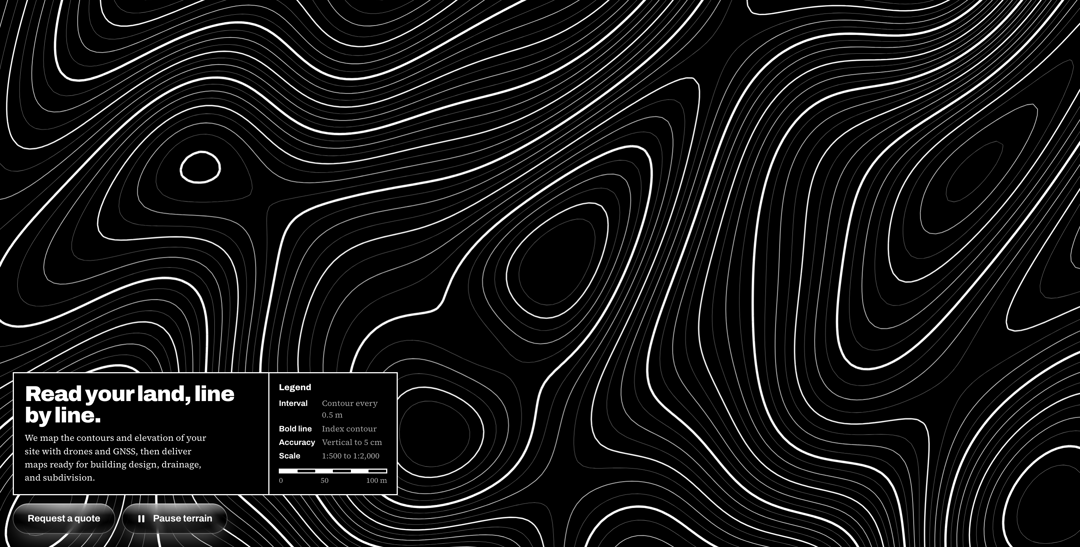
effect contur line area map
Built with React and Tailwind. Copy the prompt and paste it into Claude Code, Cursor or Lovable: your agent adds Contour line map to your project and fits it to your theme.
Code
How Contour line map is used: the demo's code. The component's own source comes with a free account.
Usage.tsx
import { useEffect, useRef, useState } from "react";
import type { PointerEvent } from "react";

type Pt = [number, number];

const css = `
@import url("https://fonts.googleapis.com/css2?family=Archivo:wdth,wght@62..125,500..900&family=Source+Serif+4:opsz,wght@8..60,400;8..60,600&display=swap");

/* Remove default page margins so the hero can fill the whole window */
html,body{margin:0;padding:0;height:100%;overflow:hidden;background:#fff}
@media (prefers-color-scheme:dark){html,body{background:#000}}

/* Theme tokens: pure black and white, inverted in dark mode */
.contour-hero{
  --bg:#fff;--fg:#000;--mute:#555;--line:#000;
  --glass:rgba(255,255,255,.22);--glass-hi:rgba(255,255,255,.75);--glass-lo:rgba(0,0,0,.25);
  position:fixed;inset:0;display:flex;flex-direction:column;overflow:hidden;
  box-sizing:border-box;margin:0;max-width:none;text-align:left;
  padding-top:env(safe-area-inset-top,0px);padding-bottom:env(safe-area-inset-bottom,0px);
  background:var(--bg);color:var(--fg);
  font:400 1.0625rem/1.65 "Source Serif 4",Georgia,serif;
}
@media (prefers-color-scheme:dark){
  .contour-hero{--bg:#000;--fg:#fff;--mute:#aaa;--line:#fff;--glass:rgba(0,0,0,.25);--glass-hi:rgba(255,255,255,.45);--glass-lo:rgba(255,255,255,.12);color-scheme:dark}
}
.contour-hero *,.contour-hero *::before,.contour-hero *::after{box-sizing:border-box}
.contour-hero h1,.contour-hero h2,.contour-hero dt,.contour-hero .glass{font-family:"Archivo","Arial Narrow",Arial,sans-serif}
.contour-hero :focus-visible{outline:3px solid var(--fg);outline-offset:3px}
.contour-hero canvas{position:absolute;inset:0;width:100%;height:100%;display:block}

/* Title block and legend sit on solid paper, like a map's title cartouche */
.contour-hero .hero-body{position:relative;z-index:2;margin:auto 0 0;padding:0 20px 20px;width:100%;
  display:grid;grid-template-columns:minmax(0,380px) 190px;justify-content:start;align-items:end}
.contour-hero .title-block{background:var(--bg);border:2px solid var(--line);padding:14px 16px 14px}
.contour-hero h1{margin:0;font-weight:900;font-size:clamp(1.4rem,2.6vw,2rem);line-height:1;letter-spacing:-.03em}
.contour-hero .title-block p{max-width:40ch;margin:8px 0 0;font-size:.82rem;line-height:1.5}
.contour-hero .legend{background:var(--bg);border:2px solid var(--line);border-left:0;padding:12px 14px;font-size:.74rem;line-height:1.45}
.contour-hero .legend h2{margin:0 0 6px;font-size:.8rem;font-weight:800}
.contour-hero .legend dl{margin:0;display:grid;grid-template-columns:auto 1fr;gap:3px 10px}
.contour-hero .legend dt{font-weight:700}
.contour-hero .legend dd{margin:0;color:var(--mute)}
.contour-hero .scale{margin-top:10px;display:flex;height:7px;border:2px solid var(--line)}
.contour-hero .scale i{flex:1}
.contour-hero .scale i:nth-child(odd){background:var(--fg)}
.contour-hero .scale-l{display:flex;justify-content:space-between;font-size:.68rem;color:var(--mute);margin-top:3px}

/* Buttons float directly over the contour lines so the glass can refract them */
.contour-hero .actions{grid-column:1 / -1;display:flex;flex-wrap:wrap;gap:10px;margin-top:12px}

/* Liquid glass */
.contour-hero .glass{
  --gx:50%;--gy:0%;
  position:relative;display:inline-flex;align-items:center;justify-content:center;gap:10px;
  padding:11px 22px;border:0;border-radius:999px;cursor:pointer;
  font-weight:700;font-size:.88rem;letter-spacing:-.005em;text-decoration:none;color:var(--fg);
  background:
    radial-gradient(120px 60px at var(--gx) var(--gy),var(--glass-hi),transparent 70%),
    linear-gradient(180deg,var(--glass-hi) 0%,transparent 38%,transparent 62%,var(--glass-lo) 100%),
    var(--glass);
  /* Fallback blur first; browsers that support url() filters in backdrop-filter use the refraction below */
  -webkit-backdrop-filter:blur(10px) saturate(1.8) contrast(1.1);
  backdrop-filter:blur(10px) saturate(1.8) contrast(1.1);
  backdrop-filter:url(#contour-refract) blur(6px) saturate(1.8) contrast(1.1);
  box-shadow:
    inset 0 1px 1px var(--glass-hi),
    inset 0 -1px 1px var(--glass-lo),
    inset 0 0 0 1px color-mix(in srgb,var(--fg) 28%,transparent),
    0 10px 30px -10px color-mix(in srgb,var(--fg) 55%,transparent);
  transition:transform .25s cubic-bezier(.3,1.6,.5,1),box-shadow .25s;
  -webkit-tap-highlight-color:transparent;
}
.contour-hero .glass:hover{transform:translateY(-2px) scale(1.04)}
.contour-hero .glass:active{transform:scale(.96)}
.contour-hero .glass[aria-pressed="true"]{box-shadow:inset 0 2px 8px var(--glass-lo),inset 0 0 0 1.5px var(--fg),0 4px 14px -8px var(--fg)}
.contour-hero .glass svg{width:1em;height:1em;flex:none}

@media (max-width:860px){
  .contour-hero .hero-body{grid-template-columns:minmax(0,420px);padding-bottom:16px}
  .contour-hero .legend{border-left:2px solid var(--line);border-top:0}
  .contour-hero .title-block{padding:12px 14px}
  .contour-hero .actions{margin-top:10px}
}
@media (max-width:640px){.contour-hero .legend{display:none}.contour-hero .glass{flex:1}}
@media (prefers-reduced-motion:reduce){.contour-hero .glass{transition:none}}
`;

const CELL = 9; // grid cell size in px
const L0 = 0.06; // first contour level
const STEP = 0.02; // spacing between levels (fine, so some lines sit close together)
const N = 46; // number of levels

// Four line weights, from hairline to extra bold
const STYLES = [
  { w: 0.45, a: 0.6 },
  { w: 1, a: 0.85 },
  { w: 1.9, a: 1 },
  { w: 3.4, a: 1 },
];
const levelClass = (n: number) => (n % 8 === 0 ? 3 : n % 4 === 0 ? 2 : n % 2 === 0 ? 1 : 0);

export default function ContourHero() {
  const canvasRef = useRef<HTMLCanvasElement>(null);
  const pausedRef = useRef(false);
  const [paused, setPaused] = useState(false);
  const [reduce] = useState(
    () => typeof window !== "undefined" && window.matchMedia("(prefers-reduced-motion: reduce)").matches
  );

  useEffect(() => {
    const cv = canvasRef.current;
    if (!cv) return;
    const ctx = cv.getContext("2d");
    if (!ctx) return;

    let W = 0, H = 0, nx = 0, ny = 0, dpr = 1;
    let f = new Float32Array(0);
    let mx = 0.72, my = 0.35, tx = 0.72, ty = 0.35; // eased and target cursor position (0 to 1)
    let amp = 0, intro = 0, tt = 0, last = 0, prev: number | null = null;
    let raf = 0;

    const ink = () => getComputedStyle(cv).color || "#000";

    const resize = () => {
      dpr = Math.min(window.devicePixelRatio || 1, 2);
      W = cv.clientWidth;
      H = cv.clientHeight;
      cv.width = W * dpr;
      cv.height = H * dpr;
      nx = Math.ceil(W / CELL) + 1;
      ny = Math.ceil(H / CELL) + 1;
      f = new Float32Array((nx + 1) * (ny + 1));
    };

    // Build the height field: layered waves, one fixed hill, and a hill that follows the cursor
    const field = (t: number) => {
      const sx = 6 / Math.max(W, 600);
      let k = 0;
      for (let j = 0; j <= ny; j++) {
        for (let i = 0; i <= nx; i++, k++) {
          const x = i * CELL * sx, y = j * CELL * sx;
          let v =
            Math.sin(x * 1.3 + t * 0.1 + 1.7 * Math.sin(y * 0.9)) * 0.22 +
            Math.sin(y * 1.1 - x * 0.6 + t * 0.07) * 0.18 +
            Math.sin((x + y) * 2.1 + t * 0.05) * 0.1 +
            Math.sin(x * 4.7 + y * 3.1 + t * 0.08) * 0.04; // small ripples
          const dx = (i * CELL - W * 0.7) / (W * 0.28);
          const dy = (j * CELL - H * 0.45) / (H * 0.35);
          v += 0.34 * Math.exp(-(dx * dx + dy * dy)); // large hill
          const hx = (i * CELL - W * 0.22) / (W * 0.1);
          const hy = (j * CELL - H * 0.3) / (W * 0.1);
          v += 0.22 * Math.exp(-(hx * hx + hy * hy)); // small hill
          const px = (i * CELL - W * 0.45) / (W * 0.07);
          const py = (j * CELL - H * 0.65) / (W * 0.07);
          v -= 0.2 * Math.exp(-(px * px + py * py)); // small depression
          const ex = (i * CELL - mx * W) / (W * 0.12);
          const ey = (j * CELL - my * H) / (W * 0.12);
          v += 0.3 * Math.exp(-(ex * ex + ey * ey));
          f[k] = 0.5 + amp * v;
        }
      }
    };

    // Marching squares: trace each contour level through the grid
    const draw = () => {
      ctx.setTransform(dpr, 0, 0, dpr, 0, 0);
      ctx.clearRect(0, 0, W, H);
      ctx.strokeStyle = ink();
      ctx.lineJoin = "round";
      const w = nx + 1;
      for (let pass = 0; pass < STYLES.length; pass++) {
        // one pass per line weight
        ctx.beginPath();
        for (let n = 0; n < N; n++) {
          if (levelClass(n) !== pass) continue;
          const L = L0 + n * STEP;
          for (let j = 0; j < ny; j++) {
            for (let i = 0; i < nx; i++) {
              const p = j * w + i;
              const a = f[p], b = f[p + 1], c = f[p + w + 1], d = f[p + w];
              if (L < Math.min(a, b, c, d) || L > Math.max(a, b, c, d)) continue;
              const cs = ((a > L ? 1 : 0) << 3) | ((b > L ? 1 : 0) << 2) | ((c > L ? 1 : 0) << 1) | (d > L ? 1 : 0);
              if (cs === 0 || cs === 15) continue;
              const x0 = i * CELL, y0 = j * CELL;
              const T: Pt = [x0 + (CELL * (L - a)) / (b - a), y0];
              const R: Pt = [x0 + CELL, y0 + (CELL * (L - b)) / (c - b)];
              const B: Pt = [x0 + (CELL * (L - d)) / (c - d), y0 + CELL];
              const E: Pt = [x0, y0 + (CELL * (L - a)) / (d - a)];
              let s: Pt[] = [];
              switch (cs) {
                case 1: case 14: s = [E, B]; break;
                case 2: case 13: s = [B, R]; break;
                case 3: case 12: s = [E, R]; break;
                case 4: case 11: s = [T, R]; break;
                case 5: s = [T, E, B, R]; break;
                case 6: case 9: s = [T, B]; break;
                case 7: case 8: s = [T, E]; break;
                case 10: s = [T, R, E, B]; break;
              }
              for (let q = 0; q < s.length; q += 2) {
                ctx.moveTo(s[q][0], s[q][1]);
                ctx.lineTo(s[q + 1][0], s[q + 1][1]);
              }
            }
          }
        }
        ctx.lineWidth = STYLES[pass].w;
        ctx.globalAlpha = STYLES[pass].a;
        ctx.stroke();
      }
      ctx.globalAlpha = 1;
    };

    const frame = (ts: number) => {
      const dt = prev === null ? 0 : (ts - prev) / 1000;
      prev = ts;
      intro += dt; // intro: terrain rises from flat ground
      if (!pausedRef.current) tt += dt; // drift time stops while paused
      amp = Math.min(1, intro / 2.6);
      amp = 1 - Math.pow(1 - amp, 3);
      mx += (tx - mx) * 0.08;
      my += (ty - my) * 0.08;
      if (ts - last > 33 || amp < 1) {
        last = ts;
        field(tt);
        draw();
      }
      raf = requestAnimationFrame(frame);
    };

    const renderStatic = () => {
      amp = 1;
      field(0);
      draw();
    };

    const onMove = (e: globalThis.PointerEvent) => {
      const r = cv.getBoundingClientRect();
      if (e.clientY < r.top || e.clientY > r.bottom) return;
      tx = (e.clientX - r.left) / r.width;
      ty = (e.clientY - r.top) / r.height;
      if (reduce) renderStatic();
    };

    let timer: number;
    const onResize = () => {
      window.clearTimeout(timer);
      timer = window.setTimeout(() => {
        resize();
        if (reduce) renderStatic();
      }, 120);
    };

    const scheme = window.matchMedia("(prefers-color-scheme: dark)");
    const onScheme = () => {
      if (reduce) draw();
    };

    resize();
    window.addEventListener("pointermove", onMove);
    const ro = new ResizeObserver(onResize);
    ro.observe(cv);
    scheme.addEventListener("change", onScheme);
    if (reduce) renderStatic();
    else raf = requestAnimationFrame(frame);

    return () => {
      cancelAnimationFrame(raf);
      window.clearTimeout(timer);
      window.removeEventListener("pointermove", onMove);
      ro.disconnect();
      scheme.removeEventListener("change", onScheme);
    };
  }, [reduce]);

  const togglePause = () => {
    pausedRef.current = !pausedRef.current;
    setPaused(pausedRef.current);
  };

  // Specular highlight follows the pointer across each glass button
  const moveGlow = (e: PointerEvent<HTMLElement>) => {
    const el = e.currentTarget;
    const r = el.getBoundingClientRect();
    el.style.setProperty("--gx", `${e.clientX - r.left}px`);
    el.style.setProperty("--gy", `${e.clientY - r.top}px`);
  };
  const resetGlow = (e: PointerEvent<HTMLElement>) => {
    e.currentTarget.style.removeProperty("--gx");
    e.currentTarget.style.removeProperty("--gy");
  };

  return (
    <header className="contour-hero">
      <style>{css}</style>

      {/* SVG filter that bends the contour lines behind each glass button */}
      <svg width="0" height="0" style={{ position: "absolute" }} aria-hidden="true" focusable="false">
        <filter id="contour-refract" x="0" y="0" width="100%" height="100%" colorInterpolationFilters="sRGB">
          <feTurbulence type="fractalNoise" baseFrequency="0.012 0.03" numOctaves={2} seed={4} result="noise" />
          <feGaussianBlur in="noise" stdDeviation="2" result="soft" />
          <feDisplacementMap in="SourceGraphic" in2="soft" scale="26" xChannelSelector="R" yChannelSelector="G" />
        </filter>
      </svg>

      <canvas ref={canvasRef} role="img" aria-label="Black and white contour map that reacts to your cursor" />

      <div className="hero-body">
        <div className="title-block">
          <h1>Read your land, line by line.</h1>
          <p>
            We map the contours and elevation of your site with drones and GNSS, then deliver maps ready for building
            design, drainage, and subdivision.
          </p>
        </div>

        <aside className="legend" aria-label="Map legend">
          <h2>Legend</h2>
          <dl>
            <dt>Interval</dt><dd>Contour every 0.5 m</dd>
            <dt>Bold line</dt><dd>Index contour</dd>
            <dt>Accuracy</dt><dd>Vertical to 5 cm</dd>
            <dt>Scale</dt><dd>1:500 to 1:2,000</dd>
          </dl>
          <div className="scale" aria-hidden="true"><i /><i /><i /><i /><i /><i /></div>
          <div className="scale-l"><span>0</span><span>50</span><span>100 m</span></div>
        </aside>

        <div className="actions">
          <a
            className="glass"
            href="mailto:hello@example.com?subject=Mapping%20quote%20request"
            onPointerMove={moveGlow}
            onPointerLeave={resetGlow}
          >
            Request a quote
          </a>
          {!reduce && (
            <button
              className="glass"
              type="button"
              aria-pressed={paused}
              onClick={togglePause}
              onPointerMove={moveGlow}
              onPointerLeave={resetGlow}
            >
              <svg viewBox="0 0 16 16" fill="currentColor" aria-hidden="true">
                {paused ? (
                  <path d="M4 2.5v11l9-5.5z" />
                ) : (
                  <>
                    <rect x="3" y="2" width="3.5" height="12" rx="1" />
                    <rect x="9.5" y="2" width="3.5" height="12" rx="1" />
                  </>
                )}
              </svg>
              <span>{paused ? "Resume terrain" : "Pause terrain"}</span>
            </button>
          )}
        </div>
      </div>
    </header>
  );
}More by pstzx
View all
Contour Land Map
11
Contour line Mountain
5
Sign In Water Effect Glass
4
Button New & Search
2
21 st Contour Line
1
hole gradient
1