
About
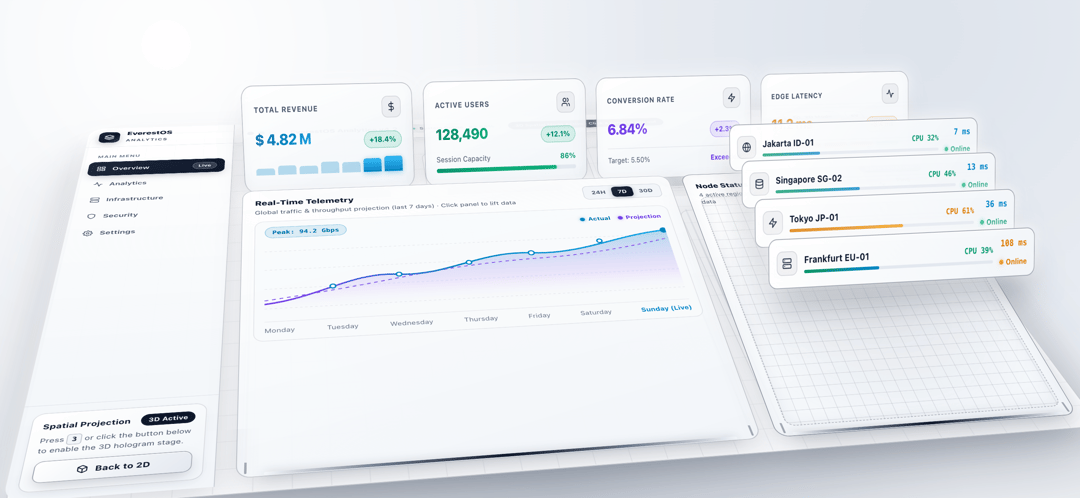
EverestOS Analytics is an interactive analytics dashboard with a switchable flat 2D view and a 3D “hologram” spatial mode.
Built with React and Tailwind. Copy the prompt and paste it into Claude Code, Cursor or Lovable: your agent adds Dashboard Analytics 3D to your project and fits it to your theme.
Code
How Dashboard Analytics 3D is used: the demo's code. The component's own source comes with a free account.
Usage.tsx
import React, { useCallback, useEffect, useState } from "react";
/* =====================================================================
EverestOS Analytics — 3D Monochrome Light Dashboard (React + TypeScript)
Usage: import EverestDashboard from "./EverestDashboard";
<EverestDashboard />
Elevate heights are controlled by the --lift-* variables in the CSS below.
===================================================================== */
type TimeRange = "24H" | "7D" | "30D";
type ConsoleId = "telemetry" | "nodes";
interface TelemetryDataset {
subtitle: string;
peak: string;
line: string;
area: string;
proj: string;
points: [number, number][];
labels: string[];
}
interface NodeStat {
name: string;
cpu: number;
ping: number;
icon: React.ReactNode;
}
const BASE_TILT_X = 58;
const BASE_TILT_Z = 0;
const BASE_SCALE = 0.84;
const TELEMETRY: Record<TimeRange, TelemetryDataset> = {
"24H": {
subtitle: "Global traffic & throughput projection (last 24 hours) · Click panel to lift data",
peak: "Peak: 88.6 Gbps",
line: "M 0 132 C 95 108, 150 124, 220 80 C 300 44, 370 70, 450 40 C 540 18, 615 32, 700 12",
area: "M 0 132 C 95 108, 150 124, 220 80 C 300 44, 370 70, 450 40 C 540 18, 615 32, 700 12 L 700 168 L 0 168 Z",
proj: "M 0 126 Q 140 102, 260 82 T 490 50 T 700 26",
points: [[110, 115], [220, 80], [340, 58], [450, 40], [575, 24], [696, 12]],
labels: ["00:00", "04:00", "08:00", "12:00", "16:00", "20:00", "Now (Live)"],
},
"7D": {
subtitle: "Global traffic & throughput projection (last 7 days) · Click panel to lift data",
peak: "Peak: 94.2 Gbps",
line: "M 0 146 C 90 136, 140 82, 220 92 C 300 102, 360 46, 450 56 C 540 66, 610 20, 700 14",
area: "M 0 146 C 90 136, 140 82, 220 92 C 300 102, 360 46, 450 56 C 540 66, 610 20, 700 14 L 700 168 L 0 168 Z",
proj: "M 0 138 Q 115 122, 230 98 T 460 70 T 700 34",
points: [[110, 112], [220, 92], [340, 72], [450, 56], [575, 34], [696, 14]],
labels: ["Monday", "Tuesday", "Wednesday", "Thursday", "Friday", "Saturday", "Sunday (Live)"],
},
"30D": {
subtitle: "Global traffic & throughput projection (last 30 days) · Click panel to lift data",
peak: "Peak: 112.8 Gbps",
line: "M 0 154 C 110 142, 160 116, 230 98 C 310 78, 380 84, 460 48 C 550 22, 620 26, 700 10",
area: "M 0 154 C 110 142, 160 116, 230 98 C 310 78, 380 84, 460 48 C 550 22, 620 26, 700 10 L 700 168 L 0 168 Z",
proj: "M 0 148 Q 150 128, 280 94 T 510 54 T 700 20",
points: [[110, 132], [230, 98], [350, 80], [460, 48], [580, 24], [696, 10]],
labels: ["Week 1", "Week 2", "Week 3", "Week 4", "Day 25", "Day 28", "Day 30 (Live)"],
},
};
const CHART_NODE_RADII = [4.5, 4.5, 4.5, 5, 4.5, 5.5];
const RANGES: TimeRange[] = ["24H", "7D", "30D"];
/* ---------- Icons ---------- */
interface SvgProps {
size?: number;
sw?: number;
children: React.ReactNode;
}
const Svg = ({ size = 15, sw = 2, children }: SvgProps) => (
<svg
width={size}
height={size}
viewBox="0 0 24 24"
fill="none"
stroke="currentColor"
strokeWidth={sw}
strokeLinecap="round"
strokeLinejoin="round"
aria-hidden="true"
>
{children}
</svg>
);
const IconCube = ({ size = 15 }: { size?: number }) => (
<Svg size={size} sw={2.2}>
<path d="M21 16V8a2 2 0 0 0-1-1.73l-7-4a2 2 0 0 0-2 0l-7 4A2 2 0 0 0 3 8v8a2 2 0 0 0 1 1.73l7 4a2 2 0 0 0 2 0l7-4A2 2 0 0 0 21 16z" />
<polyline points="3.27 6.96 12 12.01 20.73 6.96" />
<line x1="12" y1="22.08" x2="12" y2="12" />
</Svg>
);
const IconGrid = () => (
<Svg>
<rect x="3" y="3" width="7" height="7" />
<rect x="14" y="3" width="7" height="7" />
<rect x="14" y="14" width="7" height="7" />
<rect x="3" y="14" width="7" height="7" />
</Svg>
);
const IconActivity = ({ size = 15, sw = 2 }: { size?: number; sw?: number }) => (
<Svg size={size} sw={sw}>
<polyline points="22 12 18 12 15 21 9 3 6 12 2 12" />
</Svg>
);
const IconServer = ({ size = 15 }: { size?: number }) => (
<Svg size={size}>
<rect x="2" y="2" width="20" height="8" rx="2" />
<rect x="2" y="14" width="20" height="8" rx="2" />
<line x1="6" y1="6" x2="6.01" y2="6" />
<line x1="6" y1="18" x2="6.01" y2="18" />
</Svg>
);
const IconShield = () => (
<Svg>
<path d="M12 22s8-4 8-10V5l-8-3-8 3v7c0 6 8 10 8 10z" />
</Svg>
);
const IconSettings = () => (
<Svg>
<circle cx="12" cy="12" r="3" />
<path d="M19.4 15a1.65 1.65 0 0 0 .33 1.82l.06.06a2 2 0 0 1 0 2.83 2 2 0 0 1-2.83 0l-.06-.06a1.65 1.65 0 0 0-1.82-.33 1.65 1.65 0 0 0-1 1.51V21a2 2 0 0 1-2 2 2 2 0 0 1-2-2v-.09A1.65 1.65 0 0 0 9 19.4a1.65 1.65 0 0 0-1.82.33l-.06.06a2 2 0 0 1-2.83 0 2 2 0 0 1 0-2.83l.06-.06a1.65 1.65 0 0 0 .33-1.82 1.65 1.65 0 0 0-1.51-1H3a2 2 0 0 1-2-2 2 2 0 0 1 2-2h.09A1.65 1.65 0 0 0 4.6 9a1.65 1.65 0 0 0-.33-1.82l-.06-.06a2 2 0 0 1 0-2.83 2 2 0 0 1 2.83 0l.06.06a1.65 1.65 0 0 0 1.82.33H9a1.65 1.65 0 0 0 1-1.51V3a2 2 0 0 1 2-2 2 2 0 0 1 2 2v.09a1.65 1.65 0 0 0 1 1.51 1.65 1.65 0 0 0 1.82-.33l.06-.06a2 2 0 0 1 2.83 0 2 2 0 0 1 0 2.83l-.06.06a1.65 1.65 0 0 0-.33 1.82V9a1.65 1.65 0 0 0 1.51 1H21a2 2 0 0 1 2 2 2 2 0 0 1-2 2h-.09a1.65 1.65 0 0 0-1.51 1z" />
</Svg>
);
const IconDollar = () => (
<Svg>
<line x1="12" y1="1" x2="12" y2="23" />
<path d="M17 5H9.5a3.5 3.5 0 0 0 0 7h5a3.5 3.5 0 0 1 0 7H6" />
</Svg>
);
const IconUsers = () => (
<Svg>
<path d="M16 21v-2a4 4 0 0 0-4-4H6a4 4 0 0 0-4 4v2" />
<circle cx="9" cy="7" r="4" />
<path d="M22 21v-2a4 4 0 0 0-3-3.87" />
<path d="M16 3.13a4 4 0 0 1 0 7.75" />
</Svg>
);
const IconZap = ({ size = 15 }: { size?: number }) => (
<Svg size={size}>
<polygon points="13 2 3 14 12 14 11 22 21 10 12 10 13 2" />
</Svg>
);
const IconGlobe = ({ size = 15 }: { size?: number }) => (
<Svg size={size}>
<circle cx="12" cy="12" r="10" />
<line x1="2" y1="12" x2="22" y2="12" />
<path d="M12 2a15.3 15.3 0 0 1 4 10 15.3 15.3 0 0 1-4 10 15.3 15.3 0 0 1-4-10 15.3 15.3 0 0 1 4-10z" />
</Svg>
);
const IconDatabase = ({ size = 15 }: { size?: number }) => (
<Svg size={size}>
<ellipse cx="12" cy="5" rx="9" ry="3" />
<path d="M21 12c0 1.66-4 3-9 3s-9-1.34-9-3" />
<path d="M3 5v14c0 1.66 4 3 9 3s9-1.34 9-3V5" />
</Svg>
);
const IconLayers = () => (
<Svg size={17} sw={2.2}>
<polygon points="12 2 2 7 12 12 22 7 12 2" />
<polyline points="2 17 12 22 22 17" />
<polyline points="2 12 12 17 22 12" />
</Svg>
);
const IconClose = () => (
<Svg size={15} sw={2.4}>
<line x1="18" y1="6" x2="6" y2="18" />
<line x1="6" y1="6" x2="18" y2="18" />
</Svg>
);
/* ---------- Static data ---------- */
const NAV_ITEMS: { label: string; icon: React.ReactNode; live?: boolean }[] = [
{ label: "Overview", icon: <IconGrid />, live: true },
{ label: "Analytics", icon: <IconActivity /> },
{ label: "Infrastructure", icon: <IconServer /> },
{ label: "Security", icon: <IconShield /> },
{ label: "Settings", icon: <IconSettings /> },
];
const INITIAL_NODES: NodeStat[] = [
{ name: "Jakarta ID-01", cpu: 32, ping: 7, icon: <IconGlobe size={14} /> },
{ name: "Singapore SG-02", cpu: 46, ping: 13, icon: <IconDatabase size={14} /> },
{ name: "Tokyo JP-01", cpu: 61, ping: 36, icon: <IconZap size={14} /> },
{ name: "Frankfurt EU-01", cpu: 39, ping: 108, icon: <IconServer size={14} /> },
];
const CPU_WARN = 58;
const PING_WARN = 90;
/* ---------- KPI card wrapper ---------- */
interface KpiCardProps {
label: string;
icon: React.ReactNode;
elevated: boolean;
onToggle: () => void;
children: React.ReactNode;
}
function KpiCard({ label, icon, elevated, onToggle, children }: KpiCardProps) {
return (
<div className="kpi-slot">
<div className="floor-pad" />
<div className="light-pillar" />
<article
className={`holo-card kpi-card${elevated ? " is-elevated" : ""}`}
onClick={(e) => {
if ((e.target as HTMLElement).closest("button")) return;
onToggle();
}}
>
<span className="elevate-badge">ELEVATED</span>
<div className="kpi-top">
<span className="kpi-label">{label}</span>
<div className="kpi-icon-box">{icon}</div>
</div>
{children}
</article>
</div>
);
}
/* ---------- Main component ---------- */
export default function EverestDashboard() {
const [is3D, setIs3D] = useState(false);
const [section, setSection] = useState("Overview");
const [elevatedKpi, setElevatedKpi] = useState<number | null>(null);
const [floating, setFloating] = useState<ConsoleId | null>(null);
const [range, setRange] = useState<TimeRange>("7D");
const [nodes, setNodes] = useState<NodeStat[]>(INITIAL_NODES);
const [pinging, setPinging] = useState(false);
const [tilt, setTilt] = useState({ x: 0, y: 0, z: 0 });
const [tracking, setTracking] = useState(false);
const set3DMode = useCallback(
(enable?: boolean) => {
const next = typeof enable === "boolean" ? enable : !is3D;
setIs3D(next);
if (!next) {
setElevatedKpi(null);
setFloating(null);
setTilt({ x: 0, y: 0, z: 0 });
setTracking(false);
}
},
[is3D]
);
/* Keyboard: "3" toggles 3D, Escape closes it */
useEffect(() => {
const onKey = (e: KeyboardEvent) => {
const tag = (e.target as HTMLElement | null)?.tagName;
if (tag === "INPUT" || tag === "TEXTAREA") return;
if (e.key === "3") set3DMode();
else if (e.key === "Escape") set3DMode(false);
};
document.addEventListener("keydown", onKey);
return () => document.removeEventListener("keydown", onKey);
}, [set3DMode]);
/* Mouse parallax while in 3D mode */
useEffect(() => {
if (!is3D) return;
const onMove = (e: MouseEvent) => {
const nx = (e.clientX / window.innerWidth) * 2 - 1;
const ny = (e.clientY / window.innerHeight) * 2 - 1;
setTracking(true);
setTilt({ x: -ny * 3, y: nx * 4, z: 0 });
};
window.addEventListener("mousemove", onMove);
return () => window.removeEventListener("mousemove", onMove);
}, [is3D]);
const rotX = BASE_TILT_X + tilt.x;
const rotZ = BASE_TILT_Z + tilt.z;
const stageStyle: React.CSSProperties = is3D
? {
transform: `translateY(14px) rotateX(${rotX.toFixed(2)}deg) rotateY(${tilt.y.toFixed(2)}deg) rotateZ(${rotZ.toFixed(2)}deg) scale(${BASE_SCALE})`,
...(tracking ? { transition: "transform 0.22s cubic-bezier(0.22, 1, 0.36, 1)" } : {}),
}
: { transform: "none" };
const rootStyle = {
"--tilt-x": `${rotX.toFixed(2)}deg`,
"--tilt-z": `${rotZ.toFixed(2)}deg`,
} as React.CSSProperties;
const toggleKpi = (index: number) => {
if (!is3D) return;
setFloating(null);
setElevatedKpi((prev) => (prev === index ? null : index));
};
const toggleConsole = (id: ConsoleId, e: React.MouseEvent) => {
if ((e.target as HTMLElement).closest("button")) return;
if (!is3D) return;
setElevatedKpi(null);
setFloating((prev) => (prev === id ? null : id));
};
const pingNodes = (e: React.MouseEvent) => {
e.stopPropagation();
setPinging(true);
window.setTimeout(() => {
setNodes(
INITIAL_NODES.map((node) => {
const deltaCpu = Math.floor(Math.random() * 11) - 5;
const deltaPing = Math.floor(Math.random() * 5) - 2;
return {
...node,
cpu: Math.max(18, Math.min(89, node.cpu + deltaCpu)),
ping: Math.max(4, node.ping + deltaPing),
};
})
);
setPinging(false);
}, 360);
};
const data = TELEMETRY[range];
return (
<div className={`everest-root${is3D ? " is-3d" : ""}`} style={rootStyle}>
<style>{CSS}</style>
{/* Floating 3D exit button */}
<div className={`spatial-hud${is3D ? " visible" : ""}`} role="region" aria-label="Close 3D view">
<button
type="button"
className="hud-btn-exit"
title="Exit 3D mode (ESC or 3)"
onClick={() => set3DMode(false)}
>
<IconClose />
<span>Close 3D</span>
</button>
</div>
<div className="scene-viewport">
<div className="dashboard-stage" style={stageStyle}>
<div className="floor-grid-overlay" aria-hidden="true" />
{/* Sidebar */}
<aside className="sidebar">
<div>
<div className="sidebar-header">
<div className="brand-wrap">
<div className="brand-icon" style={{ color: "#ffffff" }}>
<IconLayers />
</div>
<div>
<span className="brand-title">EverestOS</span>
<span className="brand-sub">Analytics</span>
</div>
</div>
</div>
<nav className="sidebar-nav" aria-label="Main navigation">
<div className="nav-section-label">Main Menu</div>
{NAV_ITEMS.map((item) => (
<button
key={item.label}
type="button"
className={`nav-item${section === item.label ? " active" : ""}`}
onClick={() => setSection(item.label)}
>
{item.icon}
<span>{item.label}</span>
{item.live && <span className="nav-badge">Live</span>}
</button>
))}
</nav>
</div>
<div className="sidebar-footer">
<div className="sidebar-promo">
<div className="promo-header">
<span>Spatial Projection</span>
<span className={`status-pill${is3D ? " active-3d" : ""}`}>{is3D ? "3D Active" : "Flat 2D"}</span>
</div>
<p className="promo-desc">
Press <span className="kbd-hint">3</span> or click the button below to enable the 3D hologram stage.
</p>
<button type="button" className="btn-3d-primary btn-full" onClick={() => set3DMode()}>
<IconCube size={14} />
<span>{is3D ? "Back to 2D" : "Enable 3D Mode"}</span>
</button>
</div>
</div>
</aside>
{/* Main column */}
<div className="main-column">
<header className="top-header">
<div className="header-left">
<div className="mac-window-controls" aria-hidden="true">
<span className="mac-btn" style={{ background: "#0f172a" }} />
<span className="mac-btn" style={{ background: "#64748b" }} />
<span className="mac-btn" style={{ background: "#cbd5e1" }} />
</div>
<h1 className="header-title">
{section === "Overview" ? "EverestOS Analytics v4.2" : `EverestOS · ${section}`}
</h1>
<div className="live-status-pill">
<span className="live-dot" />
<span>
System Online · <strong style={{ color: "#059669" }}>99.98%</strong>
</span>
</div>
<div className={`mode-indicator${is3D ? " is-3d" : ""}`}>
<span>{is3D ? "3D Spatial Mode Active · Click a panel to pop out" : "Standard 2D View"}</span>
</div>
</div>
<div className="header-right">
<button type="button" className="btn-3d-primary" onClick={() => set3DMode()}>
<IconCube />
<span>{is3D ? "2D Mode" : "3D Mode"}</span>
</button>
<div className="avatar-badge" title="EverestOS Administrator">
<div className="avatar-inner">EV</div>
</div>
</div>
</header>
<main className="dashboard-workspace">
{/* KPI row */}
<section className="kpi-grid" aria-label="Key Metric Cards">
<KpiCard label="Total Revenue" icon={<IconDollar />} elevated={elevatedKpi === 0} onToggle={() => toggleKpi(0)}>
<div className="kpi-main">
<span className="kpi-value data-val-cyan">$ 4.82 M</span>
<span className="kpi-trend">+18.4%</span>
</div>
<div className="kpi-sparkbars">
{[44, 58, 52, 74, 68, 88, 100].map((h, i) => (
<div key={i} className={`spark-bar${i >= 5 ? " highlight" : ""}`} style={{ height: `${h}%` }} />
))}
</div>
</KpiCard>
<KpiCard label="Active Users" icon={<IconUsers />} elevated={elevatedKpi === 1} onToggle={() => toggleKpi(1)}>
<div className="kpi-main">
<span className="kpi-value data-val-emerald">128,490</span>
<span className="kpi-trend">+12.1%</span>
</div>
<div className="kpi-progress-wrap">
<div className="kpi-progress-meta">
<span>Session Capacity</span>
<span style={{ color: "#059669", fontWeight: 700 }}>86%</span>
</div>
<div className="kpi-progress-track">
<div className="kpi-progress-fill" style={{ width: "86%" }} />
</div>
</div>
</KpiCard>
<KpiCard label="Conversion Rate" icon={<IconZap />} elevated={elevatedKpi === 2} onToggle={() => toggleKpi(2)}>
<div className="kpi-main">
<span className="kpi-value data-val-violet">6.84%</span>
<span className="kpi-trend trend-violet">+2.3%</span>
</div>
<div className="kpi-sub-row">
<span>Target: 5.50%</span>
<span style={{ color: "#6d28d9", fontWeight: 700 }}>Exceeded</span>
</div>
</KpiCard>
<KpiCard label="Edge Latency" icon={<IconActivity />} elevated={elevatedKpi === 3} onToggle={() => toggleKpi(3)}>
<div className="kpi-main">
<span className="kpi-value data-val-amber">11.2 ms</span>
<span className="kpi-trend trend-amber">-3.4 ms</span>
</div>
<div className="latency-bars">
{[0, 1, 2, 3].map((i) => (
<span key={i} className="latency-seg" />
))}
<span
className="latency-seg"
style={{ background: "#10b981", boxShadow: "0 2px 6px rgba(16,185,129,0.4)" }}
/>
</div>
</KpiCard>
</section>
{/* Console row */}
<section className="lower-grid" aria-label="Telemetry & Node Status Panels">
{/* Real-Time Telemetry */}
<div className="lower-slot">
<div className="floor-pad" />
<div className="console-base-mount">
<div className="hinge-glow-bar" />
<div className="console-strut-left" />
<div className="console-strut-right" />
<article
id="telemetry-card"
className={`holo-card console-card${floating === "telemetry" ? " is-data-floating" : ""}`}
onClick={(e) => toggleConsole("telemetry", e)}
>
<div className="holo-emitter-grid" aria-hidden="true" />
<span className="elevate-badge">DATA FLOATING</span>
<div className="panel-header">
<div>
<h2 className="panel-title">Real-Time Telemetry</h2>
<p className="panel-subtitle">{data.subtitle}</p>
</div>
<div className="panel-actions">
<div className="timeframe-group" role="group" aria-label="Select time range">
{RANGES.map((r) => (
<button
key={r}
type="button"
className={`tf-btn${range === r ? " active" : ""}`}
onClick={(e) => {
e.stopPropagation();
setRange(r);
}}
>
{r}
</button>
))}
</div>
</div>
</div>
<div className="telemetry-data-stage">
<div className="telemetry-stage-top">
<span className="peak-pill">{data.peak}</span>
<div className="chart-legend">
<div className="legend-item">
<span
className="legend-dot"
style={{ background: "#0284c7", boxShadow: "0 0 6px rgba(2,132,199,0.5)" }}
/>
<span style={{ color: "#0369a1", fontWeight: 700 }}>Actual</span>
</div>
<div className="legend-item">
<span
className="legend-dot"
style={{ background: "#7c3aed", boxShadow: "0 0 6px rgba(124,58,237,0.5)" }}
/>
<span style={{ color: "#6d28d9", fontWeight: 700 }}>Projection</span>
</div>
</div>
</div>
<div className="svg-chart-container">
<svg viewBox="0 0 700 175" width="100%" height="100%" preserveAspectRatio="none">
<defs>
<linearGradient id="areaGrad" x1="0" y1="0" x2="0" y2="1">
<stop offset="0%" stopColor="#0284c7" stopOpacity="0.28" />
<stop offset="65%" stopColor="#7c3aed" stopOpacity="0.1" />
<stop offset="100%" stopColor="#ffffff" stopOpacity="0" />
</linearGradient>
<linearGradient id="strokeGrad" x1="0" y1="0" x2="1" y2="0">
<stop offset="0%" stopColor="#7c3aed" />
<stop offset="50%" stopColor="#0284c7" />
<stop offset="100%" stopColor="#0ea5e9" />
</linearGradient>
</defs>
<g stroke="rgba(15,23,42,0.1)" strokeWidth="1" strokeDasharray="4 4">
<line x1="0" y1="24" x2="700" y2="24" />
<line x1="0" y1="68" x2="700" y2="68" />
<line x1="0" y1="112" x2="700" y2="112" />
<line x1="0" y1="156" x2="700" y2="156" />
</g>
<path d={data.proj} fill="none" stroke="#7c3aed" strokeWidth="2" strokeDasharray="6 6" opacity="0.85" />
<path d={data.area} fill="url(#areaGrad)" />
<path d={data.line} fill="none" stroke="url(#strokeGrad)" strokeWidth="3.2" strokeLinecap="round" />
<g stroke="#0284c7" strokeWidth="2.5">
{data.points.map(([cx, cy], i) => (
<circle
key={i}
cx={cx}
cy={cy}
r={CHART_NODE_RADII[i]}
fill={i === data.points.length - 1 ? "#0284c7" : "#ffffff"}
/>
))}
</g>
</svg>
</div>
<div className="chart-xaxis">
{data.labels.map((label, i) => (
<span
key={label}
style={i === data.labels.length - 1 ? { color: "#0284c7", fontWeight: 700 } : undefined}
>
{label}
</span>
))}
</div>
</div>
</article>
</div>
</div>
{/* Node Status */}
<div className="lower-slot">
<div className="floor-pad" />
<div className="console-base-mount">
<div className="hinge-glow-bar" />
<div className="console-strut-left" />
<div className="console-strut-right" />
<article
id="status-node-card"
className={`holo-card console-card${floating === "nodes" ? " is-data-floating" : ""}`}
onClick={(e) => toggleConsole("nodes", e)}
>
<div className="holo-emitter-grid" aria-hidden="true" />
<span className="elevate-badge">DATA FLOATING</span>
<div className="panel-header">
<div>
<h2 className="panel-title">Node Status</h2>
<p className="panel-subtitle">4 active regional edge clusters · Click panel to lift data</p>
</div>
<button type="button" className="ping-btn" onClick={pingNodes} style={pinging ? { opacity: 0.75 } : undefined}>
<IconActivity size={13} sw={2.2} />
<span>{pinging ? "Measuring..." : "Ping Node"}</span>
</button>
</div>
<div className="server-list">
{nodes.map((node, i) => {
const cpuWarn = node.cpu >= CPU_WARN;
const pingWarn = node.ping >= PING_WARN;
return (
<div key={node.name} className="server-row" data-node={i}>
<div className="server-info">
<div className="server-icon">{node.icon}</div>
<div className="server-details">
<div className="server-name-row">
<span className="server-name">{node.name}</span>
<span className={`cpu-label${cpuWarn ? " cpu-warn" : ""}`}>CPU {node.cpu}%</span>
</div>
<div className="cpu-bar-track">
<div className={`cpu-bar-fill${cpuWarn ? " cpu-warn" : ""}`} style={{ width: `${node.cpu}%` }} />
</div>
</div>
</div>
<div className="server-metrics">
<span className={`ping-text${pingWarn ? " ping-warn" : ""}`}>{node.ping} ms</span>
<span className={`online-tag${pingWarn ? " status-warn" : ""}`}>Online</span>
</div>
</div>
);
})}
</div>
</article>
</div>
</div>
</section>
</main>
</div>
</div>
</div>
</div>
);
}
/* =====================================================================
Styles (scoped under .everest-root)
===================================================================== */
const CSS = `
/* =====================================================================
1. RESET & DESIGN TOKENS (MONOCHROME LIGHT SHELL + VIBRANT DATA)
===================================================================== */
.everest-root {
--bg-alabaster: #edf0f5;
--bg-stage-top: rgba(255, 255, 255, 0.88);
--bg-stage-bottom: rgba(244, 246, 250, 0.96);
--border-specular: rgba(15, 23, 42, 0.11);
--border-silver: rgba(15, 23, 42, 0.28);
--border-steel: rgba(15, 23, 42, 0.18);
--text-primary: #0f172a;
--text-secondary: #475569;
--text-muted: #64748b;
/* Vibrant Data-Only Accents (High-Contrast on Light Frosted Glass) */
--data-cyan: #0284c7;
--data-violet: #7c3aed;
--data-emerald: #059669;
--data-amber: #d97706;
--data-rose: #e11d48;
--tilt-x: 58deg;
--tilt-z: 0deg;
--font-sans: -apple-system, BlinkMacSystemFont, "SF Pro Display", "Segoe UI", Roboto, Helvetica, Arial, sans-serif;
--font-mono: ui-monospace, SFMono-Regular, Menlo, Monaco, Consolas, monospace;
/* ===== ELEVATE HEIGHTS (adjust these values to raise/lower) ===== */
--lift-kpi: 130px; /* KPI card when clicked */
--lift-data: 100px; /* Telemetry data when clicked */
--lift-node: 110px; /* Node Status rows (first row is highest) */
--lift-node-step: 8px; /* height difference between rows */
}
.everest-root *, .everest-root *::before, .everest-root *::after {
box-sizing: border-box;
margin: 0;
padding: 0;
}
.everest-root {
width: 100%;
height: 100vh;
font-family: var(--font-sans);
background-color: var(--bg-alabaster);
background-image:
radial-gradient(circle at 16% 18%, rgba(255, 255, 255, 0.95), transparent 46%),
radial-gradient(circle at 84% 16%, rgba(203, 213, 225, 0.48), transparent 44%),
radial-gradient(circle at 52% 88%, rgba(148, 163, 184, 0.28), transparent 50%);
color: var(--text-primary);
overflow: hidden;
-webkit-font-smoothing: antialiased;
}
/* =====================================================================
2. OUTER VIEWPORT & STRICT PRESERVE-3D HIERARCHY
===================================================================== */
.scene-viewport {
width: 100vw;
height: 100vh;
overflow: hidden;
perspective: 1650px;
perspective-origin: 50% 42%;
display: flex;
align-items: center;
justify-content: center;
position: relative;
}
.dashboard-stage {
width: 100%;
height: 100%;
display: flex;
position: relative;
transform-style: preserve-3d;
overflow: visible;
background: linear-gradient(155deg, var(--bg-stage-top), var(--bg-stage-bottom));
transition: transform 0.85s cubic-bezier(0.16, 1, 0.3, 1), box-shadow 0.8s ease, border-radius 0.8s ease;
will-change: transform;
}
.everest-root.is-3d .dashboard-stage {
border-radius: 28px;
border: 1.5px solid rgba(15, 23, 42, 0.22);
box-shadow:
0 65px 130px -20px rgba(15, 23, 42, 0.28),
0 20px 55px -10px rgba(15, 23, 42, 0.14),
inset 0 0 60px rgba(255, 255, 255, 0.85);
}
/* Monochrome Light Holographic Command Floor Grid */
.floor-grid-overlay {
position: absolute;
inset: 0;
border-radius: 28px;
pointer-events: none;
opacity: 0;
transition: opacity 0.65s ease;
background-image:
linear-gradient(to right, rgba(15, 23, 42, 0.08) 1px, transparent 1px),
linear-gradient(to bottom, rgba(15, 23, 42, 0.08) 1px, transparent 1px);
background-size: 48px 48px;
transform: translateZ(1px);
}
.everest-root.is-3d .floor-grid-overlay {
opacity: 1;
}
/* =====================================================================
3. SIDEBAR NAVIGATION (MONOCHROME PORCELAIN FROSTED GLASS)
===================================================================== */
.sidebar {
width: 244px;
flex-shrink: 0;
display: flex;
flex-direction: column;
justify-content: space-between;
border-right: 1px solid rgba(15, 23, 42, 0.09);
background: linear-gradient(180deg, rgba(255, 255, 255, 0.92), rgba(241, 245, 249, 0.96));
transform-style: preserve-3d;
overflow: visible;
transition: transform 0.75s cubic-bezier(0.22, 1, 0.36, 1), box-shadow 0.6s ease, border-color 0.5s ease;
z-index: 20;
}
.everest-root.is-3d .sidebar {
transform: translateZ(12px);
border-radius: 26px 0 0 26px;
border-color: rgba(15, 23, 42, 0.2);
box-shadow: 16px 24px 44px -12px rgba(15, 23, 42, 0.16), 0 0 24px rgba(255, 255, 255, 0.8);
}
.sidebar-header {
height: 62px;
padding: 0 18px;
display: flex;
align-items: center;
justify-content: space-between;
border-bottom: 1px solid rgba(15, 23, 42, 0.08);
}
.brand-wrap {
display: flex;
align-items: center;
gap: 11px;
}
.brand-icon {
width: 34px;
height: 34px;
border-radius: 10px;
background: linear-gradient(135deg, #1e293b, #0f172a 60%, #334155);
display: flex;
align-items: center;
justify-content: center;
box-shadow: 0 6px 14px rgba(15, 23, 42, 0.22);
border: 1px solid rgba(15, 23, 42, 0.35);
}
.brand-title {
font-size: 15px;
font-weight: 800;
letter-spacing: -0.02em;
color: #0f172a;
display: block;
line-height: 1.1;
}
.brand-sub {
font-size: 10px;
font-weight: 700;
letter-spacing: 0.11em;
text-transform: uppercase;
color: #475569;
}
.sidebar-nav {
padding: 15px 12px;
display: flex;
flex-direction: column;
gap: 5px;
}
.nav-section-label {
font-size: 10px;
font-weight: 700;
text-transform: uppercase;
letter-spacing: 0.08em;
color: var(--text-muted);
padding: 8px 11px 4px;
}
.nav-item {
display: flex;
align-items: center;
gap: 10px;
padding: 9.5px 12px;
border-radius: 11px;
font-size: 13px;
font-weight: 600;
color: var(--text-secondary);
cursor: pointer;
transition: all 0.2s ease;
border: 1px solid transparent;
background: transparent;
width: 100%;
text-align: left;
}
.nav-item:hover {
color: #0f172a;
background: rgba(15, 23, 42, 0.05);
}
.nav-item.active {
color: #ffffff;
background: linear-gradient(135deg, #1e293b, #0f172a);
border-color: #0f172a;
box-shadow: 0 8px 18px -6px rgba(15, 23, 42, 0.32);
}
.nav-badge {
margin-left: auto;
font-size: 10px;
font-weight: 700;
padding: 2px 8px;
border-radius: 999px;
background: rgba(255, 255, 255, 0.16);
color: #f8fafc;
border: 1px solid rgba(255, 255, 255, 0.28);
}
.sidebar-footer {
padding: 14px;
border-top: 1px solid rgba(15, 23, 42, 0.08);
}
.sidebar-promo {
padding: 13px;
border-radius: 15px;
background: linear-gradient(145deg, rgba(255, 255, 255, 0.96), rgba(241, 245, 249, 0.96));
border: 1px solid rgba(15, 23, 42, 0.14);
box-shadow: 0 6px 16px -6px rgba(15, 23, 42, 0.08);
}
.promo-header {
display: flex;
align-items: center;
justify-content: space-between;
margin-bottom: 6px;
font-size: 12px;
font-weight: 700;
color: #0f172a;
}
.status-pill {
font-size: 10px;
font-weight: 700;
padding: 2px 8px;
border-radius: 999px;
background: #e2e8f0;
color: #334155;
border: 1px solid rgba(15, 23, 42, 0.14);
}
.status-pill.active-3d {
background: #0f172a;
color: #ffffff;
border-color: #0f172a;
}
.promo-desc {
font-size: 11px;
color: var(--text-secondary);
line-height: 1.42;
margin-bottom: 10px;
}
.kbd-hint {
display: inline-block;
font-family: var(--font-mono);
font-size: 10px;
font-weight: 700;
padding: 1px 5px;
border-radius: 4px;
background: #f1f5f9;
border: 1px solid rgba(15, 23, 42, 0.22);
color: #0f172a;
}
/* =====================================================================
4. MAIN COLUMN & MONOCHROME LIGHT MACOS HEADER
===================================================================== */
.main-column {
flex: 1;
display: flex;
flex-direction: column;
height: 100%;
transform-style: preserve-3d;
overflow: visible;
}
.top-header {
height: 62px;
padding: 0 22px;
display: flex;
align-items: center;
justify-content: space-between;
border-bottom: 1px solid rgba(15, 23, 42, 0.09);
background: linear-gradient(90deg, rgba(255, 255, 255, 0.92), rgba(248, 250, 252, 0.95));
transform-style: preserve-3d;
overflow: visible;
transition: transform 0.75s cubic-bezier(0.22, 1, 0.36, 1), box-shadow 0.6s ease, border-color 0.5s ease;
z-index: 25;
flex-shrink: 0;
}
.everest-root.is-3d .top-header {
transform: translateZ(12px);
border-radius: 0 26px 0 0;
border-color: rgba(15, 23, 42, 0.2);
box-shadow: 0 16px 32px -12px rgba(15, 23, 42, 0.14), 0 0 20px rgba(255, 255, 255, 0.75);
}
.header-left {
display: flex;
align-items: center;
gap: 14px;
}
.mac-window-controls {
display: flex;
align-items: center;
gap: 7px;
padding-right: 10px;
border-right: 1px solid rgba(15, 23, 42, 0.14);
}
.mac-btn {
width: 11.5px;
height: 11.5px;
border-radius: 50%;
border: 1px solid rgba(15, 23, 42, 0.22);
display: inline-block;
}
.header-title {
font-size: 15.5px;
font-weight: 800;
letter-spacing: -0.015em;
color: #0f172a;
}
.live-status-pill {
display: inline-flex;
align-items: center;
gap: 7px;
padding: 4px 10px;
border-radius: 999px;
background: rgba(15, 23, 42, 0.04);
border: 1px solid rgba(15, 23, 42, 0.12);
font-size: 11px;
font-weight: 600;
color: #334155;
}
.live-dot {
width: 7px;
height: 7px;
border-radius: 50%;
background: var(--data-emerald);
box-shadow: 0 0 8px rgba(5, 150, 105, 0.65);
animation: pulseLive 2s infinite;
}
@keyframes pulseLive {
0%, 100% { opacity: 1; transform: scale(1); }
50% { opacity: 0.45; transform: scale(0.85); }
}
.mode-indicator {
display: inline-flex;
align-items: center;
gap: 6px;
padding: 4px 12px;
border-radius: 999px;
font-size: 11px;
font-weight: 600;
background: #f1f5f9;
color: var(--text-secondary);
border: 1px solid rgba(15, 23, 42, 0.12);
transition: all 0.35s ease;
}
.mode-indicator.is-3d {
background: #0f172a;
color: #ffffff;
border-color: #0f172a;
box-shadow: 0 6px 16px -4px rgba(15, 23, 42, 0.28);
}
.header-right {
display: flex;
align-items: center;
gap: 12px;
}
.btn-3d-primary {
display: inline-flex;
align-items: center;
gap: 8px;
padding: 8px 16px;
border-radius: 11px;
border: 1px solid #0f172a;
background: linear-gradient(135deg, #1e293b, #0f172a);
color: #ffffff;
font-size: 12.5px;
font-weight: 700;
cursor: pointer;
box-shadow: 0 6px 16px -4px rgba(15, 23, 42, 0.28), inset 0 1px 0 rgba(255, 255, 255, 0.2);
transition: transform 0.2s ease, box-shadow 0.3s ease, filter 0.2s ease, background 0.3s ease;
}
.btn-3d-primary:hover {
transform: translateY(-1px);
filter: brightness(1.1);
box-shadow: 0 10px 22px -6px rgba(15, 23, 42, 0.38);
}
.btn-3d-primary:active {
transform: scale(0.97);
}
.everest-root.is-3d .btn-3d-primary {
background: linear-gradient(135deg, #ffffff, #e2e8f0);
color: #0f172a;
border-color: rgba(15, 23, 42, 0.35);
box-shadow:
0 8px 20px -4px rgba(15, 23, 42, 0.22),
inset 0 1px 0 rgba(255, 255, 255, 0.95);
}
.btn-full {
width: 100%;
justify-content: center;
padding: 8px 12px;
font-size: 12px;
}
.avatar-badge {
width: 34px;
height: 34px;
border-radius: 10px;
background: linear-gradient(135deg, #cbd5e1, #64748b);
padding: 1.5px;
}
.avatar-inner {
width: 100%;
height: 100%;
border-radius: 8.5px;
background: #ffffff;
display: flex;
align-items: center;
justify-content: center;
font-size: 11.5px;
font-weight: 800;
color: #0f172a;
}
/* =====================================================================
5. DASHBOARD WORKSPACE & ERGONOMIC 3D SPACING
===================================================================== */
.dashboard-workspace {
flex: 1;
padding: 20px 24px;
display: flex;
flex-direction: column;
gap: 20px;
transform-style: preserve-3d;
overflow-y: auto;
transition: gap 0.8s cubic-bezier(0.16, 1, 0.3, 1), padding 0.8s ease;
}
.everest-root.is-3d .dashboard-workspace {
overflow: visible;
padding-top: 26px;
gap: 56px;
}
/* =====================================================================
6. TOP ROW: 4 MAIN KPI CARDS (UPRIGHT IN 3D MODE)
===================================================================== */
.kpi-grid {
display: grid;
grid-template-columns: repeat(4, minmax(0, 1fr));
gap: 18px;
transform-style: preserve-3d;
overflow: visible;
position: relative;
z-index: 40;
}
.kpi-slot {
position: relative;
transform-style: preserve-3d;
overflow: visible;
display: flex;
flex-direction: column;
}
/* Monochrome Silver/Charcoal Floor Pedestal */
.floor-pad {
position: absolute;
inset: 6px;
border-radius: 18px;
background: radial-gradient(circle at center, rgba(15, 23, 42, 0.1), rgba(148, 163, 184, 0.05) 65%, transparent);
border: 1px solid rgba(15, 23, 42, 0.22);
box-shadow: 0 0 24px rgba(15, 23, 42, 0.08);
opacity: 0;
pointer-events: none;
transform: translateZ(2px);
transition: opacity 0.65s ease, border-color 0.5s ease, box-shadow 0.5s ease;
}
.everest-root.is-3d .floor-pad {
opacity: 1;
}
/* Floor pad glows while the card above it is lifted */
.everest-root.is-3d .kpi-slot:has(.kpi-card.is-elevated) .floor-pad {
border-color: rgba(2, 132, 199, 0.65);
box-shadow: 0 0 40px rgba(2, 132, 199, 0.35);
}
/* Monochrome Vertical Light Beam */
.light-pillar {
position: absolute;
bottom: 12px;
left: 14%;
right: 14%;
height: 28px;
background: linear-gradient(to top, rgba(15, 23, 42, 0.2), rgba(148, 163, 184, 0.08) 70%, transparent);
opacity: 0;
pointer-events: none;
transform-origin: bottom center;
transform: translateZ(2px) rotateX(calc(var(--tilt-x) * -1));
transition: opacity 0.65s ease;
}
.everest-root.is-3d .light-pillar {
opacity: 1;
}
/* Monochrome Frosted Light Liquid-Glass Card Container */
.holo-card {
position: relative;
flex: 1;
border-radius: 18px;
padding: 18px;
background: linear-gradient(150deg, rgba(255, 255, 255, 0.92), rgba(248, 250, 252, 0.96));
border: 1px solid var(--border-specular);
box-shadow: 0 10px 26px -8px rgba(15, 23, 42, 0.09), inset 0 1px 0 rgba(255, 255, 255, 1);
transform-origin: bottom center;
transform-style: preserve-3d;
overflow: visible;
cursor: pointer;
transition:
transform 0.95s cubic-bezier(0.16, 1, 0.3, 1),
box-shadow 0.55s ease,
border-color 0.45s ease,
background 0.45s ease;
}
.holo-card:hover {
border-color: rgba(15, 23, 42, 0.28);
}
/* Upright billboard state for the top 4 KPI cards */
.everest-root.is-3d .kpi-card {
transform: translateZ(24px) rotateX(calc(var(--tilt-x) * -1));
background: linear-gradient(160deg, rgba(255, 255, 255, 0.96), rgba(241, 245, 249, 0.98));
border-color: var(--border-silver);
box-shadow:
0 26px 46px -12px rgba(15, 23, 42, 0.22),
0 0 28px rgba(255, 255, 255, 0.85),
inset 0 1px 0 rgba(255, 255, 255, 1),
inset 0 -8px 18px -6px rgba(15, 23, 42, 0.06);
}
.everest-root.is-3d .kpi-card:hover:not(.is-elevated) {
transform: translateZ(38px) rotateX(calc(var(--tilt-x) * -1)) scale(1.03);
border-color: #0f172a;
box-shadow:
0 34px 56px -12px rgba(15, 23, 42, 0.28),
0 0 36px rgba(255, 255, 255, 0.95);
}
/* Click-to-Elevate for KPI cards: lifts along the Z axis (see --lift-kpi) */
.everest-root.is-3d .kpi-card.is-elevated {
transform: translateZ(var(--lift-kpi)) rotateX(calc(var(--tilt-x) * -1)) scale(1.08);
border-color: #0f172a;
background: linear-gradient(160deg, #ffffff, #f8fafc);
box-shadow:
0 60px 90px -14px rgba(15, 23, 42, 0.38),
0 0 56px rgba(255, 255, 255, 1),
inset 0 0 22px rgba(255, 255, 255, 0.9);
z-index: 120;
}
/* =====================================================================
7. BOTTOM ROW: LOW-PROFILE TILTED CONSOLE PANELS (.lower-slot)
===================================================================== */
.lower-grid {
display: grid;
grid-template-columns: 1.55fr 1fr;
gap: 22px;
flex: 1;
transform-style: preserve-3d;
overflow: visible;
position: relative;
z-index: 25;
}
.lower-slot {
position: relative;
transform-style: preserve-3d;
overflow: visible;
display: flex;
flex-direction: column;
}
.console-base-mount {
position: relative;
flex: 1;
display: flex;
flex-direction: column;
transform-origin: bottom center;
transform-style: preserve-3d;
overflow: visible;
transition: transform 0.8s cubic-bezier(0.16, 1, 0.3, 1);
}
.everest-root.is-3d .console-base-mount {
transform: translateZ(4px) rotateX(-1deg);
}
/* Monochrome Luminous Hinge Strip along bottom edge */
.hinge-glow-bar {
position: absolute;
bottom: 0;
left: 5%;
right: 5%;
height: 5px;
border-radius: 999px;
background: linear-gradient(90deg, transparent, #64748b, #0f172a, #64748b, transparent);
box-shadow: 0 0 14px rgba(15, 23, 42, 0.25);
opacity: 0;
pointer-events: none;
transform: translateZ(2px);
transition: opacity 0.65s ease;
z-index: 5;
}
.everest-root.is-3d .hinge-glow-bar {
opacity: 1;
}
.console-strut-left,
.console-strut-right {
position: absolute;
bottom: 4px;
top: 24px;
width: 3px;
border-radius: 999px;
background: linear-gradient(to top, rgba(15, 23, 42, 0.35), rgba(100, 116, 139, 0.14));
opacity: 0;
pointer-events: none;
transform: translateZ(2px);
transition: opacity 0.65s ease;
}
.console-strut-left { left: 10px; }
.console-strut-right { right: 10px; }
.everest-root.is-3d .console-strut-left,
.everest-root.is-3d .console-strut-right {
opacity: 1;
}
/* Console card tilted back slightly in 3D Mode */
.everest-root.is-3d .console-card {
transform: rotateX(-5deg);
background: linear-gradient(165deg, rgba(255, 255, 255, 0.95), rgba(241, 245, 249, 0.98));
border-color: rgba(15, 23, 42, 0.24);
box-shadow:
0 24px 44px -12px rgba(15, 23, 42, 0.18),
0 0 26px rgba(255, 255, 255, 0.8),
inset 0 1px 0 rgba(255, 255, 255, 1);
}
.everest-root.is-3d .console-card:hover:not(.is-data-floating) {
transform: translateZ(10px) rotateX(-5deg) scale(1.015);
border-color: #0f172a;
box-shadow:
0 30px 52px -12px rgba(15, 23, 42, 0.24),
0 0 34px rgba(255, 255, 255, 0.95);
}
/* =====================================================================
7B. CONSOLE DATA-ONLY FLOATING PROJECTION
===================================================================== */
.everest-root.is-3d .console-card.is-data-floating {
transform: rotateX(-5deg);
border-color: rgba(15, 23, 42, 0.45);
background: linear-gradient(165deg, rgba(255, 255, 255, 0.96), rgba(241, 245, 249, 0.98));
box-shadow:
0 26px 48px -10px rgba(15, 23, 42, 0.22),
0 0 34px rgba(255, 255, 255, 0.9),
inset 0 0 22px rgba(15, 23, 42, 0.04);
z-index: 110;
}
/* Monochrome Hologram Emitter Grid */
.holo-emitter-grid {
position: absolute;
left: 16px;
right: 16px;
bottom: 14px;
top: 58px;
border-radius: 14px;
pointer-events: none;
opacity: 0;
transform: translateZ(2px);
background:
radial-gradient(ellipse at center, rgba(15, 23, 42, 0.08), rgba(100, 116, 139, 0.04) 58%, transparent 82%),
linear-gradient(to right, rgba(15, 23, 42, 0.1) 1px, transparent 1px),
linear-gradient(to bottom, rgba(15, 23, 42, 0.1) 1px, transparent 1px);
background-size: 100% 100%, 20px 20px, 20px 20px;
border: 1px dashed rgba(15, 23, 42, 0.32);
box-shadow: inset 0 0 20px rgba(15, 23, 42, 0.06);
transition: opacity 0.55s ease;
}
.everest-root.is-3d .console-card.is-data-floating .holo-emitter-grid {
opacity: 1;
}
/* Monochrome Charcoal Pop-Out Badge */
.elevate-badge {
position: absolute;
top: -11px;
right: 14px;
padding: 3px 10px;
border-radius: 999px;
font-size: 9.5px;
font-weight: 800;
letter-spacing: 0.08em;
color: #ffffff;
background: linear-gradient(90deg, #0f172a, #334155);
border: 1px solid #0f172a;
box-shadow: 0 6px 16px rgba(15, 23, 42, 0.28);
opacity: 0;
transform: translateY(4px) scale(0.9);
transition: opacity 0.28s ease, transform 0.28s ease;
pointer-events: none;
}
.everest-root.is-3d .holo-card.is-elevated .elevate-badge,
.everest-root.is-3d .console-card.is-data-floating .elevate-badge {
opacity: 1;
transform: translateY(0) scale(1);
}
/* =====================================================================
8. KPI CARD INTERNALS (MONOCHROME CHROME + VIBRANT COLORFUL DATA)
===================================================================== */
.kpi-top {
display: flex;
align-items: center;
justify-content: space-between;
margin-bottom: 10px;
}
.kpi-label {
font-size: 11px;
font-weight: 700;
text-transform: uppercase;
letter-spacing: 0.06em;
color: #475569;
}
.kpi-icon-box {
width: 31px;
height: 31px;
border-radius: 9px;
display: flex;
align-items: center;
justify-content: center;
background: rgba(15, 23, 42, 0.05);
color: #1e293b;
border: 1px solid rgba(15, 23, 42, 0.12);
}
.kpi-main {
display: flex;
align-items: baseline;
justify-content: space-between;
gap: 8px;
}
.kpi-value {
font-size: 22px;
font-weight: 800;
letter-spacing: -0.02em;
}
/* High-Contrast Vibrant Data Gradients on Light Glass */
.data-val-cyan {
background: linear-gradient(135deg, #0369a1, #0284c7 60%, #0ea5e9);
-webkit-background-clip: text;
-webkit-text-fill-color: transparent;
}
.data-val-emerald {
background: linear-gradient(135deg, #047857, #059669 60%, #10b981);
-webkit-background-clip: text;
-webkit-text-fill-color: transparent;
}
.data-val-violet {
background: linear-gradient(135deg, #6d28d9, #7c3aed 60%, #8b5cf6);
-webkit-background-clip: text;
-webkit-text-fill-color: transparent;
}
.data-val-amber {
background: linear-gradient(135deg, #b45309, #d97706 60%, #f59e0b);
-webkit-background-clip: text;
-webkit-text-fill-color: transparent;
}
.kpi-trend {
display: inline-flex;
align-items: center;
font-size: 11px;
font-weight: 700;
padding: 3px 8px;
border-radius: 999px;
background: rgba(16, 185, 129, 0.14);
color: #047857;
border: 1px solid rgba(5, 150, 105, 0.3);
}
.kpi-trend.trend-violet {
background: rgba(139, 92, 246, 0.14);
color: #6d28d9;
border-color: rgba(124, 58, 237, 0.3);
}
.kpi-trend.trend-amber {
background: rgba(245, 158, 11, 0.16);
color: #b45309;
border-color: rgba(217, 119, 6, 0.32);
}
.kpi-sparkbars {
margin-top: 12px;
height: 22px;
display: flex;
align-items: flex-end;
gap: 5px;
}
.spark-bar {
flex: 1;
border-radius: 4px 4px 0 0;
background: rgba(2, 132, 199, 0.28);
}
.spark-bar.highlight {
background: linear-gradient(to top, #0284c7, #38bdf8);
box-shadow: 0 2px 8px rgba(2, 132, 199, 0.35);
}
.kpi-progress-wrap {
margin-top: 12px;
}
.kpi-progress-meta {
display: flex;
justify-content: space-between;
font-size: 11px;
color: var(--text-secondary);
margin-bottom: 5px;
}
.kpi-progress-track {
width: 100%;
height: 6px;
border-radius: 999px;
background: #e2e8f0;
overflow: hidden;
}
.kpi-progress-fill {
height: 100%;
border-radius: 999px;
background: linear-gradient(90deg, #059669, #10b981);
box-shadow: 0 0 8px rgba(16, 185, 129, 0.4);
}
.kpi-sub-row {
margin-top: 12px;
padding-top: 9px;
border-top: 1px solid rgba(15, 23, 42, 0.08);
display: flex;
justify-content: space-between;
font-size: 11px;
color: var(--text-secondary);
}
.latency-bars {
margin-top: 14px;
display: flex;
gap: 6px;
}
.latency-seg {
flex: 1;
height: 6px;
border-radius: 999px;
background: #f59e0b;
box-shadow: 0 2px 6px rgba(245, 158, 11, 0.35);
}
/* =====================================================================
9. REAL-TIME TELEMETRY & NODE STATUS INTERNALS
===================================================================== */
.panel-header {
display: flex;
align-items: flex-start;
justify-content: space-between;
gap: 12px;
margin-bottom: 12px;
}
.panel-title {
font-size: 14.5px;
font-weight: 800;
color: #0f172a;
}
.panel-subtitle {
font-size: 11.5px;
color: var(--text-secondary);
margin-top: 2px;
}
.panel-actions {
display: flex;
align-items: center;
gap: 12px;
flex-wrap: wrap;
}
/* Monochrome Timeframe Buttons */
.timeframe-group {
display: inline-flex;
padding: 3px;
border-radius: 9px;
background: #f1f5f9;
border: 1px solid rgba(15, 23, 42, 0.14);
}
.tf-btn {
padding: 4px 10px;
border-radius: 7px;
border: none;
background: transparent;
color: var(--text-secondary);
font-size: 11px;
font-weight: 700;
cursor: pointer;
transition: all 0.2s ease;
}
.tf-btn:hover {
color: #0f172a;
}
.tf-btn.active {
background: linear-gradient(135deg, #1e293b, #0f172a);
color: #ffffff;
box-shadow: 0 2px 8px rgba(15, 23, 42, 0.25);
}
.chart-legend {
display: flex;
align-items: center;
gap: 12px;
font-size: 11px;
color: #334155;
}
.legend-item {
display: flex;
align-items: center;
gap: 5px;
}
.legend-dot {
width: 8px;
height: 8px;
border-radius: 50%;
}
/* Vibrant Data Peak Pill */
.peak-pill {
font-family: var(--font-mono);
font-size: 11px;
font-weight: 800;
padding: 3px 10px;
border-radius: 999px;
background: rgba(2, 132, 199, 0.12);
color: #0369a1;
border: 1px solid rgba(2, 132, 199, 0.34);
}
/* Telemetry Floating Data Stage */
.telemetry-data-stage {
position: relative;
padding: 12px 14px 10px;
border-radius: 14px;
background: rgba(248, 250, 252, 0.85);
border: 1px solid rgba(15, 23, 42, 0.1);
transform-origin: bottom center;
transform-style: preserve-3d;
z-index: 15;
transition:
transform 0.95s cubic-bezier(0.16, 1, 0.3, 1),
background 0.45s ease,
border-color 0.45s ease,
box-shadow 0.5s ease;
}
.telemetry-stage-top {
display: flex;
align-items: center;
justify-content: space-between;
gap: 10px;
margin-bottom: 8px;
}
.everest-root.is-3d #telemetry-card.is-data-floating .telemetry-data-stage {
transform: translateZ(var(--lift-data)) rotateX(calc(var(--tilt-x) * -0.9));
background: linear-gradient(155deg, rgba(255, 255, 255, 0.98), rgba(241, 245, 249, 0.99));
border-color: rgba(15, 23, 42, 0.38);
box-shadow:
0 44px 70px -10px rgba(15, 23, 42, 0.3),
0 0 30px rgba(255, 255, 255, 0.95),
inset 0 1px 0 rgba(255, 255, 255, 1);
}
.svg-chart-container {
width: 100%;
height: 154px;
position: relative;
}
.chart-xaxis {
display: flex;
justify-content: space-between;
margin-top: 8px;
padding-top: 8px;
border-top: 1px solid rgba(15, 23, 42, 0.08);
font-size: 11px;
color: var(--text-muted);
}
/* Monochrome Ping Node Button */
.ping-btn {
display: inline-flex;
align-items: center;
gap: 6px;
padding: 5px 11px;
border-radius: 8px;
border: 1px solid rgba(15, 23, 42, 0.22);
background: #ffffff;
color: #0f172a;
font-size: 11px;
font-weight: 700;
cursor: pointer;
box-shadow: 0 2px 6px rgba(15, 23, 42, 0.06);
transition: all 0.2s ease;
}
.ping-btn:hover {
background: #0f172a;
border-color: #0f172a;
color: #ffffff;
box-shadow: 0 6px 14px rgba(15, 23, 42, 0.2);
}
.server-list {
display: flex;
flex-direction: column;
gap: 9px;
margin-top: 6px;
transform-style: preserve-3d;
overflow: visible;
position: relative;
z-index: 15;
}
/* Monochrome Server Row Containers */
.server-row {
display: flex;
align-items: center;
justify-content: space-between;
gap: 10px;
padding: 9px 11px;
border-radius: 12px;
background: rgba(248, 250, 252, 0.9);
border: 1px solid rgba(15, 23, 42, 0.09);
transform-origin: bottom center;
transform-style: preserve-3d;
transition:
transform 0.95s cubic-bezier(0.16, 1, 0.3, 1),
border-color 0.35s ease,
background 0.35s ease,
box-shadow 0.45s ease;
}
.server-row:hover {
border-color: rgba(15, 23, 42, 0.24);
background: #ffffff;
}
/* Detached floating holographic data plates in 3D Mode */
.everest-root.is-3d #status-node-card.is-data-floating .server-list {
gap: 12px;
}
.everest-root.is-3d #status-node-card.is-data-floating .server-row {
background: linear-gradient(135deg, rgba(255, 255, 255, 0.98), rgba(241, 245, 249, 0.99));
border-color: rgba(15, 23, 42, 0.36);
box-shadow:
0 32px 50px -8px rgba(15, 23, 42, 0.26),
0 0 22px rgba(255, 255, 255, 0.95),
inset 0 1px 0 rgba(255, 255, 255, 1);
}
.everest-root.is-3d #status-node-card.is-data-floating .server-row[data-node="0"] {
transform: translateZ(calc(var(--lift-node) - var(--lift-node-step) * 0)) rotateX(calc(var(--tilt-x) * -0.9));
}
.everest-root.is-3d #status-node-card.is-data-floating .server-row[data-node="1"] {
transform: translateZ(calc(var(--lift-node) - var(--lift-node-step) * 1)) rotateX(calc(var(--tilt-x) * -0.9));
}
.everest-root.is-3d #status-node-card.is-data-floating .server-row[data-node="2"] {
transform: translateZ(calc(var(--lift-node) - var(--lift-node-step) * 2)) rotateX(calc(var(--tilt-x) * -0.9));
}
.everest-root.is-3d #status-node-card.is-data-floating .server-row[data-node="3"] {
transform: translateZ(calc(var(--lift-node) - var(--lift-node-step) * 3)) rotateX(calc(var(--tilt-x) * -0.9));
}
.everest-root.is-3d #status-node-card.is-data-floating .server-row:hover {
border-color: #0f172a;
box-shadow:
0 38px 58px -8px rgba(15, 23, 42, 0.32),
0 0 30px rgba(255, 255, 255, 1);
}
.server-info {
display: flex;
align-items: center;
gap: 10px;
flex: 1;
min-width: 0;
}
/* Monochrome Node Hardware Icons */
.server-icon {
width: 30px;
height: 30px;
border-radius: 8px;
display: flex;
align-items: center;
justify-content: center;
flex-shrink: 0;
background: rgba(15, 23, 42, 0.05);
color: #1e293b;
border: 1px solid rgba(15, 23, 42, 0.12);
}
.server-details {
flex: 1;
min-width: 0;
}
.server-name-row {
display: flex;
align-items: center;
justify-content: space-between;
gap: 6px;
margin-bottom: 4px;
}
.server-name {
font-size: 12px;
font-weight: 700;
color: #0f172a;
white-space: nowrap;
overflow: hidden;
text-overflow: ellipsis;
}
/* Vibrant Data CPU & Latency Colors */
.cpu-label {
font-family: var(--font-mono);
font-size: 10.5px;
font-weight: 700;
color: #059669;
}
.cpu-label.cpu-warn {
color: #d97706;
}
.cpu-bar-track {
width: 100%;
height: 4px;
border-radius: 999px;
background: #e2e8f0;
overflow: hidden;
}
.cpu-bar-fill {
height: 100%;
border-radius: 999px;
background: linear-gradient(90deg, #059669, #0284c7);
transition: width 0.5s ease, background 0.4s ease;
}
.cpu-bar-fill.cpu-warn {
background: linear-gradient(90deg, #d97706, #f59e0b);
}
.server-metrics {
text-align: right;
flex-shrink: 0;
}
.ping-text {
font-family: var(--font-mono);
font-size: 11.5px;
font-weight: 800;
color: #0284c7;
display: block;
}
.ping-text.ping-warn {
color: #d97706;
}
.online-tag {
display: inline-flex;
align-items: center;
gap: 4px;
font-size: 10px;
font-weight: 700;
color: #059669;
}
.online-tag::before {
content: "";
width: 6px;
height: 6px;
border-radius: 50%;
background: #10b981;
box-shadow: 0 0 6px rgba(16, 185, 129, 0.7);
}
.online-tag.status-warn {
color: #d97706;
}
.online-tag.status-warn::before {
background: #f59e0b;
box-shadow: 0 0 6px rgba(245, 158, 11, 0.7);
}
/* =====================================================================
10. MINIMALIST MONOCHROME FLOATING 3D CLOSE HUD
===================================================================== */
.spatial-hud {
position: fixed;
bottom: 22px;
left: 50%;
transform: translateX(-50%) translateY(90px);
z-index: 200;
display: flex;
align-items: center;
justify-content: center;
opacity: 0;
pointer-events: none;
transition: transform 0.55s cubic-bezier(0.16, 1, 0.3, 1), opacity 0.45s ease;
}
.spatial-hud.visible {
transform: translateX(-50%) translateY(0);
opacity: 1;
pointer-events: auto;
}
.hud-btn-exit {
display: inline-flex;
align-items: center;
gap: 8px;
padding: 10px 22px;
border-radius: 999px;
border: 1px solid #0f172a;
background: linear-gradient(135deg, #1e293b, #0f172a);
color: #ffffff;
font-size: 12.5px;
font-weight: 700;
letter-spacing: 0.02em;
cursor: pointer;
box-shadow:
0 16px 32px -8px rgba(15, 23, 42, 0.35),
inset 0 1px 0 rgba(255, 255, 255, 0.25);
transition: transform 0.2s ease, background 0.25s ease, box-shadow 0.25s ease, color 0.2s ease;
}
.hud-btn-exit:hover {
transform: translateY(-2px);
background: linear-gradient(135deg, #ffffff, #f1f5f9);
border-color: #0f172a;
color: #0f172a;
box-shadow:
0 20px 38px -8px rgba(15, 23, 42, 0.28);
}
.hud-btn-exit:active {
transform: scale(0.97);
}
/* =====================================================================
11. RESPONSIVE ADAPTATIONS
===================================================================== */
@media (max-width: 1120px) {
.kpi-grid {
grid-template-columns: repeat(2, minmax(0, 1fr));
}
.lower-grid {
grid-template-columns: 1fr;
}
}
@media (max-width: 768px) {
.sidebar {
display: none;
}
.spatial-hud {
bottom: 14px;
}
}
`;More by pstzx
View all
Button Payment
63
Sign In Water Effect Glass
19
Contour Land Map
15
Contour line Mountain
12
21 st Contour Line
7
Contour line map
7
Button New & Search
6
Button Sign In
More in Cards
View all
Stats cards with links
94

Card
71
Statistics Card 7
316

Course Design Cards
1.2K

Interactive Tech Stack Bento Grid with Hover Effects
503
Statistics Card 2
295

Card Studio
14

Card
18
