
About
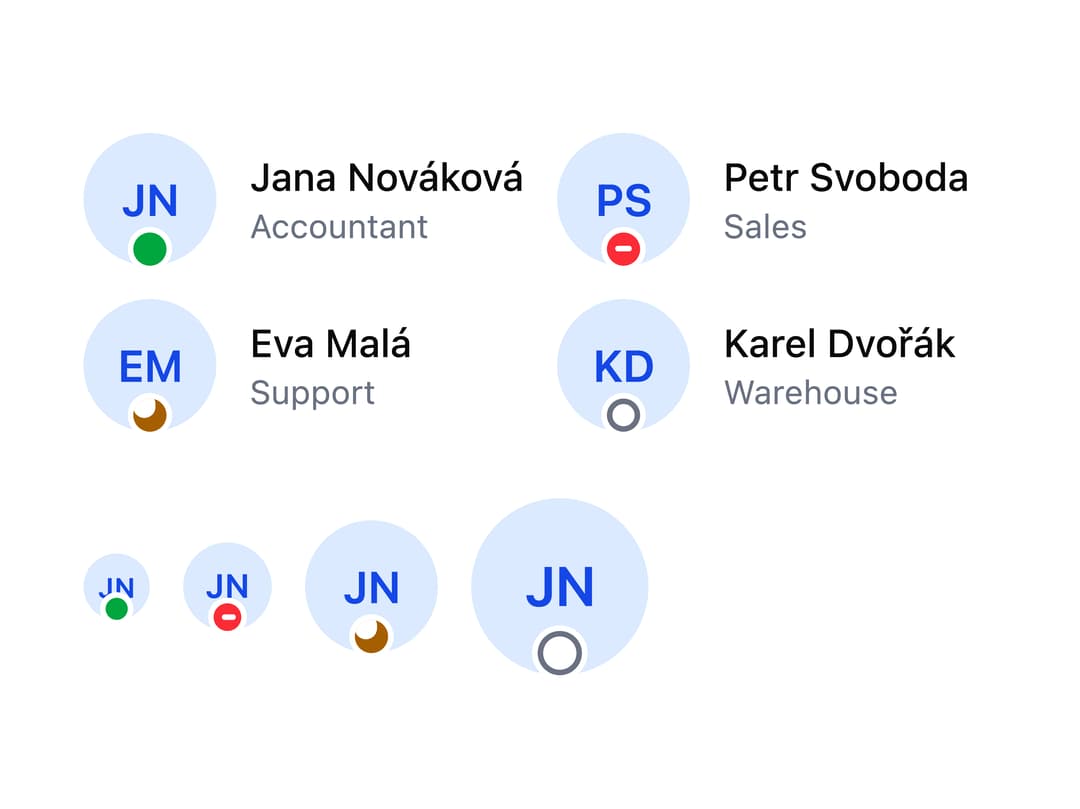
A circular or square profile picture that shows a person's photo, falls back to their initials or a generic user icon, and can display an online/offline/busy/away status dot.
Built with React and Tailwind. Copy the prompt and paste it into Claude Code, Cursor or Lovable: your agent adds Avatar to your project and fits it to your theme.
Code
How Avatar is used: the demo's code. The component's own source comes with a free account.
Usage.tsx
import Avatar from "@/components/ui/avatar";

const team = [
  { name: "Jana Nováková", role: "Accountant", status: "online" },
  { name: "Petr Svoboda", role: "Sales", status: "busy" },
  { name: "Eva Malá", role: "Support", status: "away" },
  { name: "Karel Dvořák", role: "Warehouse", status: "offline" },
] as const;

export default function Status() {
  return (
    <div className="space-y-6">
      <ul className="grid gap-3 sm:grid-cols-2">
        {team.map((person) => (
          <li className="flex items-center gap-3" key={person.name}>
            {/* Named - screen readers hear "Jana Nováková, Online" */}
            <Avatar name={person.name} size="lg" status={person.status} />
            <div>
              <div className="text-sm font-medium">{person.name}</div>
              <div className="text-xs text-neutral-500 dark:text-neutral-400">
                {person.role}
              </div>
            </div>
          </li>
        ))}
      </ul>
      <div className="flex items-center gap-3">
        <Avatar name="Jana Nováková" size="sm" status="online" />
        <Avatar name="Jana Nováková" size="md" status="busy" />
        <Avatar name="Jana Nováková" size="lg" status="away" />
        <Avatar name="Jana Nováková" size="xl" status="offline" />
      </div>
    </div>
  );
}
Dependencies
More by robertlib
View all
Timeline
1
Collapsible Content
Form Description
Chip
Switch

Form Error
Select
Spinner