
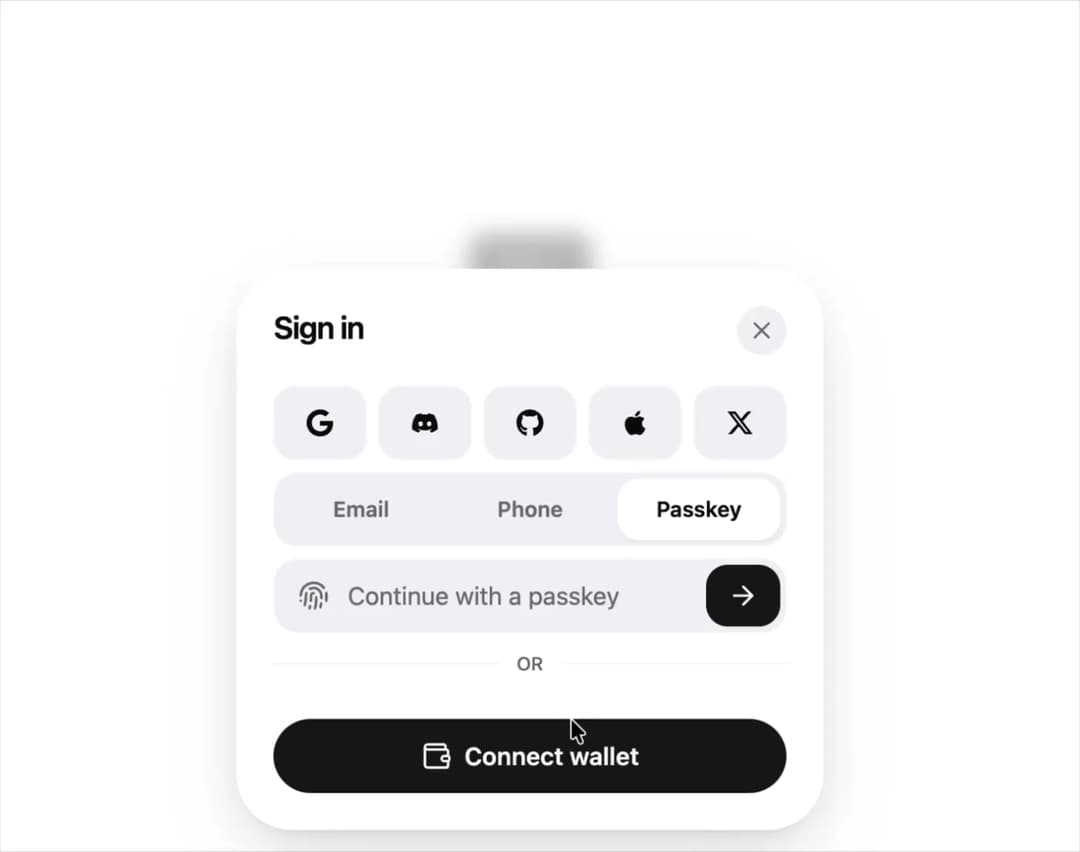
About
A bottom sheet for signing in with social providers, email or phone one-time codes, passkeys and crypto wallets, with the sheet height morphing between steps.
Built with React and Tailwind. Copy the prompt and paste it into Claude Code, Cursor or Lovable: your agent adds Auth Drawer to your project and fits it to your theme.
Code
How Auth Drawer is used: the demo's code. The component's own source comes with a free account.
Usage.tsx
import AuthDrawer from "@/components/ui/auth-drawer";
import { Button } from "@/components/ui/button";
import { Toaster } from "@/components/ui/sonner";
import {
  FaApple,
  FaDiscord,
  FaGithub,
  FaGoogle,
  FaWallet,
  FaXTwitter,
} from "react-icons/fa6";
import { SiBrave, SiCoinbase, SiWalletconnect } from "react-icons/si";
import { toast } from "sonner";

const providers = [
  { id: "google", label: "Continue with Google", icon: <FaGoogle /> },
  { id: "discord", label: "Continue with Discord", icon: <FaDiscord /> },
  { id: "github", label: "Continue with GitHub", icon: <FaGithub /> },
  { id: "apple", label: "Continue with Apple", icon: <FaApple /> },
  { id: "x", label: "Continue with X", icon: <FaXTwitter /> },
];

const wallets = [
  {
    id: "coinbase",
    label: "Coinbase",
    icon: <SiCoinbase className="text-[#0052ff]" />,
  },
  {
    id: "walletconnect",
    label: "WalletConnect",
    icon: <SiWalletconnect className="text-[#3b99fc]" />,
  },
  {
    id: "brave",
    label: "Brave Wallet",
    icon: <SiBrave className="text-[#fb542b]" />,
  },
  {
    id: "other",
    label: "Other wallets",
    badge: "350+",
    icon: <FaWallet className="text-muted-foreground" />,
  },
];

const wait = (ms: number) => new Promise<void>((r) => setTimeout(r, ms));

export default function AuthDrawerDemo() {
  return (
    <div className="flex flex-col items-center gap-3 text-center">
      <AuthDrawer
        trigger={<Button>Sign in</Button>}
        providers={providers}
        wallets={wallets}
        onProvider={(id) => toast(`OAuth: ${id}`)}
        onWallet={(id) => toast(`Connect ${id}`)}
        onSendCode={() => wait(400)}
        onVerify={async ({ code }) => {
          await wait(600);
          return code === "123456";
        }}
        onPasskey={async () => {
          await wait(2200);
          return true;
        }}
        onSuccess={({ method }) => toast.success(`Signed in with ${method}`)}
      />
      <p className="text-sm text-muted-foreground">Demo code: 123456</p>
      <Toaster />
    </div>
  );
}
Dependencies
More by sidiora-labs
View all
Wave Slider
4
Preview Rail
3
Motion Breadcrumb
2
Expandable Tabs
2
Not Found
1
Swap
1
Swipeable List
1
Morphing Modal
1
More in Sign-in
View all

Modern & Stunning sign in
1.6K
SignInPage
661

Sign In Form
203
Clean & Minimal sign in
628
Sign In Card
18
Sign In Auth Card
2

Split Sign In Form
41
Centered Social Login
52


