
About
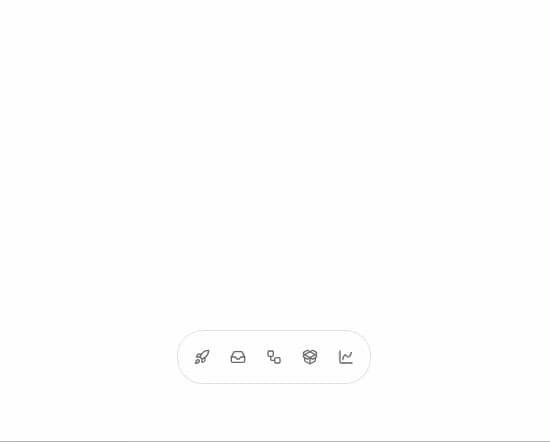
An icon-only tab bar that expands to show the active tab's label and reveals a content panel above the bar.
Built with React and Tailwind. Copy the prompt and paste it into Claude Code, Cursor or Lovable: your agent adds Expandable Tabs to your project and fits it to your theme.
Code
How Expandable Tabs is used: the demo's code. The component's own source comes with a free account.
Usage.tsx
import {
  ExpandableTabs,
  type ExpandableTabsItem,
} from "@/components/ui/expandable-tabs";
import { BadgeCheck } from "lucide-react";
import { Brush } from "lucide-react";
import { CalendarClock } from "lucide-react";
import { ChartSpline } from "lucide-react";
import { ChevronRight } from "lucide-react";
import { ClipboardCheck } from "lucide-react";
import { CloudUpload } from "lucide-react";
import { FileText } from "lucide-react";
import { Gauge } from "lucide-react";
import { GitBranch } from "lucide-react";
import { Images } from "lucide-react";
import { Inbox } from "lucide-react";
import { Megaphone } from "lucide-react";
import { MessageCircle } from "lucide-react";
import { PackageOpen } from "lucide-react";
import { RefreshCw } from "lucide-react";
import { Rocket } from "lucide-react";
import { Siren } from "lucide-react";
import { SwatchBook } from "lucide-react";
import { Users } from "lucide-react";
import { Webhook } from "lucide-react";
import { Workflow } from "lucide-react";
import type { LucideIcon } from "lucide-react";

function RowItem({ icon: Icon, label }: { icon: LucideIcon; label: string }) {
  return (
    <button
      type="button"
      className="flex w-full items-center gap-3 rounded-xl px-3 py-2.5 text-left text-sm font-medium text-foreground transition-colors hover:bg-muted"
    >
      <Icon className="h-4 w-4 text-muted-foreground" />
      <span className="flex-1">{label}</span>
      <ChevronRight className="h-4 w-4 text-muted-foreground" />
    </button>
  );
}

function RowList({ rows }: { rows: { icon: LucideIcon; label: string }[] }) {
  return (
    <div className="flex w-[17.125rem] flex-col gap-0.5">
      {rows.map((row) => (
        <RowItem key={row.label} icon={row.icon} label={row.label} />
      ))}
    </div>
  );
}

const items: ExpandableTabsItem[] = [
  {
    id: "launch",
    label: "Launch",
    icon: <Rocket className="h-4 w-4" />,
    content: (
      <RowList
        rows={[
          { icon: FileText, label: "Release Brief" },
          { icon: ClipboardCheck, label: "Launch Checklist" },
          { icon: Megaphone, label: "Campaign Notes" },
          { icon: CalendarClock, label: "Rollout Calendar" },
          { icon: CloudUpload, label: "Ship Build" },
        ]}
      />
    ),
  },
  {
    id: "inbox",
    label: "Inbox",
    icon: <Inbox className="h-4 w-4" />,
    content: (
      <RowList
        rows={[
          { icon: MessageCircle, label: "Client Feedback" },
          { icon: Users, label: "Team Requests" },
          { icon: BadgeCheck, label: "Approval Notes" },
        ]}
      />
    ),
  },
  {
    id: "flows",
    label: "Flows",
    icon: <Workflow className="h-4 w-4" />,
    content: (
      <RowList
        rows={[
          { icon: GitBranch, label: "Trigger Map" },
          { icon: Webhook, label: "Webhook Runs" },
          { icon: RefreshCw, label: "Retry Queue" },
        ]}
      />
    ),
  },
  {
    id: "assets",
    label: "Assets",
    icon: <PackageOpen className="h-4 w-4" />,
    content: (
      <RowList
        rows={[
          { icon: SwatchBook, label: "Brand Kit" },
          { icon: Images, label: "Mockup Library" },
          { icon: Brush, label: "Design Tokens" },
          { icon: CloudUpload, label: "Export Queue" },
        ]}
      />
    ),
  },
  {
    id: "status",
    label: "Status",
    icon: <ChartSpline className="h-4 w-4" />,
    content: (
      <RowList
        rows={[
          { icon: Gauge, label: "Activation" },
          { icon: ChartSpline, label: "Conversion" },
          { icon: Siren, label: "Incidents" },
        ]}
      />
    ),
  },
];

export default function ExpandableTabsDemo() {
  return (
    <div className="flex min-h-[22rem] w-full items-end justify-center bg-background p-8">
      <ExpandableTabs items={items} />
    </div>
  );
}
Dependencies
More by sidiora-labs
View all
Preview Rail
2
Morphing Modal
1
Not Found

Text Cascade
Smooth Scroll
Swap
Motion Breadcrumb
Wallet Card
More in Navigation
View all

Sidebar
269

Tabs
15
Pagination
108

Breadrcrumb
23

Sidebar
344
Footer
447

Pagination
90
Pagination with Arrows
5
