
About
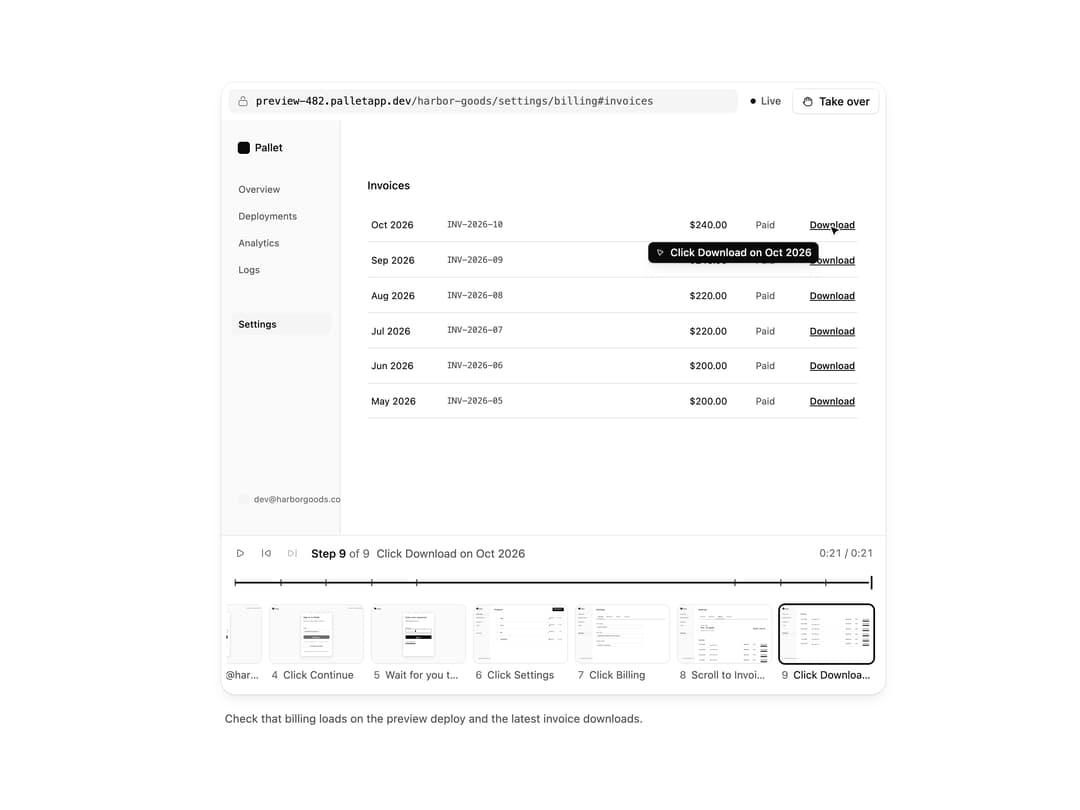
Watch a browser agent work: live screen, cursor actions, a step timeline with thumbnails, and take over or hand back control.
Built with React and Tailwind. Copy the prompt and paste it into Claude Code, Cursor or Lovable: your agent adds Computer View to your project and fits it to your theme.
Code
How Computer View is used: the demo's code. The component's own source comes with a free account.
Usage.tsx
"use client"

import * as React from "react"
import { cn } from "@/lib/utils"
import { Button, ComputerFrame, ComputerView, ComputerViewStatus, Icon, IconNode, createIcon } from "@/components/ui/computer-view"

type Phase = "connecting" | "before" | "paused" | "user" | "after" | "ended"

/* -------------------------------------------------------------------------------------------------
 * The session: a browser agent checks a preview deploy. It signs in, stops at the password
 * (you type it, the agent never sees it), then opens billing and downloads the latest invoice.
 * -----------------------------------------------------------------------------------------------*/

const URL = "preview-482.palletapp.dev"

function Page({ children, className }: { children: React.ReactNode; className?: string }) {
  return (
    <div
      className={cn("bg-(color:--chatcn-bg) text-(color:--chatcn-fg) absolute inset-0 overflow-hidden", className)}
      style={{ fontSize: "1.5cqw", lineHeight: 1.4 }}
    >
      {children}
    </div>
  )
}

/*
 * Monochrome placeholder screens for the computer view examples. Everything is sized in `em` off a
 * root font size of 1.5cqw, so one screen renders crisply at full size and as a thumbnail.
 * Targets sit at fixed percentages so the agent's cursor lands exactly on them.
 */

function At({
  x,
  y,
  w,
  h,
  className,
  style,
  children,
}: {
  x: number
  y: number
  w?: number
  h?: number
  className?: string
  style?: React.CSSProperties
  children?: React.ReactNode
}) {
  return (
    <div
      className={cn("absolute", className)}
      style={{
        left: `${x}%`,
        top: `${y}%`,
        width: w === undefined ? undefined : `${w}%`,
        height: h === undefined ? undefined : `${h}%`,
        ...style,
      }}
    >
      {children}
    </div>
  )
}

/* -------------------------------------------------------------------------------------------------
 * Screens
 * -----------------------------------------------------------------------------------------------*/

function BlankScreen() {
  return (
    <Page className="bg-(color:--chatcn-bg-subtle)">
      <At x={0} y={0} w={34} h={0.6} className="bg-(color:--chatcn-fg)" />
      <At
        x={42}
        y={46}
        w={16}
        h={2.4}
        className="bg-(color:--chatcn-fill)"
        style={{ borderRadius: "0.4em" }}
      />
      <At
        x={45}
        y={52}
        w={10}
        h={2.4}
        className="bg-(color:--chatcn-fill)"
        style={{ borderRadius: "0.4em" }}
      />
    </Page>
  )
}

function Logo({ x, y }: { x: number; y: number }) {
  return (
    <At x={x} y={y} className="flex items-center" style={{ gap: "0.5em" }}>
      <span
        className="bg-(color:--chatcn-fg) block"
        style={{ width: "1.2em", height: "1.2em", borderRadius: "0.3em" }}
      />
      <span className="font-medium" style={{ fontSize: "1.05em" }}>
        Pallet
      </span>
    </At>
  )
}

function Card({ children }: { children: React.ReactNode }) {
  return (
    <At
      x={33}
      y={14}
      w={34}
      h={74}
      className="bg-(color:--chatcn-card)"
      style={{ borderRadius: "0.9em", boxShadow: "var(--chatcn-shadow-sm)" }}
    >
      {children}
    </At>
  )
}

function Field({
  x,
  y,
  w,
  label,
  value,
  placeholder,
  focused,
  password,
}: {
  x: number
  y: number
  w: number
  label: string
  value?: string
  placeholder?: string
  focused?: boolean
  password?: boolean
}) {
  return (
    <>
      <At
        x={x}
        y={y - 5.5}
        className="text-(color:--chatcn-fg-muted) font-medium"
        style={{ fontSize: "0.85em" }}
      >
        {label}
      </At>
      <At
        x={x}
        y={y - 3}
        w={w}
        h={6}
        className={cn(
          "bg-(color:--chatcn-bg) flex items-center",
          focused ? "text-(color:--chatcn-fg)" : "text-(color:--chatcn-fg-subtle)",
        )}
        style={{
          borderRadius: "0.45em",
          padding: "0 0.8em",
          boxShadow: focused
            ? "0 0 0 0.12em var(--chatcn-fg)"
            : "inset 0 0 0 0.08em var(--chatcn-border-strong)",
        }}
      >
        {value ? (
          <span className="text-(color:--chatcn-fg)">{password ? "•".repeat(value.length) : value}</span>
        ) : (
          placeholder
        )}
        {focused ? (
          <span
            className="bg-(color:--chatcn-fg) ms-[0.1em] inline-block"
            style={{ width: "0.08em", height: "1.1em" }}
          />
        ) : null}
      </At>
    </>
  )
}

function PrimaryButton({
  x,
  y,
  w,
  label,
  busy,
}: {
  x: number
  y: number
  w: number
  label: string
  busy?: boolean
}) {
  return (
    <At
      x={x}
      y={y - 3}
      w={w}
      h={6}
      className="bg-(color:--chatcn-fg) text-(color:--chatcn-bg) flex items-center justify-center font-medium"
      style={{ borderRadius: "0.45em", opacity: busy ? 0.6 : 1 }}
    >
      {busy ? "Checking…" : label}
    </At>
  )
}

function SignInScreen({
  email,
  focused,
  busy,
}: {
  email?: string
  focused?: boolean
  busy?: boolean
}) {
  return (
    <Page className="bg-(color:--chatcn-bg-subtle)">
      <Logo x={3} y={5} />
      <At x={84} y={5} className="text-(color:--chatcn-fg-subtle)" style={{ fontSize: "0.85em" }}>
        Preview · main@4f2c1a9
      </At>
      <Card>{null}</Card>
      <At
        x={36}
        y={20}
        className="font-medium"
        style={{ fontSize: "1.45em", letterSpacing: "-0.01em" }}
      >
        Sign in to Pallet
      </At>
      <At x={36} y={27} className="text-(color:--chatcn-fg-muted)" style={{ fontSize: "0.95em" }}>
        Use your work email to continue.
      </At>
      <Field
        x={36}
        y={45}
        w={28}
        label="Email"
        value={email}
        placeholder="you@company.com"
        focused={focused}
      />
      <PrimaryButton x={36} y={55.5} w={28} label="Continue" busy={busy} />
      <At
        x={36}
        y={62.5}
        w={28}
        className="text-(color:--chatcn-fg-subtle) flex items-center"
        style={{ gap: "0.8em", fontSize: "0.8em" }}
      >
        <span className="bg-(color:--chatcn-border) h-px flex-1" />
        or
        <span className="bg-(color:--chatcn-border) h-px flex-1" />
      </At>
      <At
        x={36}
        y={66.5}
        w={28}
        h={6}
        className="flex items-center justify-center font-medium"
        style={{
          borderRadius: "0.45em",
          boxShadow: "inset 0 0 0 0.08em var(--chatcn-border-strong)",
        }}
      >
        Continue with SSO
      </At>
      <At
        x={36}
        y={79}
        w={28}
        className="text-(color:--chatcn-fg-subtle) text-center"
        style={{ fontSize: "0.8em" }}
      >
        By continuing you accept the terms of service.
      </At>
    </Page>
  )
}

function PasswordScreen({ filled }: { filled?: boolean }) {
  return (
    <Page className="bg-(color:--chatcn-bg-subtle)">
      <Logo x={3} y={5} />
      <Card>{null}</Card>
      <At
        x={36}
        y={20}
        className="font-medium"
        style={{ fontSize: "1.45em", letterSpacing: "-0.01em" }}
      >
        Enter your password
      </At>
      <At x={36} y={27} className="text-(color:--chatcn-fg-muted)" style={{ fontSize: "0.95em" }}>
        dev@harborgoods.co
      </At>
      <Field
        x={36}
        y={45}
        w={28}
        label="Password"
        value={filled ? "correcthorse" : undefined}
        placeholder="Password"
        focused
        password
      />
      <PrimaryButton x={36} y={55.5} w={28} label="Sign in" />
      <At x={36} y={63} className="text-(color:--chatcn-fg-muted) underline" style={{ fontSize: "0.85em" }}>
        Forgot password?
      </At>
    </Page>
  )
}

const BEFORE_PASSWORD: ComputerFrame[] = [
  {
    id: "open",
    url: URL,
    screen: <BlankScreen />,
    action: { kind: "navigate", label: `Open ${URL}` },
  },
  {
    id: "email-click",
    url: `${URL}/login`,
    screen: <SignInScreen />,
    action: { kind: "click", label: "Click Email", x: 0.5, y: 0.45 },
  },
  {
    id: "email-type",
    url: `${URL}/login`,
    screen: <SignInScreen email="dev@harborgoods.co" focused />,
    action: { kind: "type", label: "Type dev@harborgoods.co", x: 0.5, y: 0.45 },
  },
  {
    id: "continue",
    url: `${URL}/login`,
    screen: <SignInScreen email="dev@harborgoods.co" busy />,
    action: { kind: "click", label: "Click Continue", x: 0.5, y: 0.555 },
  },
  {
    id: "password",
    url: `${URL}/login/password`,
    screen: <PasswordScreen />,
    action: { kind: "wait", label: "Wait for you to sign in", x: 0.5, y: 0.45 },
  },
]

const STEP_MS = 1500

const NAV = ["Overview", "Deployments", "Analytics", "Logs", "Settings"]

function Shell({ active, children }: { active: string; children: React.ReactNode }) {
  return (
    <Page>
      <At
        x={0}
        y={0}
        w={18}
        h={100}
        className="bg-(color:--chatcn-bg-subtle)"
        style={{ boxShadow: "inset -0.08em 0 0 var(--chatcn-border)" }}
      />
      <Logo x={2.5} y={5} />
      {NAV.map((item, i) => (
        <At
          key={item}
          x={1.5}
          y={14 + i * 6.5 + (item === "Settings" ? 6.5 : 0)}
          w={15}
          h={5.2}
          className={cn(
            "flex items-center",
            item === active ? "bg-(color:--chatcn-fill) text-(color:--chatcn-fg) font-medium" : "text-(color:--chatcn-fg-muted)",
          )}
          style={{ borderRadius: "0.45em", padding: "0 0.75em", fontSize: "0.95em" }}
        >
          {item}
        </At>
      ))}
      <At
        x={2.5}
        y={90}
        className="text-(color:--chatcn-fg-subtle) flex items-center"
        style={{ gap: "0.5em", fontSize: "0.85em" }}
      >
        <span
          className="bg-(color:--chatcn-fill) block rounded-full"
          style={{ width: "1.4em", height: "1.4em" }}
        />
        dev@harborgoods.co
      </At>
      {children}
    </Page>
  )
}

function DashboardScreen() {
  const rows = [
    ["web", "Ready", "2 m ago"],
    ["docs", "Ready", "1 h ago"],
    ["api", "Building", "now"],
    ["marketing", "Ready", "3 d ago"],
  ]
  return (
    <Shell active="Overview">
      <At x={22} y={6} className="font-medium" style={{ fontSize: "1.45em" }}>
        Projects
      </At>
      <At
        x={84}
        y={5.5}
        w={12}
        h={5.5}
        className="bg-(color:--chatcn-fg) text-(color:--chatcn-bg) flex items-center justify-center font-medium"
        style={{ borderRadius: "0.45em", fontSize: "0.9em" }}
      >
        New project
      </At>
      {rows.map(([name, status, when], i) => (
        <At
          key={name}
          x={22}
          y={18 + i * 12}
          w={74}
          h={10}
          className="flex items-center"
          style={{
            borderRadius: "0.6em",
            boxShadow: "inset 0 0 0 0.08em var(--chatcn-border)",
            padding: "0 1.2em",
            gap: "1em",
          }}
        >
          <span
            className="bg-(color:--chatcn-fill) block"
            style={{ width: "2em", height: "2em", borderRadius: "0.4em" }}
          />
          <span className="flex-1 font-medium">{name}</span>
          <span
            className="text-(color:--chatcn-fg-muted) flex items-center"
            style={{ gap: "0.4em", fontSize: "0.9em" }}
          >
            <span
              className={cn(
                "block rounded-full",
                status === "Ready" ? "bg-(color:--chatcn-fg)" : "bg-(color:--chatcn-fg-faint)",
              )}
              style={{ width: "0.5em", height: "0.5em" }}
            />
            {status}
          </span>
          <span
            className="text-(color:--chatcn-fg-subtle)"
            style={{ fontSize: "0.9em", width: "5em", textAlign: "right" }}
          >
            {when}
          </span>
        </At>
      ))}
    </Shell>
  )
}

const TABS = ["General", "Members", "Billing", "Security"]

function SettingsTabs({ active }: { active: string }) {
  return (
    <>
      <At x={22} y={6} className="font-medium" style={{ fontSize: "1.45em" }}>
        Settings
      </At>
      <At x={22} y={24.5} w={74} h={0.2} className="bg-(color:--chatcn-border)" />
      {TABS.map((tab, i) => (
        <At
          key={tab}
          x={22 + i * 9.5}
          y={17}
          w={9}
          h={7.5}
          className={cn(
            "flex items-center justify-center",
            tab === active ? "text-(color:--chatcn-fg) font-medium" : "text-(color:--chatcn-fg-muted)",
          )}
          style={{
            fontSize: "0.95em",
            boxShadow: tab === active ? "inset 0 -0.15em 0 var(--chatcn-fg)" : undefined,
          }}
        >
          {tab}
        </At>
      ))}
    </>
  )
}

function SettingsScreen() {
  return (
    <Shell active="Settings">
      <SettingsTabs active="General" />
      {[
        ["Team name", "Harbor Goods"],
        ["Team URL", "palletapp.dev/team/harbor-goods"],
        ["Default region", "Frankfurt, Germany"],
      ].map(([label, value], i) => (
        <At key={label} x={22} y={31 + i * 15} w={50}>
          <div
            className="text-(color:--chatcn-fg-muted) font-medium"
            style={{ fontSize: "0.85em", marginBottom: "0.5em" }}
          >
            {label}
          </div>
          <div
            className="flex items-center"
            style={{
              height: "2.6em",
              borderRadius: "0.45em",
              padding: "0 0.8em",
              boxShadow: "inset 0 0 0 0.08em var(--chatcn-border-strong)",
            }}
          >
            {value}
          </div>
        </At>
      ))}
    </Shell>
  )
}

const INVOICES = [
  ["Oct 2026", "INV-2026-10", "$240.00"],
  ["Sep 2026", "INV-2026-09", "$240.00"],
  ["Aug 2026", "INV-2026-08", "$220.00"],
  ["Jul 2026", "INV-2026-07", "$220.00"],
  ["Jun 2026", "INV-2026-06", "$200.00"],
  ["May 2026", "INV-2026-05", "$200.00"],
]

function BillingScreen({
  scrolled,
  downloaded,
}: {
  scrolled?: boolean
  downloaded?: boolean
}) {
  const top = scrolled ? 14 : 58
  return (
    <Shell active="Settings">
      {scrolled ? null : (
        <>
          <SettingsTabs active="Billing" />
          <At
            x={22}
            y={30}
            w={74}
            h={21}
            className="flex items-center justify-between"
            style={{
              borderRadius: "0.7em",
              boxShadow: "inset 0 0 0 0.08em var(--chatcn-border)",
              padding: "0 1.6em",
            }}
          >
            <div>
              <div className="text-(color:--chatcn-fg-muted)" style={{ fontSize: "0.85em" }}>
                Current plan
              </div>
              <div className="font-medium" style={{ fontSize: "1.5em" }}>
                Pro, 12 seats
              </div>
              <div className="text-(color:--chatcn-fg-subtle)" style={{ fontSize: "0.85em" }}>
                Renews on Nov 1, 2026
              </div>
            </div>
            <div className="font-medium" style={{ fontSize: "1.3em" }}>
              $240 / month
            </div>
          </At>
        </>
      )}
      <At x={22} y={top} className="font-medium" style={{ fontSize: "1.1em" }}>
        Invoices
      </At>
      {INVOICES.map(([month, id, amount], i) => (
        <At
          key={id}
          x={22}
          y={top + 7 + i * 8.5}
          w={74}
          h={8.5}
          className="text-(color:--chatcn-fg) flex items-center"
          style={{
            boxShadow: "inset 0 -0.08em 0 var(--chatcn-border)",
            padding: "0 0.4em",
            gap: "1em",
            fontSize: "0.95em",
          }}
        >
          <span style={{ width: "7em" }}>{month}</span>
          <span className="text-(color:--chatcn-fg-muted) flex-1 font-mono" style={{ fontSize: "0.9em" }}>
            {id}
          </span>
          <span style={{ width: "6em" }}>{amount}</span>
          <span className="text-(color:--chatcn-fg-muted)" style={{ width: "4em" }}>
            Paid
          </span>
          <span className="font-medium underline" style={{ width: "5.5em", textAlign: "right" }}>
            Download
          </span>
        </At>
      ))}
      {downloaded ? (
        <At
          x={70}
          y={84}
          w={27}
          h={9}
          className="bg-(color:--chatcn-fg) text-(color:--chatcn-bg) flex items-center"
          style={{ borderRadius: "0.6em", padding: "0 1em", gap: "0.6em", fontSize: "0.9em" }}
        >
          <span className="font-medium">Downloaded</span>
          <span className="font-mono opacity-70" style={{ fontSize: "0.9em" }}>
            INV-2026-10.pdf
          </span>
        </At>
      ) : null}
    </Shell>
  )
}

/** Where the Download link of the first invoice sits when the page is scrolled. */
const FIRST_DOWNLOAD = { x: 0.915, y: (14 + 7 + 4.25) / 100 }

const AFTER_PASSWORD: ComputerFrame[] = [
  {
    id: "dashboard",
    url: `${URL}/harbor-goods`,
    screen: <DashboardScreen />,
    action: { kind: "click", label: "Click Settings", x: 0.09, y: 0.49 },
  },
  {
    id: "settings",
    url: `${URL}/harbor-goods/settings`,
    screen: <SettingsScreen />,
    action: { kind: "click", label: "Click Billing", x: 0.455, y: 0.207 },
  },
  {
    id: "billing",
    url: `${URL}/harbor-goods/settings/billing`,
    screen: <BillingScreen />,
    action: { kind: "scroll", label: "Scroll to Invoices", x: 0.6, y: 0.64 },
  },
  {
    id: "invoices",
    url: `${URL}/harbor-goods/settings/billing#invoices`,
    screen: <BillingScreen scrolled />,
    action: { kind: "click", label: "Click Download on Oct 2026", ...FIRST_DOWNLOAD },
  },
  {
    id: "downloaded",
    url: `${URL}/harbor-goods/settings/billing#invoices`,
    screen: <BillingScreen scrolled downloaded />,
    action: { kind: "wait", label: "Check INV-2026-10.pdf", x: 0.73, y: 0.875 },
  },
]

/** Stamps session time on each frame so the timeline spaces them like the real run. */
function stamp(frames: ComputerFrame[], from: number) {
  return frames.map((f, i) => ({ ...f, at: from + i * STEP_MS }))
}

const iconNode: IconNode = [
  ["path", {"d":"M5.49 17.46A8.5 8.5 0 1 0 6.54 5.49"}],
  ["path", {"d":"m8.21 8.65-2.94-.26a2 2 0 0 1-1.82-2.16l.26-2.94"}],
]

const RotateCcwIcon: Icon = /* @__PURE__ */ createIcon("rotate-ccw", iconNode)

export default function ComputerViewDemo() {
  const [run, setRun] = React.useState(0)
  // Opens mid-session on billing, so the first frame shows a real screen; loops after that.
  const [phase, setPhase] = React.useState<Phase>("after")
  const [count, setCount] = React.useState(BEFORE_PASSWORD.length + 3)
  const [autoTakeover, setAutoTakeover] = React.useState(true)

  // The scripted session. Frames arrive one at a time; the password step waits for a person.
  React.useEffect(() => {
    let id: number
    const later = (fn: () => void, ms: number) => {
      id = window.setTimeout(fn, ms)
    }
    if (phase === "connecting") later(() => setPhase("before"), 1100)
    else if (phase === "before") {
      if (count < BEFORE_PASSWORD.length)
        later(() => setCount((c) => c + 1), count === 0 ? 200 : STEP_MS)
      else later(() => setPhase("paused"), 700)
    } else if (phase === "paused" && autoTakeover) later(() => setPhase("user"), 3600)
    else if (phase === "user" && autoTakeover) later(() => setPhase("after"), 2600)
    else if (phase === "after") {
      const total = BEFORE_PASSWORD.length + AFTER_PASSWORD.length
      if (count < total) later(() => setCount((c) => c + 1), STEP_MS)
      else later(() => setPhase("ended"), 1200)
    } else if (phase === "ended" && autoTakeover) {
      later(() => {
        setCount(0)
        setPhase("connecting")
        setRun((r) => r + 1)
      }, 4000)
    }
    return () => window.clearTimeout(id)
  }, [phase, count, autoTakeover, run])

  const before = stamp(BEFORE_PASSWORD, 0)
  // The pause adds real time to the run, so later frames sit further along the timeline.
  const after = stamp(AFTER_PASSWORD, BEFORE_PASSWORD.length * STEP_MS + 9000)
  const all = [...before, ...after]
  const frames = all.slice(0, count)
  // While you type the password, the last frame shows the field filling, screenshots paused.
  const shown =
    phase === "user" || phase === "after"
      ? frames.map((f) => (f.id === "password" ? { ...f, screen: <PasswordScreen filled /> } : f))
      : frames

  const status: ComputerViewStatus =
    phase === "connecting"
      ? "connecting"
      : phase === "paused"
        ? "paused"
        : phase === "user"
          ? "user"
          : phase === "ended"
            ? "ended"
            : "live"

  return (
    <div className="flex w-full justify-center p-6">
    <div className="flex w-full max-w-3xl flex-col gap-3">
      <ComputerView
        key={run}
        frames={shown}
        status={status}
        pausedReason="The password is next. Enter it yourself; the agent never sees what you type."
        onTakeOver={() => {
          setAutoTakeover(false)
          setPhase("user")
        }}
        onHandBack={() => setPhase("after")}
      />
      <div className="flex min-h-8 items-center justify-between gap-3 px-1">
        <p className="text-[0.8125rem]/[1.25rem] text-(color:--chatcn-fg-muted) text-pretty">
          Check that billing loads on the preview deploy and the latest invoice downloads.
        </p>
        {phase === "ended" ? (
          <Button
            size="sm"
            onClick={() => {
              setCount(0)
              setAutoTakeover(true)
              setPhase("connecting")
              setRun((r) => r + 1)
            }}
          >
            <RotateCcwIcon />
            Run again
          </Button>
        ) : null}
      </div>
    </div>
    </div>
  )
}
More by Aaditya
View all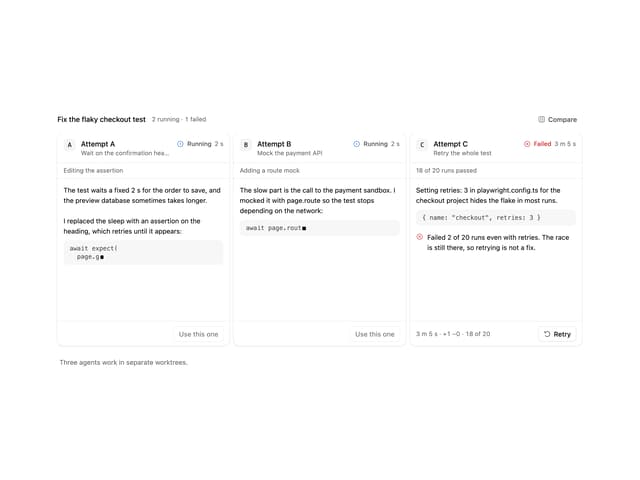
Agent Lanes
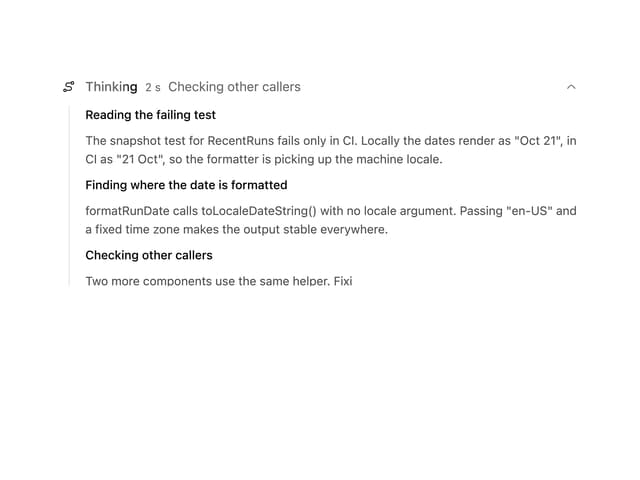
Reasoning
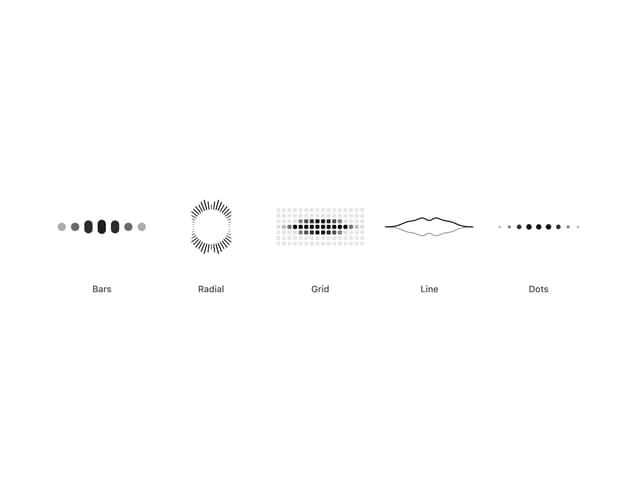
Audio Visualizer
Dither Orb
Voice Orb
More in AI chats
View all

AI Actions
332
Background Inbox
32

AI Task List
176
Color Picker
142
Streaming Text
20
Permission Grant
20
AI Suggestions
18
Agent Chat
18


