
About
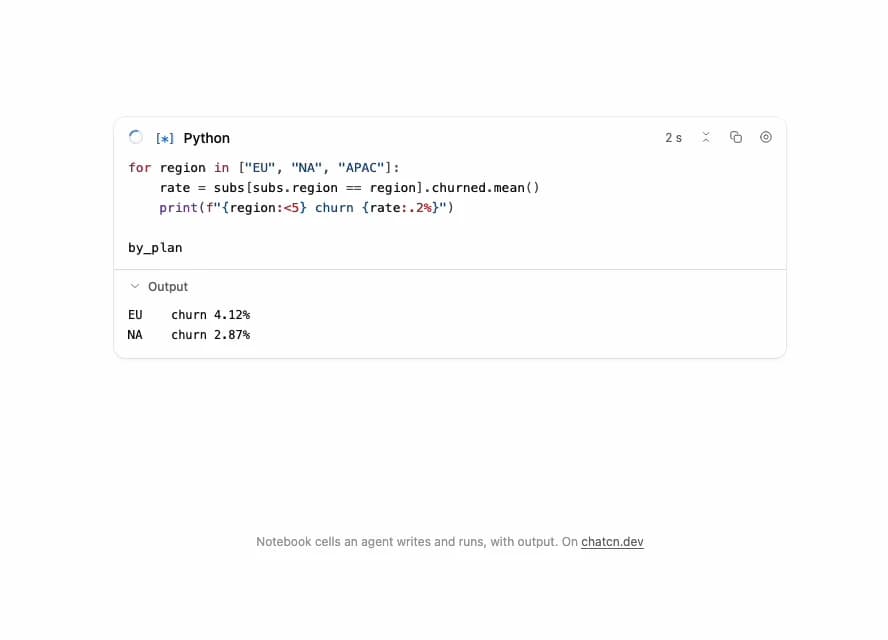
A notebook cell an agent writes and runs: the code streams in with syntax colors, the cell queues and runs with a live timer, printed output arrives line by line and a table result lands under it.
Built with React and Tailwind. Copy the prompt and paste it into Claude Code, Cursor or Lovable: your agent adds Notebook Cell to your project and fits it to your theme.
Code
How Notebook Cell is used: the demo's code. The component's own source comes with a free account.
Usage.tsx
"use client"

import * as React from "react"
import { NotebookCell, NotebookCellStatus, NotebookOutput } from "@/components/ui/notebook-cell"

const FIT_CSS = "html,body{overflow:hidden}[data-fit-small] [data-fit-hide]{display:none!important}"

/**
 * 21st shows a demo in a small frame: about 674 by 421 on a component page, 358 by 224 on a
 * phone and 245 by 139 on a profile card. A demo taller than its frame gets scrollbars, which
 * render white on dark pages. FitFrame fills the frame exactly instead.
 *
 * - "scale": the content shrinks until it fits, centered. For visuals such as orbs.
 * - "crop": the content stays at full size from the top and fades out at the bottom. For text
 *   that streams in, where a changing scale would make the page breathe.
 *
 * `minWidth` lays out a wide demo (a table, a two column panel) at that width and scales it down
 * to the frame, instead of letting it collapse to a narrow layout. The frame centers it, so it
 * shrinks evenly on both sides.
 *
 * Anything marked `data-fit-hide` (state buttons, the chatcn.dev line) drops out in frames
 * shorter than `hideBelow`, so a profile card shows the visual alone.
 */
function FitFrame({
  children,
  mode = "scale",
  hideBelow = 360,
  minWidth,
}: {
  children: React.ReactNode
  mode?: "scale" | "crop"
  hideBelow?: number
  minWidth?: string
}) {
  const content = React.useRef<HTMLDivElement>(null)
  const [cropped, setCropped] = React.useState(false)

  React.useLayoutEffect(() => {
    const el = content.current
    if (!el) return
    const measure = () => {
      const vw = window.innerWidth
      const vh = window.innerHeight
      el.toggleAttribute("data-fit-small", vh < hideBelow)
      // Layout sizes ignore the transform, so measuring never feeds back.
      const w = Math.max(el.offsetWidth, el.scrollWidth)
      const h = Math.max(el.offsetHeight, el.scrollHeight)
      const scale = mode === "scale" ? Math.min(1, vw / w, vh / h) : 1
      el.style.transform = scale < 1 ? `scale(${scale})` : ""
      setCropped(mode === "crop" && h > vh + 1)
    }
    measure()
    const observer = new ResizeObserver(measure)
    observer.observe(el)
    // Content that changes inside a fixed width box (a headline that cycles words) never resizes
    // the box itself, so changes below it measure again on the next frame.
    let frame = 0
    const mutations = new MutationObserver(() => {
      cancelAnimationFrame(frame)
      frame = requestAnimationFrame(measure)
    })
    mutations.observe(el, { subtree: true, childList: true, characterData: true })
    window.addEventListener("resize", measure)
    return () => {
      observer.disconnect()
      mutations.disconnect()
      cancelAnimationFrame(frame)
      window.removeEventListener("resize", measure)
    }
  }, [mode, hideBelow])

  const fade = "linear-gradient(to bottom, #000 calc(100% - 40px), transparent)"
  return (
    <div
      className="flex w-full justify-center overflow-hidden"
      style={{
        height: "100dvh",
        alignItems: mode === "crop" ? "flex-start" : "center",
        maskImage: cropped ? fade : undefined,
        WebkitMaskImage: cropped ? fade : undefined,
      }}
    >
      <style>{FIT_CSS}</style>
      <div
        ref={content}
        className="w-full shrink-0"
        style={{ transformOrigin: mode === "crop" ? "top center" : "center", minWidth }}
      >
        {children}
      </div>
    </div>
  )
}

type Phase = "writing" | NotebookCellStatus

const CODE = `for region in ["EU", "NA", "APAC"]:
    rate = subs[subs.region == region].churned.mean()
    print(f"{region:<5} churn {rate:.2%}")

by_plan`

const LINES = ["EU    churn 4.12%\n", "NA    churn 2.87%\n", "APAC  churn 2.39%\n"]

const byPlanOutputs: NotebookOutput[] = [
  {
    type: "table",
    indexName: "plan",
    index: ["Team", "Starter", "Business"],
    columns: ["accounts", "churned", "mrr", "churn_rate"],
    rows: [
      [6214, 389, 412_880, 0.0626],
      [9870, 171, 148_050, 0.0173],
      [2358, 51, 377_280, 0.0216],
    ],
  },
]

/** The agent writes the cell, it queues, runs with a live timer, streams lines, then lands. */
function NotebookCellDemo() {
  const [phase, setPhase] = React.useState<Phase>("writing")
  const [length, setLength] = React.useState(0)
  const [printed, setPrinted] = React.useState(0)
  const [table, setTable] = React.useState(false)
  const [count, setCount] = React.useState(3)
  const [startedAt, setStartedAt] = React.useState<number>()

  React.useEffect(() => {
    let id: number
    if (phase === "writing") {
      id =
        length < CODE.length
          ? window.setTimeout(() => setLength((n) => Math.min(CODE.length, n + 4)), 30)
          : window.setTimeout(() => setPhase("queued"), 400)
    } else if (phase === "queued") {
      id = window.setTimeout(() => {
        setStartedAt(Date.now())
        setPhase("running")
      }, 900)
    } else if (phase === "running") {
      id =
        printed < LINES.length
          ? window.setTimeout(() => setPrinted((n) => n + 1), 900)
          : window.setTimeout(() => {
              setTable(true)
              setPhase("done")
            }, 700)
    } else {
      id = window.setTimeout(() => {
        setLength(0)
        setPrinted(0)
        setTable(false)
        setCount((n) => n + 1)
        setPhase("writing")
      }, 5000)
    }
    return () => window.clearTimeout(id)
  }, [phase, length, printed])

  const outputs: NotebookOutput[] = [
    ...(printed > 0
      ? [
          {
            type: "stream" as const,
            name: "stdout" as const,
            text: LINES.slice(0, printed).join(""),
          },
        ]
      : []),
    ...(table ? byPlanOutputs : []),
  ]

  return (
    <NotebookCell
      className="w-full max-w-2xl"
      code={CODE.slice(0, length)}
      streaming={phase === "writing"}
      status={phase === "writing" ? "idle" : phase}
      executionCount={phase === "done" ? count : null}
      startedAt={startedAt}
      outputs={outputs}
      onRun={() => {
        setPrinted(0)
        setTable(false)
        setCount((n) => n + 1)
        setPhase("queued")
      }}
      onInterrupt={() => setPhase("done")}
    />
  )
}

/** The line under each 21st demo that points back to the kit. */
function MoreOn({ slug, children }: { slug: string; children: React.ReactNode }) {
  return (
    <p data-fit-hide className="text-[0.75rem]/[1rem] text-(color:--chatcn-fg-faint) text-center text-balance">
      {children}{" "}
      <a
        href={`https://chatcn.dev/docs/components/${slug}`}
        target="_blank"
        rel="noopener"
        className="text-(color:--chatcn-fg-subtle) hover:text-(color:--chatcn-fg) underline underline-offset-2"
      >
        chatcn.dev
      </a>
    </p>
  )
}

/** The kit's own example, framed for the 21st preview. */
export default function NotebookCellPreview() {
  return (
    <FitFrame minWidth="40rem">
      <div className="flex w-full flex-col items-center justify-center gap-4 p-6">
        <div className="flex h-[25rem] w-full max-w-2xl items-start justify-center">
          <NotebookCellDemo />
        </div>
        <MoreOn slug="notebook-cell">Notebook cells an agent writes and runs, with output. On</MoreOn>
      </div>
    </FitFrame>
  )
}
Dependencies
More by Aadi
View all
Dither Orb
12
Audio Visualizer
9
Voice Orb
8
Agent Lanes
6
Computer View
3
Waveform
2
Reasoning
2
Voice Session
1