
About
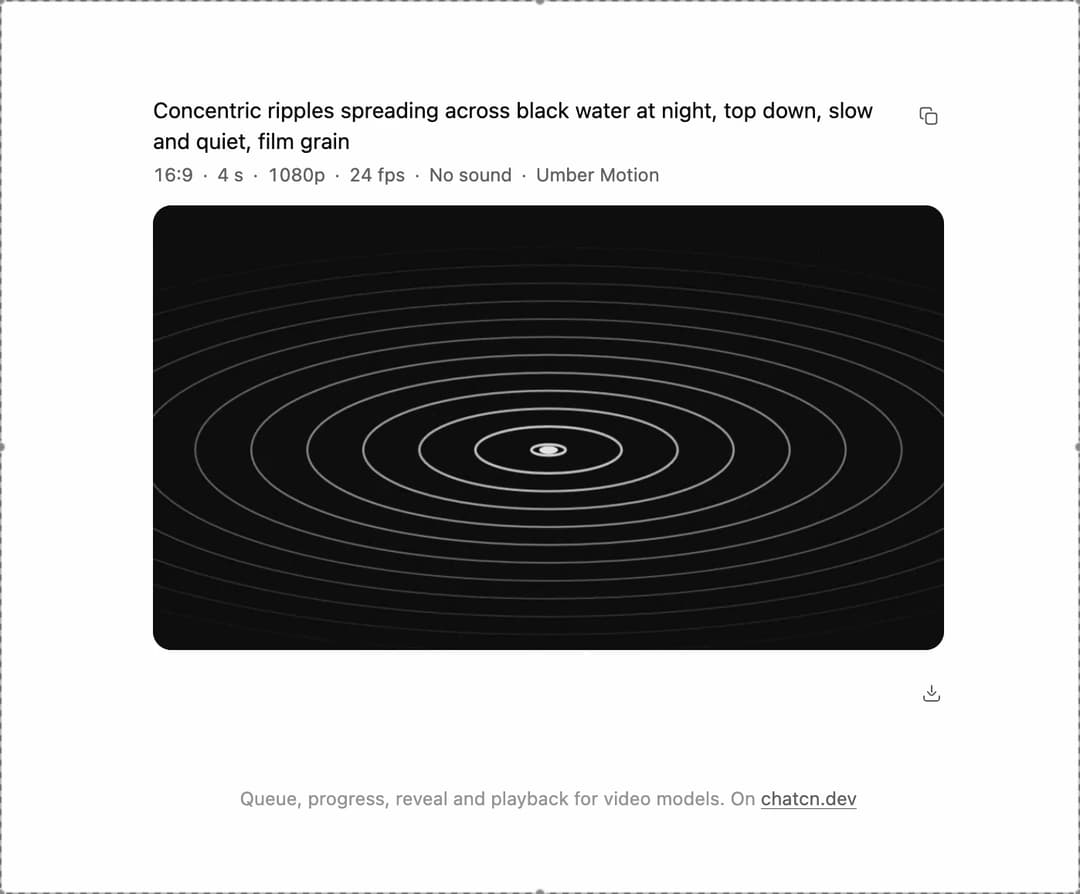
A video generation card from queue to playback: place in line with the wait, a poster that reveals from the top as progress climbs, then the clip plays with its length, resolution and frame rate, and downloads.
Built with React and Tailwind. Copy the prompt and paste it into Claude Code, Cursor or Lovable: your agent adds Video Generation to your project and fits it to your theme.
Code
How Video Generation is used: the demo's code. The component's own source comes with a free account.
Usage.tsx
"use client"

import * as React from "react"
import { VideoGeneration } from "@/components/ui/video-generation"

/** Small seeded PRNG (mulberry32): same seed, same picture. */
function random(seed: number) {
  let a = seed >>> 0
  return () => {
    a = (a + 0x6d2b79f5) >>> 0
    let t = a
    t = Math.imul(t ^ (t >>> 15), t | 1)
    t ^= t + Math.imul(t ^ (t >>> 7), t | 61)
    return ((t ^ (t >>> 14)) >>> 0) / 4294967296
  }
}

/** One frame of the demo clip: ripples spreading on black water, with a little film grain. */
function drawRipples(ctx: CanvasRenderingContext2D, w: number, h: number, t: number) {
  ctx.globalAlpha = 1
  ctx.fillStyle = "black"
  ctx.fillRect(0, 0, w, h)
  ctx.fillStyle = "white"
  ctx.globalAlpha = 0.05
  ctx.fillRect(0, 0, w, h)
  const cx = w * 0.5
  const cy = h * 0.55
  const max = w * 0.85
  const rings = 12
  ctx.strokeStyle = "white"
  for (let k = 0; k < rings; k++) {
    const f = ((k + t * 0.9) % rings) / rings
    const r = f * max
    ctx.globalAlpha = Math.max(0, (1 - f) * 0.85)
    ctx.lineWidth = 1 + (1 - f) * 2.5
    ctx.beginPath()
    ctx.ellipse(cx, cy, Math.max(0.1, r), Math.max(0.1, r * 0.32), 0, 0, Math.PI * 2)
    ctx.stroke()
  }
  ctx.globalAlpha = 0.9
  ctx.beginPath()
  ctx.ellipse(cx, cy, w * 0.012, w * 0.005, 0, 0, Math.PI * 2)
  ctx.fill()
  // Grain changes every frame, like film.
  const rand = random(Math.floor(t * 24) + 1)
  for (let i = 0; i < 700; i++) {
    ctx.globalAlpha = 0.04 + rand() * 0.08
    ctx.fillRect(rand() * w, rand() * h, 1.5, 1.5)
  }
  ctx.globalAlpha = 1
}

/**
 * Records the demo clip in the browser with `MediaRecorder`, so the video demos need no video
 * file at all. Returns the poster (the first frame) at once and the clip once it is recorded.
 * Recording runs in real time, so a 6 s clip is ready after about 6 s.
 */
function useRecordedClip({ seconds = 6, width = 960, height = 540 } = {}) {
  const [poster, setPoster] = React.useState<string>()
  const [src, setSrc] = React.useState<string>()

  React.useEffect(() => {
    const canvas = document.createElement("canvas")
    canvas.width = width
    canvas.height = height
    const ctx = canvas.getContext("2d")
    if (!ctx) return
    drawRipples(ctx, width, height, 0)
    setPoster(canvas.toDataURL("image/jpeg", 0.86))

    if (typeof MediaRecorder === "undefined" || !canvas.captureStream) return
    const type = ["video/webm;codecs=vp9", "video/webm", "video/mp4"].find((t) =>
      MediaRecorder.isTypeSupported(t),
    )
    if (!type) return
    const stream = canvas.captureStream(30)
    const recorder = new MediaRecorder(stream, { mimeType: type, videoBitsPerSecond: 2_500_000 })
    const chunks: Blob[] = []
    let url: string | undefined
    let raf = 0
    let cancelled = false
    recorder.ondataavailable = (event) => {
      if (event.data.size > 0) chunks.push(event.data)
    }
    recorder.onstop = () => {
      if (cancelled) return
      url = URL.createObjectURL(new Blob(chunks, { type: type.split(";")[0] }))
      setSrc(url)
    }
    const start = performance.now()
    const frame = () => {
      const t = (performance.now() - start) / 1000
      drawRipples(ctx, width, height, t)
      if (t < seconds) raf = requestAnimationFrame(frame)
      else if (recorder.state === "recording") recorder.stop()
    }
    recorder.start(250)
    raf = requestAnimationFrame(frame)
    return () => {
      cancelled = true
      cancelAnimationFrame(raf)
      if (recorder.state === "recording") recorder.stop()
      for (const track of stream.getTracks()) track.stop()
      if (url) URL.revokeObjectURL(url)
    }
  }, [seconds, width, height])

  return { poster, src }
}

interface JobOptions {
  /** Queue positions to step through before generating. Empty skips the queue. */
  queue?: number[]
  queueStepMs?: number
  /** Time from 0 to 100 percent. */
  durationMs?: number
  /** Where the job ends. Default "done". */
  outcome?: "done" | "failed" | "blocked"
  /** Percent at which a failed or blocked job stops. */
  stopAt?: number
  /** Start on mount. Default true. */
  autoStart?: boolean
}

type JobStatus = "queued" | "generating" | "done" | "failed" | "blocked"

/**
 * A scripted generation job for demos: walks the queue, then reports progress in uneven steps
 * every 240 ms, the way real providers do, and lands on the outcome. `run()` starts it again.
 */
function useGenerationJob({
  queue = [2, 1],
  queueStepMs = 900,
  durationMs = 5600,
  outcome = "done",
  stopAt = 46,
  autoStart = true,
}: JobOptions = {}) {
  const [state, setState] = React.useState<{
    status: JobStatus
    progress?: number
    queuePosition?: number
  }>({ status: "queued", queuePosition: queue[0] })
  const [runId, setRunId] = React.useState(autoStart ? 1 : 0)
  const options = React.useRef({ queue, queueStepMs, durationMs, outcome, stopAt })
  options.current = { queue, queueStepMs, durationMs, outcome, stopAt }

  React.useEffect(() => {
    if (runId === 0) return
    const { queue, queueStepMs, durationMs, outcome, stopAt } = options.current
    const timers: number[] = []
    const rand = random(runId * 31)
    const at = (ms: number, fn: () => void) => timers.push(window.setTimeout(fn, ms))
    setState({ status: "queued", queuePosition: queue[0] })
    queue.forEach((position, i) => {
      at(i * queueStepMs, () => setState({ status: "queued", queuePosition: position }))
    })
    const start = queue.length * queueStepMs
    at(start, () => setState({ status: "generating", progress: 0 }))
    const steps = Math.max(4, Math.round(durationMs / 240))
    let p = 0
    let t = start
    for (let i = 1; i <= steps; i++) {
      t += 240
      p = Math.min(100, p + (100 / steps) * (0.4 + rand() * 1.2))
      const value = i === steps ? 100 : Math.min(99, Math.round(p))
      if (outcome !== "done" && value >= stopAt) {
        at(t, () => setState({ status: outcome, progress: value }))
        break
      }
      at(t, () => setState({ status: "generating", progress: value }))
      if (i === steps) at(t + 280, () => setState({ status: "done", progress: 100 }))
    }
    return () => {
      for (const id of timers) window.clearTimeout(id)
    }
  }, [runId])

  const run = React.useCallback(() => setRunId((id) => id + 1), [])
  return { ...state, run }
}

const reducedMotion = () => window.matchMedia("(prefers-reduced-motion: reduce)").matches

/** How long the finished clip plays before the next job starts. */
const PLAY_MS = 3200

const FIT_CSS = "html,body{overflow:hidden}[data-fit-small] [data-fit-hide]{display:none!important}"

/**
 * 21st shows a demo in a small frame: about 674 by 421 on a component page, 358 by 224 on a
 * phone and 245 by 139 on a profile card. A demo taller than its frame gets scrollbars, which
 * render white on dark pages. FitFrame fills the frame exactly instead.
 *
 * - "scale": the content shrinks until it fits, centered. For visuals such as orbs.
 * - "crop": the content stays at full size from the top and fades out at the bottom. For text
 *   that streams in, where a changing scale would make the page breathe.
 *
 * `minWidth` lays out a wide demo (a table, a two column panel) at that width and scales it down
 * to the frame, instead of letting it collapse to a narrow layout. The frame centers it, so it
 * shrinks evenly on both sides.
 *
 * Anything marked `data-fit-hide` (state buttons, the chatcn.dev line) drops out in frames
 * shorter than `hideBelow`, so a profile card shows the visual alone.
 */
function FitFrame({
  children,
  mode = "scale",
  hideBelow = 360,
  minWidth,
}: {
  children: React.ReactNode
  mode?: "scale" | "crop"
  hideBelow?: number
  minWidth?: string
}) {
  const content = React.useRef<HTMLDivElement>(null)
  const [cropped, setCropped] = React.useState(false)

  React.useLayoutEffect(() => {
    const el = content.current
    if (!el) return
    const measure = () => {
      const vw = window.innerWidth
      const vh = window.innerHeight
      el.toggleAttribute("data-fit-small", vh < hideBelow)
      // Layout sizes ignore the transform, so measuring never feeds back.
      const w = Math.max(el.offsetWidth, el.scrollWidth)
      const h = Math.max(el.offsetHeight, el.scrollHeight)
      const scale = mode === "scale" ? Math.min(1, vw / w, vh / h) : 1
      el.style.transform = scale < 1 ? `scale(${scale})` : ""
      setCropped(mode === "crop" && h > vh + 1)
    }
    measure()
    const observer = new ResizeObserver(measure)
    observer.observe(el)
    // Content that changes inside a fixed width box (a headline that cycles words) never resizes
    // the box itself, so changes below it measure again on the next frame.
    let frame = 0
    const mutations = new MutationObserver(() => {
      cancelAnimationFrame(frame)
      frame = requestAnimationFrame(measure)
    })
    mutations.observe(el, { subtree: true, childList: true, characterData: true })
    window.addEventListener("resize", measure)
    return () => {
      observer.disconnect()
      mutations.disconnect()
      cancelAnimationFrame(frame)
      window.removeEventListener("resize", measure)
    }
  }, [mode, hideBelow])

  const fade = "linear-gradient(to bottom, #000 calc(100% - 40px), transparent)"
  return (
    <div
      className="flex w-full justify-center overflow-hidden"
      style={{
        height: "100dvh",
        alignItems: mode === "crop" ? "flex-start" : "center",
        maskImage: cropped ? fade : undefined,
        WebkitMaskImage: cropped ? fade : undefined,
      }}
    >
      <style>{FIT_CSS}</style>
      <div
        ref={content}
        className="w-full shrink-0"
        style={{ transformOrigin: mode === "crop" ? "top center" : "center", minWidth }}
      >
        {children}
      </div>
    </div>
  )
}

/** The line under each 21st demo that points back to the kit. */
function MoreOn({ slug, children }: { slug: string; children: React.ReactNode }) {
  return (
    <p data-fit-hide className="text-[0.75rem]/[1rem] text-(color:--chatcn-fg-faint) text-center text-balance">
      {children}{" "}
      <a
        href={`https://chatcn.dev/docs/components/${slug}`}
        target="_blank"
        rel="noopener"
        className="text-(color:--chatcn-fg-subtle) hover:text-(color:--chatcn-fg) underline underline-offset-2"
      >
        chatcn.dev
      </a>
    </p>
  )
}

/**
 * A video job from queue to clip: it waits its turn, the poster reveals from the top as progress
 * climbs with a time estimate, then the finished clip plays with its length, resolution and frame
 * rate. Loops. The clip is drawn and recorded in the browser, so the demo ships no video file.
 */
export default function VideoGenerationPreview() {
  const clip = useRecordedClip({ seconds: 4 })
  const job = useGenerationJob({ queue: [2, 1], queueStepMs: 500, durationMs: 3400 })
  const ready = job.status === "done" && clip.src !== undefined
  const { run } = job

  React.useEffect(() => {
    if (!ready || reducedMotion()) return
    const id = window.setTimeout(run, PLAY_MS)
    return () => window.clearTimeout(id)
  }, [ready, run])

  return (
    <FitFrame minWidth="34rem">
      <div className="flex w-full flex-col items-center justify-center gap-4 p-6">
        <div className="h-[27rem] w-full max-w-lg">
          <VideoGeneration
            prompt="Concentric ripples spreading across black water at night, top down, slow and quiet, film grain"
            status={job.status === "done" && !ready ? "generating" : job.status}
            progress={job.status === "done" && !ready ? 99 : job.progress}
            queuePosition={job.queuePosition}
            etaMs={job.status === "queued" ? (job.queuePosition ?? 1) * 40_000 : undefined}
            posterSrc={clip.poster}
            src={ready ? clip.src : undefined}
            duration={4}
            resolution="1080p"
            fps={24}
            audio={false}
            settings={["Umber Motion"]}
            filename="ripples-on-black-water.webm"
            onCancel={run}
            onRetry={run}
            autoPlay
            loop
          />
        </div>
        <MoreOn slug="video-generation">Queue, progress, reveal and playback for video models. On</MoreOn>
      </div>
    </FitFrame>
  )
}
Dependencies
More by Aadi
View all
Dither Orb
12
Audio Visualizer
11
Voice Orb
8
Agent Lanes
6
Waveform
4
Computer View
3
Chat Search
2
Stat Card
2
More in AI chats
View all

AI Actions
339

Illos Knowledge Sources
41

Aquarium Prompt
56
Commit
33
Attachments
39
Color Picker
171
Chat Bubble
199

AI Suggestions
20

