
About
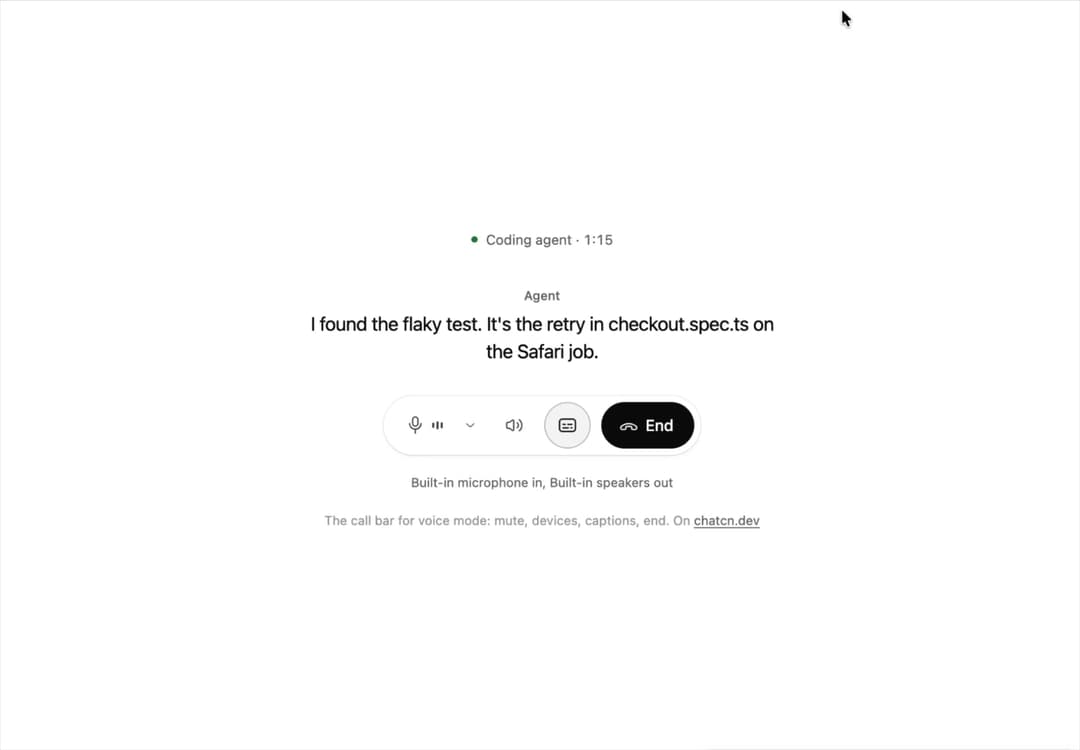
The call bar for voice mode: mute with a live level, microphone and speaker menus, captions and end.
Built with React and Tailwind. Copy the prompt and paste it into Claude Code, Cursor or Lovable: your agent adds Voice Controls to your project and fits it to your theme.
Code
How Voice Controls is used: the demo's code. The component's own source comes with a free account.
Usage.tsx
"use client"

import * as React from "react"
import { Button, ChatcnAudioDevice, Icon, IconNode, VoiceControls, createIcon } from "@/components/ui/voice-controls"

interface GhostState {
  x: number
  y: number
  shown: boolean
  down: boolean
}

/**
 * A pointer that walks a demo through its clicks, so a preview shows what each control does.
 * `stage` is the positioned box the pointer moves in; targets are found inside it. Sizes come
 * from layout boxes, so a scaled FitFrame never throws the aim off.
 */
function useGhost(stage: React.RefObject<HTMLElement | null>) {
  const [ghost, setGhost] = React.useState<GhostState>({ x: 0, y: 0, shown: false, down: false })

  const find = React.useCallback(
    (target: string | HTMLElement) =>
      typeof target === "string"
        ? stage.current?.querySelector<HTMLElement>(target) ?? null
        : target,
    [stage],
  )

  const moveTo = React.useCallback(
    (target: string | HTMLElement, dx = 0.5, dy = 0.6) => {
      const root = stage.current
      const el = find(target)
      if (!root || !el) return null
      const rr = root.getBoundingClientRect()
      const scale = root.offsetWidth ? rr.width / root.offsetWidth : 1
      const er = el.getBoundingClientRect()
      const x = (er.left - rr.left + er.width * dx) / scale
      const y = (er.top - rr.top + er.height * dy) / scale
      // A hidden pointer fades in a short way off its first target instead of flying in from
      // wherever it was last.
      setGhost((g) => (g.shown ? { x, y, shown: true, down: false } : { x: x + 70, y: y + 46, shown: false, down: false }))
      window.requestAnimationFrame(() =>
        window.requestAnimationFrame(() => setGhost({ x, y, shown: true, down: false })),
      )
      return el
    },
    [stage, find],
  )

  const press = React.useCallback((down: boolean) => setGhost((g) => ({ ...g, down })), [])
  const hide = React.useCallback(() => setGhost((g) => ({ ...g, shown: false, down: false })), [])

  return { ghost, moveTo, press, hide, find }
}

type Speaker = "agent" | "you"

/* -------------------------------------------------------------------------------------------------
 * Simulated speech levels
 *
 * Demos, tests and design reviews need a voice without a microphone. A random walk reads as
 * noise; speech has syllables (about four a second), short gaps between words and a slower phrase
 * contour. This generator models those three layers so a meter driven by it looks like someone
 * talking.
 * -----------------------------------------------------------------------------------------------*/

interface ChatcnSpeechLevelOptions {
  /** Changes the rhythm, so two voices never move in lockstep. Default 1. */
  seed?: number
  /** Syllables per second. Default 4.2. */
  syllableRate?: number
  /** Peak level from 0 to 1. Default 0.8. */
  loudness?: number
  /** Level while silent, so a live meter never looks dead. Default 0.02. */
  floor?: number
}

interface ChatcnSpeechLevel {
  /** Current smoothed level from 0 to 1. Call it every frame. */
  getLevel: () => number
  /** `count` band levels from 0 to 1, lowest first, with two moving formant humps. */
  getBands: (count: number) => Float32Array
  setSpeaking: (speaking: boolean) => void
  isSpeaking: () => boolean
}

const fract = (x: number) => x - Math.floor(x)

const hash = (n: number, seed: number) => fract(Math.sin(n * 12.9898 + seed * 78.233) * 43758.5453)

/** A speech-like level source you start and stop. Framework free; see `useChatcnSimulatedLevel`. */
function createChatcnSpeechLevel(options: ChatcnSpeechLevelOptions = {}): ChatcnSpeechLevel {
  const { seed = 1, syllableRate = 4.2, loudness = 0.8, floor = 0.02 } = options
  let speaking = false
  let envelope = floor
  let last = 0
  let phase = 0
  let syllable = 0

  const target = (t: number) => {
    if (!speaking) return floor + 0.01 * (0.5 + 0.5 * Math.sin(t * 7.3 + seed))
    const k = Math.floor(phase)
    const u = phase - k
    let amp = 0.45 + 0.55 * hash(k, seed)
    // Roughly one slot in six is the gap between words.
    if (hash(k * 1.7 + 3, seed) < 0.17) amp *= 0.08
    const shape = u < 0.22 ? (u / 0.22) ** 0.7 : (1 - (u - 0.22) / 0.78) ** 1.5
    const contour = 0.78 + 0.22 * Math.sin(t * 0.55 + seed * 2)
    return loudness * contour * (0.12 + 0.88 * amp * shape)
  }

  const getLevel = () => {
    const now = performance.now()
    if (now - last < 8) return envelope
    const dt = last ? Math.min(0.1, (now - last) / 1000) : 1 / 60
    last = now
    const t = now / 1000
    // Syllable length jitters by up to 40 percent, so the rhythm never ticks like a clock.
    const k = Math.floor(phase)
    phase += dt * syllableRate * (0.8 + 0.4 * hash(k * 3.1, seed))
    syllable = k
    const goal = target(t)
    const rate = goal > envelope ? 28 : 9
    envelope += (goal - envelope) * (1 - Math.exp(-rate * dt))
    return envelope
  }

  const getBands = (count: number) => {
    const level = getLevel()
    const out = new Float32Array(Math.max(0, count))
    const t = performance.now() / 1000
    // Formants move per syllable: vowels change where the energy sits.
    const f1 = 0.16 + 0.1 * hash(syllable * 2.3, seed)
    const f2 = 0.42 + 0.18 * hash(syllable * 5.9 + 1, seed)
    for (let i = 0; i < count; i++) {
      const x = count === 1 ? 0.5 : i / (count - 1)
      const bump = Math.exp(-(((x - f1) / 0.14) ** 2)) + 0.75 * Math.exp(-(((x - f2) / 0.2) ** 2))
      const air = 0.18 * (1 - x)
      const flicker = 0.85 + 0.15 * Math.sin(t * 23 + i * 1.9 + seed)
      out[i] = Math.min(1, level * (bump + air) * flicker * 1.15)
    }
    return out
  }

  return {
    getLevel,
    getBands,
    setSpeaking: (next) => {
      speaking = next
    },
    isSpeaking: () => speaking,
  }
}

/**
 * Simulated speech levels for demos without a microphone. Returns stable getters for voice
 * components, so the meter animates without re-rendering. Pass `speaking` to start and stop.
 *
 * `<VoiceOrb state="speaking" level={assistant.getLevel} />`
 */
function useChatcnSimulatedLevel(
  speaking: boolean,
  options: ChatcnSpeechLevelOptions = {},
): Pick<ChatcnSpeechLevel, "getLevel" | "getBands"> {
  const [sim] = React.useState(() => createChatcnSpeechLevel(options))
  React.useEffect(() => sim.setSpeaking(speaking), [sim, speaking])
  return React.useMemo(() => ({ getLevel: sim.getLevel, getBands: sim.getBands }), [sim])
}

const reducedMotion = () =>
  typeof window !== "undefined" && window.matchMedia("(prefers-reduced-motion: reduce)").matches

const STOP = Symbol("stop")

/**
 * Runs `script` in a loop with a `wait(ms)` that stops cleanly on unmount or once `active` turns
 * false. Reduced motion never starts it.
 */
function useLoop(
  script: (wait: (ms: number) => Promise<void>) => Promise<void>,
  active = true,
) {
  const ref = React.useRef(script)
  ref.current = script
  React.useEffect(() => {
    if (!active || reducedMotion()) return
    let alive = true
    const timers = new Set<number>()
    const wait = (ms: number) =>
      new Promise<void>((resolve, reject) => {
        const id = window.setTimeout(() => {
          timers.delete(id)
          if (alive) resolve()
          else reject(STOP)
        }, ms)
        timers.add(id)
      })
    ;(async () => {
      try {
        while (alive) await ref.current(wait)
      } catch (error) {
        if (error !== STOP) throw error
      }
    })()
    return () => {
      alive = false
      for (const id of timers) window.clearTimeout(id)
    }
  }, [active])
}

const LINES: { who: Speaker; text: string }[] = [
  { who: "agent", text: "I found the flaky test. It's the retry in checkout.spec.ts on the Safari job." },
  { who: "you", text: "Can you cap it at three attempts and rerun CI?" },
  { who: "agent", text: "Done. CI is running again, and I'll tell you when it's green." },
]

const WORD_MS = 150

/** Moves to a target, presses and clicks it. Returns the element, or null if it is gone. */
async function tap(
  g: ReturnType<typeof useGhost>,
  target: string | HTMLElement,
  wait: (ms: number) => Promise<void>,
  travel = 700,
) {
  if (!g.moveTo(target)) return null
  await wait(travel)
  g.press(true)
  await wait(130)
  const el = g.find(target)
  el?.click()
  g.press(false)
  return el
}

const microphones: ChatcnAudioDevice[] = [
  { id: "default", label: "Built-in microphone", isDefault: true },
  { id: "earbuds", label: "Wireless earbuds" },
  { id: "usb", label: "USB podcast mic" },
]

const speakers: ChatcnAudioDevice[] = [
  { id: "default", label: "Built-in speakers", isDefault: true },
  { id: "earbuds", label: "Wireless earbuds" },
  { id: "monitor", label: "Monitor speakers" },
]

const FIT_CSS = "html,body{overflow:hidden}[data-fit-small] [data-fit-hide]{display:none!important}"

/**
 * 21st shows a demo in a small frame: about 674 by 421 on a component page, 358 by 224 on a
 * phone and 245 by 139 on a profile card. A demo taller than its frame gets scrollbars, which
 * render white on dark pages. FitFrame fills the frame exactly instead.
 *
 * - "scale": the content shrinks until it fits, centered. For visuals such as orbs.
 * - "crop": the content stays at full size from the top and fades out at the bottom. For text
 *   that streams in, where a changing scale would make the page breathe.
 *
 * `minWidth` lays out a wide demo (a table, a two column panel) at that width and scales it down
 * to the frame, instead of letting it collapse to a narrow layout. The frame centers it, so it
 * shrinks evenly on both sides.
 *
 * Anything marked `data-fit-hide` (state buttons, the chatcn.dev line) drops out in frames
 * shorter than `hideBelow`, so a profile card shows the visual alone.
 */
function FitFrame({
  children,
  mode = "scale",
  hideBelow = 360,
  minWidth,
}: {
  children: React.ReactNode
  mode?: "scale" | "crop"
  hideBelow?: number
  minWidth?: string
}) {
  const content = React.useRef<HTMLDivElement>(null)
  const [cropped, setCropped] = React.useState(false)

  React.useLayoutEffect(() => {
    const el = content.current
    if (!el) return
    const measure = () => {
      const vw = window.innerWidth
      const vh = window.innerHeight
      el.toggleAttribute("data-fit-small", vh < hideBelow)
      // Layout sizes ignore the transform, so measuring never feeds back.
      const w = Math.max(el.offsetWidth, el.scrollWidth)
      const h = Math.max(el.offsetHeight, el.scrollHeight)
      const scale = mode === "scale" ? Math.min(1, vw / w, vh / h) : 1
      el.style.transform = scale < 1 ? `scale(${scale})` : ""
      setCropped(mode === "crop" && h > vh + 1)
    }
    measure()
    const observer = new ResizeObserver(measure)
    observer.observe(el)
    // Content that changes inside a fixed width box (a headline that cycles words) never resizes
    // the box itself, so changes below it measure again on the next frame.
    let frame = 0
    const mutations = new MutationObserver(() => {
      cancelAnimationFrame(frame)
      frame = requestAnimationFrame(measure)
    })
    mutations.observe(el, { subtree: true, childList: true, characterData: true })
    window.addEventListener("resize", measure)
    return () => {
      observer.disconnect()
      mutations.disconnect()
      cancelAnimationFrame(frame)
      window.removeEventListener("resize", measure)
    }
  }, [mode, hideBelow])

  const fade = "linear-gradient(to bottom, #000 calc(100% - 40px), transparent)"
  return (
    <div
      className="flex w-full justify-center overflow-hidden"
      style={{
        height: "100dvh",
        alignItems: mode === "crop" ? "flex-start" : "center",
        maskImage: cropped ? fade : undefined,
        WebkitMaskImage: cropped ? fade : undefined,
      }}
    >
      <style>{FIT_CSS}</style>
      <div
        ref={content}
        className="w-full shrink-0"
        style={{ transformOrigin: mode === "crop" ? "top center" : "center", minWidth }}
      >
        {children}
      </div>
    </div>
  )
}

const pad = (n: number) => String(n).padStart(2, "0")

const iconNode: IconNode = [
  ["path", {"d":"M5.49 17.46A8.5 8.5 0 1 0 6.54 5.49"}],
  ["path", {"d":"m8.21 8.65-2.94-.26a2 2 0 0 1-1.82-2.16l.26-2.94"}],
]

const RotateCcwIcon: Icon = /* @__PURE__ */ createIcon("rotate-ccw", iconNode)

/** The pointer itself. Put it last inside the stage, which must be `relative`. */
function Ghost({ ghost }: { ghost: GhostState }) {
  return (
    <div
      aria-hidden
      className="pointer-events-none absolute top-0 left-0 z-20"
      style={{
        transform: `translate(${ghost.x}px, ${ghost.y}px)`,
        opacity: ghost.shown ? 1 : 0,
        // Hidden, it jumps; shown, it glides.
        transition: ghost.shown
          ? "transform 620ms cubic-bezier(0.4, 0, 0.2, 1), opacity 220ms ease-out"
          : "opacity 220ms ease-out",
      }}
    >
      <svg
        width="18"
        height="20"
        viewBox="0 0 18 20"
        className="drop-shadow-[0_1px_2px_rgb(0_0_0/0.25)]"
        style={{
          transform: ghost.down ? "scale(0.86)" : "scale(1)",
          transformOrigin: "2px 2px",
          transition: "transform 120ms ease-out",
        }}
      >
        <path
          d="M2 1.5 L2 16 L5.9 12.4 L8.6 18.3 L11.2 17.1 L8.6 11.3 L13.9 11.1 Z"
          className="fill-[oklch(0.2_0_0)] stroke-white dark:fill-white dark:stroke-[oklch(0.2_0_0)]"
          strokeWidth="1.3"
          strokeLinejoin="round"
        />
      </svg>
    </div>
  )
}

/** The line under each 21st demo that points back to the kit. */
function MoreOn({ slug, children }: { slug: string; children: React.ReactNode }) {
  return (
    <p data-fit-hide className="text-[0.75rem]/[1rem] text-(color:--chatcn-fg-faint) text-center text-balance">
      {children}{" "}
      <a
        href={`https://chatcn.dev/docs/components/${slug}`}
        target="_blank"
        rel="noopener"
        className="text-(color:--chatcn-fg-subtle) hover:text-(color:--chatcn-fg) underline underline-offset-2"
      >
        chatcn.dev
      </a>
    </p>
  )
}

/**
 * A voice call with a coding agent: live captions for both sides, the mic bars moving while you
 * talk. The pointer mutes and unmutes, turns captions off and on, then ends the call and calls
 * again. Device menus stay closed so the preview never covers itself. Click to stop the tour.
 */
export default function VoiceControlsPreview() {
  const stage = React.useRef<HTMLDivElement>(null)
  const g = useGhost(stage)
  const [touring, setTouring] = React.useState(true)
  const [muted, setMuted] = React.useState(false)
  const [captions, setCaptions] = React.useState(true)
  const [mic, setMic] = React.useState("default")
  const [out, setOut] = React.useState("default")
  const [ended, setEnded] = React.useState(false)
  const [who, setWho] = React.useState<Speaker>("agent")
  const [said, setSaid] = React.useState("")
  const [seconds, setSeconds] = React.useState(72)
  const you = useChatcnSimulatedLevel(who === "you" && !muted && !ended && said !== "", { seed: 5 })

  React.useEffect(() => {
    if (ended) return
    const id = window.setInterval(() => setSeconds((s) => s + 1), 1000)
    return () => window.clearInterval(id)
  }, [ended])

  useLoop(async (wait) => {
    const speak = async (i: number) => {
      const line = LINES[i]!
      setWho(line.who)
      const words = line.text.split(" ")
      for (let n = 1; n <= words.length; n++) {
        setSaid(words.slice(0, n).join(" "))
        await wait(WORD_MS)
      }
    }
    setEnded(false)
    setMuted(false)
    setCaptions(true)
    setSeconds(72)
    setSaid("")
    await wait(500)
    await speak(0)
    await wait(700)
    await speak(1)
    await wait(500)
    await tap(g, 'button[aria-label="Mute microphone"]', wait)
    await wait(1600)
    await tap(g, 'button[aria-label="Mute microphone"]', wait, 300)
    await wait(300)
    g.hide()
    await speak(2)
    await wait(600)
    await tap(g, 'button[aria-label="Captions"]', wait)
    await wait(1500)
    await tap(g, 'button[aria-label="Captions"]', wait, 300)
    await wait(900)
    const end = Array.from(stage.current?.querySelectorAll<HTMLElement>("button") ?? []).find(
      (b) => b.textContent?.trim() === "End",
    )
    if (end) await tap(g, end, wait)
    await wait(1600)
    const again = Array.from(stage.current?.querySelectorAll<HTMLElement>("button") ?? []).find(
      (b) => b.textContent?.trim() === "Call again",
    )
    if (again) await tap(g, again, wait)
    await wait(200)
    g.hide()
  }, touring)

  const micName = microphones.find((d) => d.id === mic)?.label
  const outName = speakers.find((d) => d.id === out)?.label

  return (
    <FitFrame minWidth="34rem">
      <div className="flex w-full flex-col items-center justify-center gap-4 p-6">
        <div
          ref={stage}
          className="relative flex w-full max-w-lg flex-col items-center gap-6 overflow-hidden px-2 py-1"
          onPointerDown={() => {
            if (!touring) return
            setTouring(false)
            g.hide()
          }}
        >
          <div className="text-[0.8125rem]/[1.25rem] text-(color:--chatcn-fg-subtle) flex items-center gap-2 tabular-nums">
            <span
              className={
                ended
                  ? "bg-(color:--chatcn-fg-faint) size-1.5 rounded-full"
                  : "bg-(color:--chatcn-green) size-1.5 rounded-full"
              }
            />
            {ended ? "Call ended" : "Coding agent"} · {Math.floor(seconds / 60)}:{pad(seconds % 60)}
          </div>

          <div className="flex h-24 w-full flex-col items-center justify-center gap-1.5 text-center">
            {ended ? (
              <p className="text-[0.9375rem]/[1.5rem] tracking-[-0.006em] text-(color:--chatcn-fg-muted)">The agent will message you when CI is green.</p>
            ) : captions ? (
              said ? (
                <>
                  <span className="text-[0.75rem]/[1rem] text-(color:--chatcn-fg-subtle) font-medium">
                    {who === "agent" ? "Agent" : "You"}
                  </span>
                  <p className="text-[1.125rem]/[1.625rem] tracking-[-0.015em] text-(color:--chatcn-fg) max-w-md text-pretty">{said}</p>
                </>
              ) : null
            ) : (
              <p className="text-[0.8125rem]/[1.25rem] text-(color:--chatcn-fg-subtle)">Captions are off</p>
            )}
          </div>

          <div className="flex h-11 items-center">
            {ended ? (
              <Button size="sm" variant="outline" onClick={() => setEnded(false)}>
                <RotateCcwIcon />
                Call again
              </Button>
            ) : (
              <VoiceControls
                size="lg"
                muted={muted}
                onMutedChange={setMuted}
                captions={captions}
                onCaptionsChange={setCaptions}
                microphones={microphones}
                microphone={mic}
                onMicrophoneChange={setMic}
                speakers={speakers}
                speaker={out}
                onSpeakerChange={setOut}
                inputLevel={you.getLevel}
                onEnd={() => setEnded(true)}
              />
            )}
          </div>

          <p aria-live="polite" className="text-[0.75rem]/[1rem] text-(color:--chatcn-fg-subtle) h-4 text-center">
            {ended ? "" : muted ? "Muted. The agent cannot hear you." : `${micName} in, ${outName} out`}
          </p>
          <Ghost ghost={g.ghost} />
        </div>
        <MoreOn slug="voice-controls">The call bar for voice mode: mute, devices, captions, end. On</MoreOn>
      </div>
    </FitFrame>
  )
}
Dependencies
More by Aadi
View all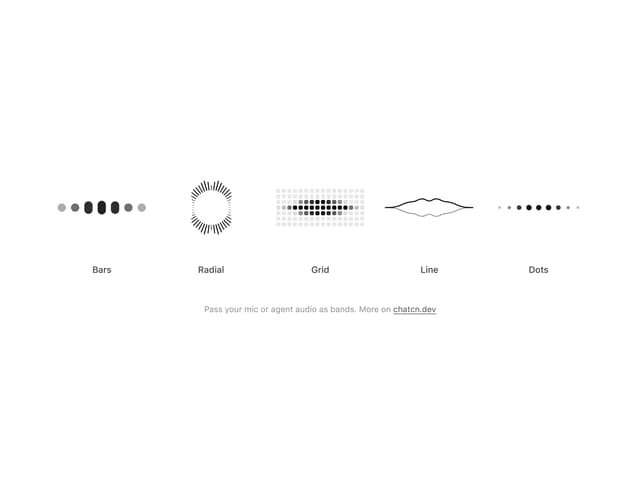
Audio Visualizer
12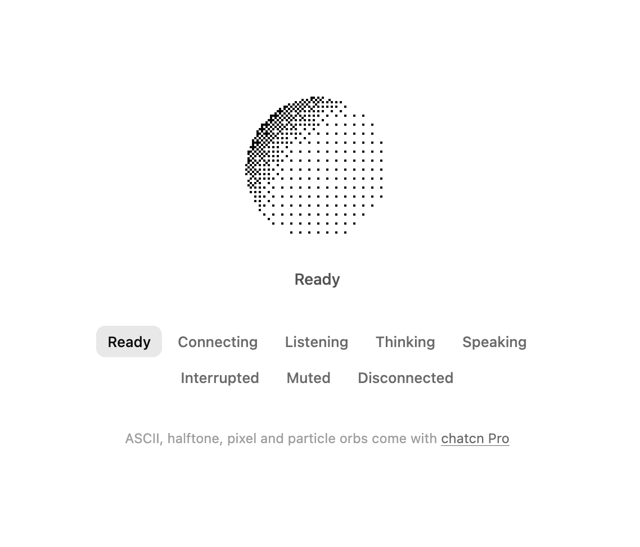
Dither Orb
12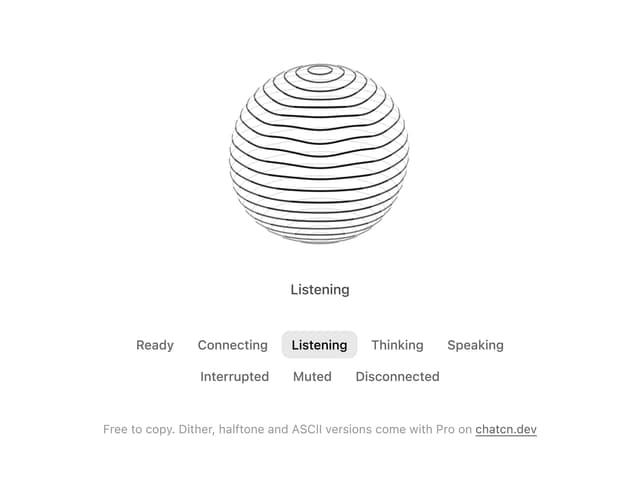
Voice Orb
8
Agent Lanes
7
Waveform
5
Stat Card
4
Chat Search
3
Plan
3
More in AI chats
View all

AI Actions
339

Aquarium Prompt
58

Illos Knowledge Sources
42
Commit
34
Chat Bubble
199
Attachments
39
Color Picker
173
Message Thread
58


