
About
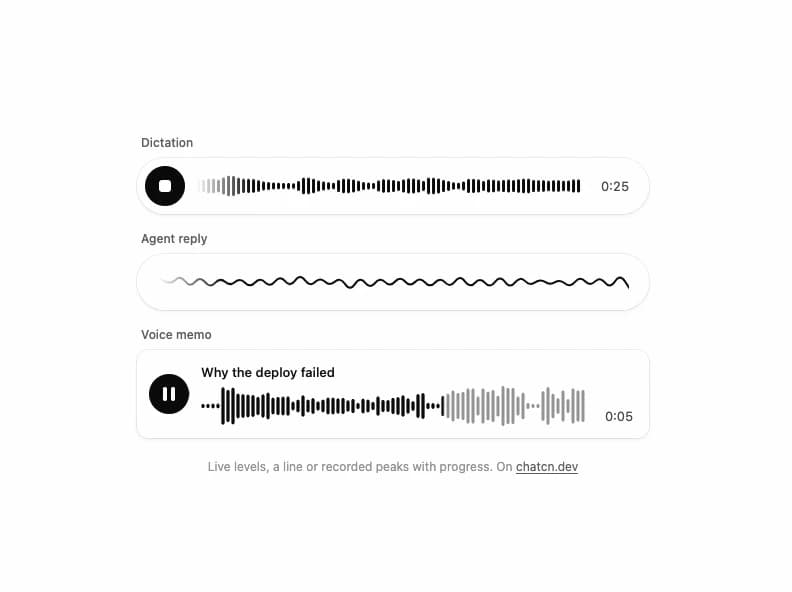
Sound for voice apps three ways: live level bars that scroll for dictation, one continuous line for an agent reply, and recorded peaks that play from faint to ink with progress. Works with any level source or microphone.
Built with React and Tailwind. Copy the prompt and paste it into Claude Code, Cursor or Lovable: your agent adds Waveform to your project and fits it to your theme.
Code
How Waveform is used: the demo's code. The component's own source comes with a free account.
Usage.tsx
"use client"

import * as React from "react"
import { Waveform } from "@/components/ui/waveform"

/* -------------------------------------------------------------------------------------------------
 * Simulated speech levels
 *
 * Demos, tests and design reviews need a voice without a microphone. A random walk reads as
 * noise; speech has syllables (about four a second), short gaps between words and a slower phrase
 * contour. This generator models those three layers so a meter driven by it looks like someone
 * talking.
 * -----------------------------------------------------------------------------------------------*/

interface ChatcnSpeechLevelOptions {
  /** Changes the rhythm, so two voices never move in lockstep. Default 1. */
  seed?: number
  /** Syllables per second. Default 4.2. */
  syllableRate?: number
  /** Peak level from 0 to 1. Default 0.8. */
  loudness?: number
  /** Level while silent, so a live meter never looks dead. Default 0.02. */
  floor?: number
}

interface ChatcnSpeechLevel {
  /** Current smoothed level from 0 to 1. Call it every frame. */
  getLevel: () => number
  /** `count` band levels from 0 to 1, lowest first, with two moving formant humps. */
  getBands: (count: number) => Float32Array
  setSpeaking: (speaking: boolean) => void
  isSpeaking: () => boolean
}

const fract = (x: number) => x - Math.floor(x)

const hash = (n: number, seed: number) => fract(Math.sin(n * 12.9898 + seed * 78.233) * 43758.5453)

/** A speech-like level source you start and stop. Framework free; see `useChatcnSimulatedLevel`. */
function createChatcnSpeechLevel(options: ChatcnSpeechLevelOptions = {}): ChatcnSpeechLevel {
  const { seed = 1, syllableRate = 4.2, loudness = 0.8, floor = 0.02 } = options
  let speaking = false
  let envelope = floor
  let last = 0
  let phase = 0
  let syllable = 0

  const target = (t: number) => {
    if (!speaking) return floor + 0.01 * (0.5 + 0.5 * Math.sin(t * 7.3 + seed))
    const k = Math.floor(phase)
    const u = phase - k
    let amp = 0.45 + 0.55 * hash(k, seed)
    // Roughly one slot in six is the gap between words.
    if (hash(k * 1.7 + 3, seed) < 0.17) amp *= 0.08
    const shape = u < 0.22 ? (u / 0.22) ** 0.7 : (1 - (u - 0.22) / 0.78) ** 1.5
    const contour = 0.78 + 0.22 * Math.sin(t * 0.55 + seed * 2)
    return loudness * contour * (0.12 + 0.88 * amp * shape)
  }

  const getLevel = () => {
    const now = performance.now()
    if (now - last < 8) return envelope
    const dt = last ? Math.min(0.1, (now - last) / 1000) : 1 / 60
    last = now
    const t = now / 1000
    // Syllable length jitters by up to 40 percent, so the rhythm never ticks like a clock.
    const k = Math.floor(phase)
    phase += dt * syllableRate * (0.8 + 0.4 * hash(k * 3.1, seed))
    syllable = k
    const goal = target(t)
    const rate = goal > envelope ? 28 : 9
    envelope += (goal - envelope) * (1 - Math.exp(-rate * dt))
    return envelope
  }

  const getBands = (count: number) => {
    const level = getLevel()
    const out = new Float32Array(Math.max(0, count))
    const t = performance.now() / 1000
    // Formants move per syllable: vowels change where the energy sits.
    const f1 = 0.16 + 0.1 * hash(syllable * 2.3, seed)
    const f2 = 0.42 + 0.18 * hash(syllable * 5.9 + 1, seed)
    for (let i = 0; i < count; i++) {
      const x = count === 1 ? 0.5 : i / (count - 1)
      const bump = Math.exp(-(((x - f1) / 0.14) ** 2)) + 0.75 * Math.exp(-(((x - f2) / 0.2) ** 2))
      const air = 0.18 * (1 - x)
      const flicker = 0.85 + 0.15 * Math.sin(t * 23 + i * 1.9 + seed)
      out[i] = Math.min(1, level * (bump + air) * flicker * 1.15)
    }
    return out
  }

  return {
    getLevel,
    getBands,
    setSpeaking: (next) => {
      speaking = next
    },
    isSpeaking: () => speaking,
  }
}

/**
 * Simulated speech levels for demos without a microphone. Returns stable getters for voice
 * components, so the meter animates without re-rendering. Pass `speaking` to start and stop.
 *
 * `<VoiceOrb state="speaking" level={assistant.getLevel} />`
 */
function useChatcnSimulatedLevel(
  speaking: boolean,
  options: ChatcnSpeechLevelOptions = {},
): Pick<ChatcnSpeechLevel, "getLevel" | "getBands"> {
  const [sim] = React.useState(() => createChatcnSpeechLevel(options))
  React.useEffect(() => sim.setSpeaking(speaking), [sim, speaking])
  return React.useMemo(() => ({ getLevel: sim.getLevel, getBands: sim.getBands }), [sim])
}

const reducedMotion = () => window.matchMedia("(prefers-reduced-motion: reduce)").matches

/** Plays the memo on a loop, from a little way in so the first frame is mid playback. */
function usePlayhead(duration: number) {
  const [time, setTime] = React.useState(duration * 0.3)
  React.useEffect(() => {
    if (reducedMotion()) return
    const began = performance.now() - duration * 0.3 * 1000
    let raf = 0
    const tick = (now: number) => {
      setTime(((now - began) / 1000) % duration)
      raf = requestAnimationFrame(tick)
    }
    raf = requestAnimationFrame(tick)
    return () => cancelAnimationFrame(raf)
  }, [duration])
  return time
}

const MEMO_S = 8

const FIT_CSS = "html,body{overflow:hidden}[data-fit-small] [data-fit-hide]{display:none!important}"

/**
 * 21st shows a demo in a small frame: about 674 by 421 on a component page, 358 by 224 on a
 * phone and 245 by 139 on a profile card. A demo taller than its frame gets scrollbars, which
 * render white on dark pages. FitFrame fills the frame exactly instead.
 *
 * - "scale": the content shrinks until it fits, centered. For visuals such as orbs.
 * - "crop": the content stays at full size from the top and fades out at the bottom. For text
 *   that streams in, where a changing scale would make the page breathe.
 *
 * `minWidth` lays out a wide demo (a table, a two column panel) at that width and scales it down
 * to the frame, instead of letting it collapse to a narrow layout. The frame centers it, so it
 * shrinks evenly on both sides.
 *
 * Anything marked `data-fit-hide` (state buttons, the chatcn.dev line) drops out in frames
 * shorter than `hideBelow`, so a profile card shows the visual alone.
 */
function FitFrame({
  children,
  mode = "scale",
  hideBelow = 360,
  minWidth,
}: {
  children: React.ReactNode
  mode?: "scale" | "crop"
  hideBelow?: number
  minWidth?: string
}) {
  const content = React.useRef<HTMLDivElement>(null)
  const [cropped, setCropped] = React.useState(false)

  React.useLayoutEffect(() => {
    const el = content.current
    if (!el) return
    const measure = () => {
      const vw = window.innerWidth
      const vh = window.innerHeight
      el.toggleAttribute("data-fit-small", vh < hideBelow)
      // Layout sizes ignore the transform, so measuring never feeds back.
      const w = Math.max(el.offsetWidth, el.scrollWidth)
      const h = Math.max(el.offsetHeight, el.scrollHeight)
      const scale = mode === "scale" ? Math.min(1, vw / w, vh / h) : 1
      el.style.transform = scale < 1 ? `scale(${scale})` : ""
      setCropped(mode === "crop" && h > vh + 1)
    }
    measure()
    const observer = new ResizeObserver(measure)
    observer.observe(el)
    // Content that changes inside a fixed width box (a headline that cycles words) never resizes
    // the box itself, so changes below it measure again on the next frame.
    let frame = 0
    const mutations = new MutationObserver(() => {
      cancelAnimationFrame(frame)
      frame = requestAnimationFrame(measure)
    })
    mutations.observe(el, { subtree: true, childList: true, characterData: true })
    window.addEventListener("resize", measure)
    return () => {
      observer.disconnect()
      mutations.disconnect()
      cancelAnimationFrame(frame)
      window.removeEventListener("resize", measure)
    }
  }, [mode, hideBelow])

  const fade = "linear-gradient(to bottom, #000 calc(100% - 40px), transparent)"
  return (
    <div
      className="flex w-full justify-center overflow-hidden"
      style={{
        height: "100dvh",
        alignItems: mode === "crop" ? "flex-start" : "center",
        maskImage: cropped ? fade : undefined,
        WebkitMaskImage: cropped ? fade : undefined,
      }}
    >
      <style>{FIT_CSS}</style>
      <div
        ref={content}
        className="w-full shrink-0"
        style={{ transformOrigin: mode === "crop" ? "top center" : "center", minWidth }}
      >
        {children}
      </div>
    </div>
  )
}

const format = (s: number) => `0:${String(Math.floor(s)).padStart(2, "0")}`

/** Deterministic speech like peaks: syllables, word gaps and a phrase contour. */
function speechPeaks(count: number, seed: number) {
  const hash = (n: number) => {
    const x = Math.sin(n * 12.9898 + seed * 78.233) * 43758.5453
    return x - Math.floor(x)
  }
  return Array.from({ length: count }, (_, i) => {
    const word = Math.floor(i / 5)
    if (hash(word * 3.1) < 0.14) return 0.04 + 0.04 * hash(i)
    const contour = 0.65 + 0.35 * Math.sin((i / count) * Math.PI * 2.3 + seed)
    return (0.25 + 0.75 * hash(i * 1.7)) * contour
  })
}

const PEAKS = speechPeaks(96, 2)

/** The line under each 21st demo that points back to the kit. */
function MoreOn({ slug, children }: { slug: string; children: React.ReactNode }) {
  return (
    <p data-fit-hide className="text-[0.75rem]/[1rem] text-(color:--chatcn-fg-faint) text-center text-balance">
      {children}{" "}
      <a
        href={`https://chatcn.dev/docs/components/${slug}`}
        target="_blank"
        rel="noopener"
        className="text-(color:--chatcn-fg-subtle) hover:text-(color:--chatcn-fg) underline underline-offset-2"
      >
        chatcn.dev
      </a>
    </p>
  )
}

/**
 * Three ways a voice app shows sound: a dictation pill whose bars scroll with the speaker, an
 * agent reply drawn as one live line, and a recorded voice memo that plays its peaks from faint
 * to ink. Every level here is simulated, so it runs without a microphone.
 */
export default function WaveformPreview() {
  const user = useChatcnSimulatedLevel(true, { seed: 3 })
  const agent = useChatcnSimulatedLevel(true, { seed: 7, loudness: 0.9 })
  const time = usePlayhead(MEMO_S)
  const talked = usePlayhead(50)

  return (
    <FitFrame minWidth="34rem">
      <div className="flex w-full flex-col items-center justify-center gap-5 p-6">
        <div className="flex w-full max-w-lg flex-col gap-4">
          <div className="flex flex-col gap-2">
            <span className="text-[0.75rem]/[1rem] text-(color:--chatcn-fg-subtle) ps-1 font-medium">Dictation</span>
            <div className="bg-(color:--chatcn-card) shadow-(--chatcn-shadow-sm) flex h-14 items-center gap-3 rounded-full ps-2 pe-5">
              <span
                aria-hidden
                className="bg-(color:--chatcn-fg) text-(color:--chatcn-bg) grid size-10 shrink-0 place-items-center rounded-full"
              >
                <span className="size-3 rounded-[3px] bg-current" />
              </span>
              <Waveform level={user.getLevel} className="h-9 flex-1" />
              <span className="text-[0.8125rem]/[1.25rem] text-(color:--chatcn-fg-muted) w-9 text-end tabular-nums">{format(talked)}</span>
            </div>
          </div>

          <div className="flex flex-col gap-2">
            <span className="text-[0.75rem]/[1rem] text-(color:--chatcn-fg-subtle) ps-1 font-medium">Agent reply</span>
            <div className="bg-(color:--chatcn-card) shadow-(--chatcn-shadow-sm) flex h-14 items-center rounded-full px-5">
              <Waveform variant="line" level={agent.getLevel} barWidth={2} className="h-9 flex-1" />
            </div>
          </div>

          <div className="flex flex-col gap-2">
            <span className="text-[0.75rem]/[1rem] text-(color:--chatcn-fg-subtle) ps-1 font-medium">Voice memo</span>
            <div className="bg-(color:--chatcn-card) shadow-(--chatcn-shadow-sm) rounded-(--chatcn-radius-lg) flex items-center gap-3 p-3 pe-4">
              <span
                aria-hidden
                className="bg-(color:--chatcn-fg) text-(color:--chatcn-bg) grid size-10 shrink-0 place-items-center rounded-full"
              >
                <span className="flex gap-1">
                  <span className="h-3.5 w-1 rounded-sm bg-current" />
                  <span className="h-3.5 w-1 rounded-sm bg-current" />
                </span>
              </span>
              <div className="flex min-w-0 flex-1 flex-col gap-1">
                <span className="text-[0.8125rem]/[1.25rem] text-(color:--chatcn-fg) truncate font-medium">
                  Why the deploy failed
                </span>
                <Waveform peaks={PEAKS} progress={time / MEMO_S} className="h-10 w-full" />
              </div>
              <span className="text-[0.8125rem]/[1.25rem] text-(color:--chatcn-fg-muted) w-9 self-end text-end tabular-nums">
                {format(time)}
              </span>
            </div>
          </div>
        </div>
        <MoreOn slug="waveform">Live levels, a line or recorded peaks with progress. On</MoreOn>
      </div>
    </FitFrame>
  )
}
More by Aadi
View all
Dither Orb
12
Audio Visualizer
9
Voice Orb
8
Agent Lanes
6
Computer View
3
Reasoning
2
Voice Session
1
Run Inbox
1