
About
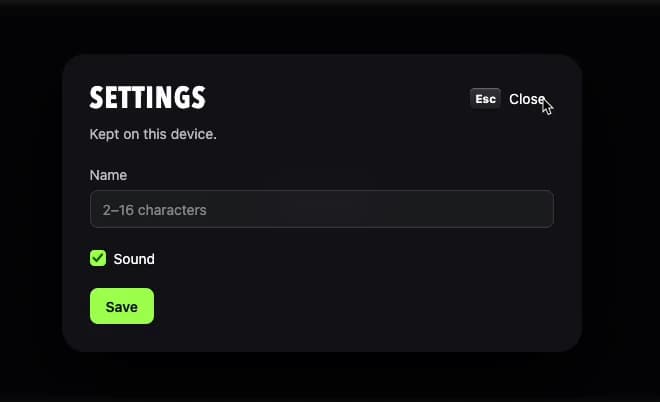
A modal dialog that overlays the page for content needing an answer or full attention, closable with Esc, a close button, or an outside click, with focus trapped inside while open. Ported to React from oyna-ui's Vue Dialog component by azabroflovski.
Built with React and Tailwind. Copy the prompt and paste it into Claude Code, Cursor or Lovable: your agent adds Dialog to your project and fits it to your theme.
Code
How Dialog is used: the demo's code. The component's own source comes with a free account.
Usage.tsx
"use client";

import * as React from "react";
import ODialog from "@/components/ui/dialog";

export default function DialogDemo() {
  const [open, setOpen] = React.useState(false);
  const [name, setName] = React.useState("");
  const [sound, setSound] = React.useState(true);

  return (
    <div className="flex min-h-[420px] w-full items-center justify-center bg-[#0b0b0f] p-10">
      <button
        type="button"
        onClick={() => setOpen(true)}
        className="inline-flex items-center gap-2 rounded-md bg-white/10 px-4 py-2 text-sm font-medium text-white transition-colors hover:bg-white/20"
      >
        Open dialog
      </button>

      <ODialog
        open={open}
        onOpenChange={setOpen}
        title="Settings"
        description="Kept on this device."
      >
        <div className="flex flex-col gap-1.5">
          <label htmlFor="dialog-demo-name" className="text-sm text-white/75">
            Name
          </label>
          <input
            id="dialog-demo-name"
            value={name}
            onChange={(event) => setName(event.target.value)}
            placeholder="2–16 characters"
            className="rounded-md border border-white/15 bg-white/5 px-3 py-2 text-sm text-white outline-none focus-visible:border-[var(--o-accent)]"
          />
        </div>

        <label className="inline-flex items-center gap-2 text-sm text-white">
          <input
            type="checkbox"
            checked={sound}
            onChange={(event) => setSound(event.target.checked)}
            className="h-4 w-4 accent-[var(--o-accent)]"
          />
          Sound
        </label>

        <button
          type="button"
          onClick={() => setOpen(false)}
          className="self-start rounded-md bg-[var(--o-accent)] px-4 py-2 text-sm font-semibold text-[var(--o-on-accent)]"
        >
          Save
        </button>
      </ODialog>
    </div>
  );
}
Dependencies
More by azabroflovski
View all
Select
1
Switch
Checkbox
Card
Bar Chart
More in Forms
View all

Premium Auth
517

Contact Card
1K

Book A Demo 1
70

Login 1
52

Form
16
Login Card
26
Authentication Card
47

Login Form
6

