
About
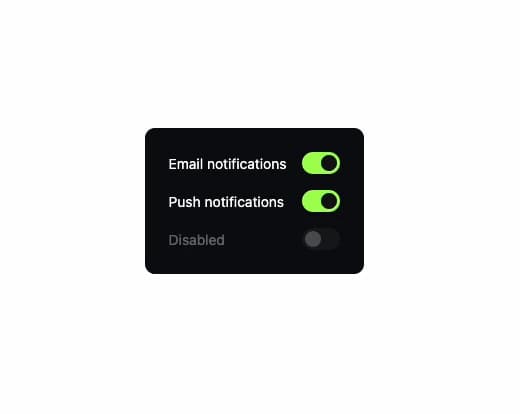
An on/off toggle switch for a settings row, with the label on the left and the switch on the right; ported to React from the Vue-based Oyna UI library by azabroflovski (MIT licensed).
Built with React and Tailwind. Copy the prompt and paste it into Claude Code, Cursor or Lovable: your agent adds Switch to your project and fits it to your theme.
Code
How Switch is used: the demo's code. The component's own source comes with a free account.
Usage.tsx
import Switch from "@/components/ui/switch";
import { useState } from "react";

export default function SwitchDemo() {
  const [email, setEmail] = useState(true);
  const [push, setPush] = useState(false);

  return (
    <div
      className="flex flex-col gap-4 rounded-lg p-6"
      style={{ background: "#0b0b0f", color: "#fff" }}
    >
      <Switch checked={email} onCheckedChange={setEmail}>
        Email notifications
      </Switch>
      <Switch checked={push} onCheckedChange={setPush}>
        Push notifications
      </Switch>
      <Switch disabled>Disabled</Switch>
    </div>
  );
}
More by azabroflovski
View all
Select
1
Dialog
Checkbox
Card
Bar Chart
More in Forms
View all

Premium Auth
517

Contact Card
1K

Book A Demo 1
70

Login 1
52

Form
16
Login Card
26
Authentication Card
47

Login Form
7

