
About
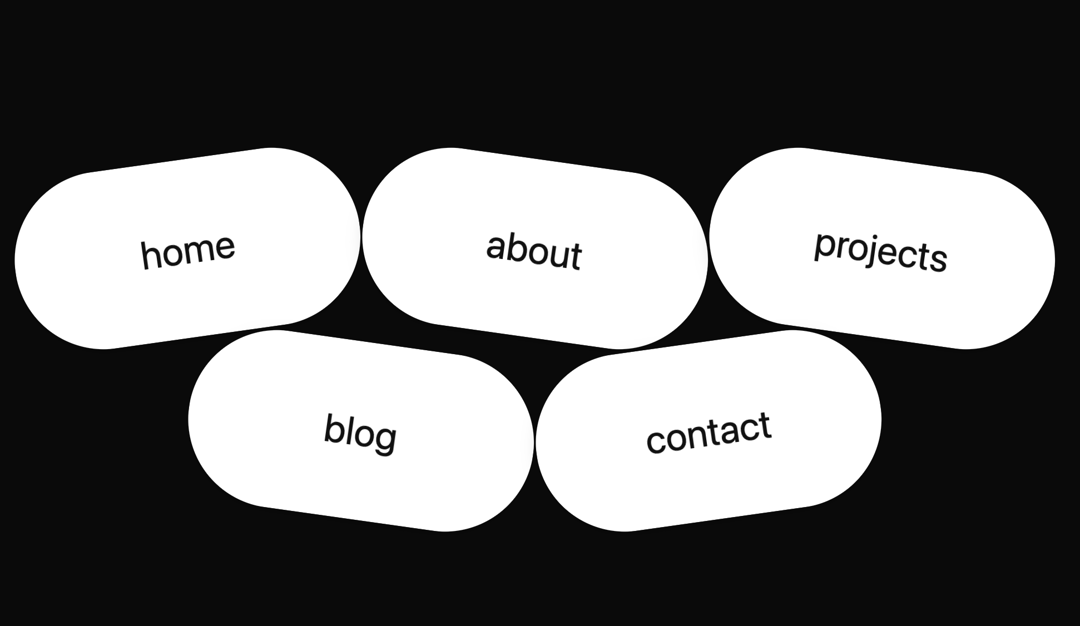
Here is Bubble Menu component
Built with React and Tailwind. Copy the prompt and paste it into Claude Code, Cursor or Lovable: your agent adds Bubble Menu to your project and fits it to your theme.
Code
How Bubble Menu is used: the demo's code. The component's own source comes with a free account.
Usage.tsx
import BubbleMenu from '@/components/ui/bubble-menu'

export default function BubbleMenuDemo() {
  const items = [
    {
      label: 'home',
      href: '#',
      ariaLabel: 'Home',
      rotation: -8,
      hoverStyles: { bgColor: '#3b82f6', textColor: '#ffffff' },
    },
    {
      label: 'about',
      href: '#',
      ariaLabel: 'About',
      rotation: 8,
      hoverStyles: { bgColor: '#10b981', textColor: '#ffffff' },
    },
    {
      label: 'projects',
      href: '#',
      ariaLabel: 'Projects',
      rotation: 8,
      hoverStyles: { bgColor: '#f59e0b', textColor: '#ffffff' },
    },
    {
      label: 'blog',
      href: '#',
      ariaLabel: 'Blog',
      rotation: 8,
      hoverStyles: { bgColor: '#ef4444', textColor: '#ffffff' },
    },
    {
      label: 'contact',
      href: '#',
      ariaLabel: 'Contact',
      rotation: -8,
      hoverStyles: { bgColor: '#8b5cf6', textColor: '#ffffff' },
    },
  ]

  return (
    <BubbleMenu
      logo={<span style={{ fontWeight: 700 }}>RB</span>}
      items={items}
      menuAriaLabel="Toggle navigation"
      menuBg="#ffffff"
      menuContentColor="#111111"
      useFixedPosition={false}
      animationEase="back.out(1.5)"
      animationDuration={0.5}
      staggerDelay={0.12}
    />
  )
}
Dependencies
More by deleted
View all

Splash Cursor
1.3K
Star Border
728
Tilted Scroll
433
Waves Background
362
Squares Background
326
Prism
218
Grid Motion
183
Circular Gallery
173
More in Navigation
View all

Sidebar
233

Tabs
60
Newsletter Signup Footer
16
Progress Bar Stepper
36

Footer 2
201
Navbar with Theme Toggle
43

Pagination
86
Numberless Pagination with Text
11
