
About
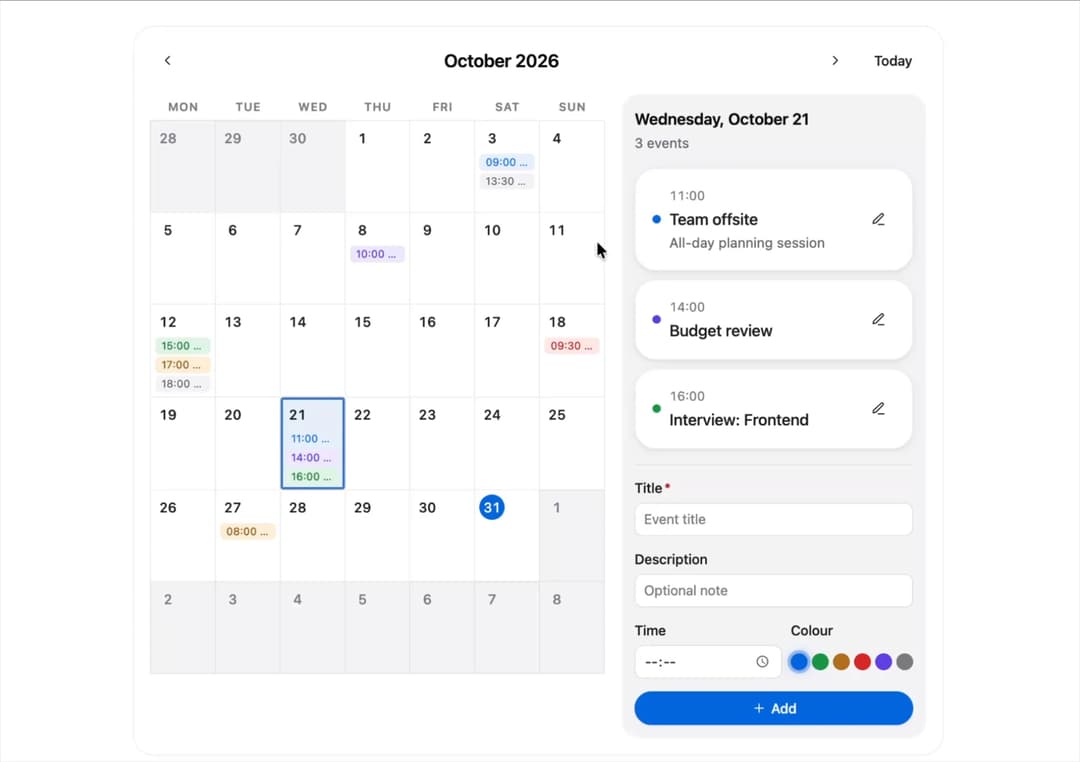
A monthly planner widget that shows events as chips on a calendar grid and lets you inspect, add, edit and delete events for the selected day from a side panel.
Built with React and Tailwind. Copy the prompt and paste it into Claude Code, Cursor or Lovable: your agent adds Event Calendar to your project and fits it to your theme.
Code
How Event Calendar is used: the demo's code. The component's own source comes with a free account.
Usage.tsx
import { useMemo } from "react";
import EventCalendar from "@/components/ui/event-calendar";

export default function Demo() {
  const events = useMemo(() => {
    const now = new Date();
    const y = now.getFullYear();
    const m = now.getMonth();
    const mk = (
      day: number,
      time: string,
      title: string,
      tone: any,
      description?: string,
    ) => ({
      id: `evt-${day}-${title}`,
      title,
      date: new Date(y, m, day),
      time,
      description,
      tone,
    });
    return [
      mk(
        3,
        "09:00",
        "Design review",
        "accent",
        "Walk through the new onboarding flow",
      ),
      mk(3, "13:30", "Lunch with Sam", "neutral"),
      mk(8, "10:00", "Sprint planning", "info"),
      mk(
        12,
        "15:00",
        "Product demo",
        "success",
        "Show the Q3 roadmap to stakeholders",
      ),
      mk(12, "17:00", "Launch checklist", "warning"),
      mk(12, "18:00", "1:1 with manager", "neutral"),
      mk(18, "09:30", "Dentist", "danger"),
      mk(21, "11:00", "Team offsite", "accent", "All-day planning session"),
      mk(21, "14:00", "Budget review", "info"),
      mk(21, "16:00", "Interview: Frontend", "success"),
      mk(27, "08:00", "Flight to NYC", "warning"),
    ];
  }, []);

  return (
    <div className="w-full flex justify-center p-6 bg-background">
      <div className="w-full max-w-3xl">
        <EventCalendar
          defaultEvents={events}
          defaultSelectedDate={
            new Date(new Date().getFullYear(), new Date().getMonth(), 12)
          }
        />
      </div>
    </div>
  );
}
More by murad-sinatra
View all
Table
2
Command Palette
1
Drawer
1
Toggles
1
Number Field
1
Tooltip
Popover
Loaders