
About
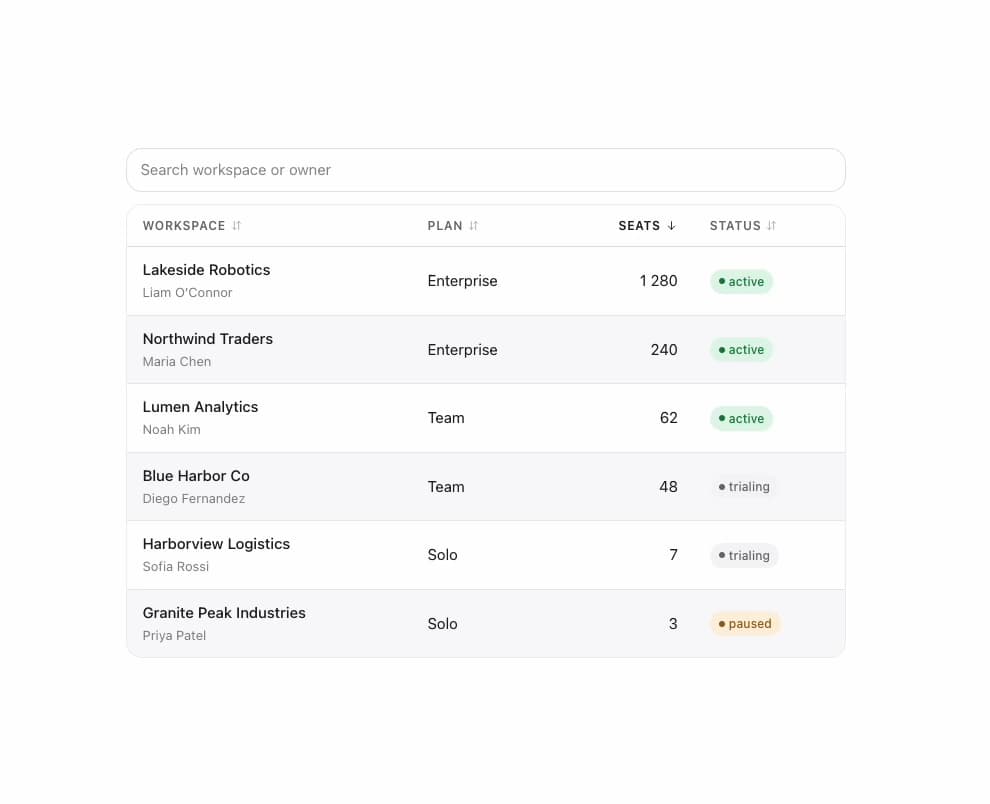
A semantic data table with three-state column sorting (ascending, descending, then back to source order), zebra striping, a sticky header option, and a per-column mobile hide flag.
Built with React and Tailwind. Copy the prompt and paste it into Claude Code, Cursor or Lovable: your agent adds Table to your project and fits it to your theme.
Code
How Table is used: the demo's code. The component's own source comes with a free account.
Usage.tsx
"use client";

import React from "react";

import Table, { type TableColumn } from "@/components/ui/table";
import { Badge } from "@/components/ui/table-utils/badge";

interface Workspace {
  id: string;
  name: string;
  owner: string;
  plan: "Solo" | "Team" | "Enterprise";
  seats: number;
  status: "active" | "trialing" | "paused";
}

const WORKSPACES: Workspace[] = [
  {
    id: "1",
    name: "Northwind Traders",
    owner: "Maria Chen",
    plan: "Enterprise",
    seats: 240,
    status: "active",
  },
  {
    id: "2",
    name: "Blue Harbor Co",
    owner: "Diego Fernandez",
    plan: "Team",
    seats: 48,
    status: "trialing",
  },
  {
    id: "3",
    name: "Granite Peak Industries",
    owner: "Priya Patel",
    plan: "Solo",
    seats: 3,
    status: "paused",
  },
  {
    id: "4",
    name: "Lakeside Robotics",
    owner: "Liam O\u2019Connor",
    plan: "Enterprise",
    seats: 1280,
    status: "active",
  },
  {
    id: "5",
    name: "Lumen Analytics",
    owner: "Noah Kim",
    plan: "Team",
    seats: 62,
    status: "active",
  },
  {
    id: "6",
    name: "Harborview Logistics",
    owner: "Sofia Rossi",
    plan: "Solo",
    seats: 7,
    status: "trialing",
  },
];

const STATUS_TONE = {
  active: "success",
  trialing: "info",
  paused: "warning",
} as const;

const COLUMNS: TableColumn<Workspace>[] = [
  {
    id: "name",
    header: "Workspace",
    sortValue: (row) => row.name,
    cell: (row) => (
      <span>
        <strong style={{ fontWeight: "var(--mors-weight-medium)" }}>
          {row.name}
        </strong>
        <br />
        <span
          style={{
            color: "var(--mors-color-text-tertiary)",
            fontSize: "var(--mors-text-sm)",
          }}
        >
          {row.owner}
        </span>
      </span>
    ),
  },
  {
    id: "plan",
    header: "Plan",
    sortValue: (row) => row.plan,
    hideOnMobile: true,
    cell: (row) => row.plan,
  },
  {
    id: "seats",
    header: "Seats",
    align: "end",
    sortValue: (row) => row.seats,
    cell: (row) => row.seats.toLocaleString(),
  },
  {
    id: "status",
    header: "Status",
    sortValue: (row) => row.status,
    cell: (row) => (
      <Badge tone={STATUS_TONE[row.status]} dot>
        {row.status}
      </Badge>
    ),
  },
];

export default function TableDemo() {
  const [query, setQuery] = React.useState("");

  const filtered = WORKSPACES.filter(
    (workspace) =>
      query.length === 0 ||
      `${workspace.name} ${workspace.owner}`
        .toLowerCase()
        .includes(query.toLowerCase()),
  );

  return (
    <div
      className="mors-scope"
      style={{
        width: "100%",
        maxWidth: 720,
        display: "flex",
        flexDirection: "column",
        gap: "var(--mors-space-4)",
      }}
    >
      <input
        type="text"
        value={query}
        onChange={(event) => setQuery(event.currentTarget.value)}
        placeholder="Search workspace or owner"
        aria-label="Search workspaces"
        style={{
          width: "100%",
          padding: "10px 14px",
          borderRadius: "var(--mors-radius-lg)",
          border: "1px solid var(--mors-color-border)",
          background: "var(--mors-color-surface)",
          color: "var(--mors-color-text)",
          font: "inherit",
          fontSize: "var(--mors-text-base)",
        }}
      />
      <Table
        columns={COLUMNS}
        rows={filtered}
        rowKey={(row) => row.id}
        caption="Workspaces, sortable by column"
        defaultSort={{ columnId: "seats", direction: "desc" }}
        zebra
        emptyState={<span>No workspaces match “{query}”.</span>}
      />
    </div>
  );
}
More by murad-sinatra
View all
Command Palette
Tooltip
Popover
Loaders
Mors Card
Swatch
Divider
Token Field