
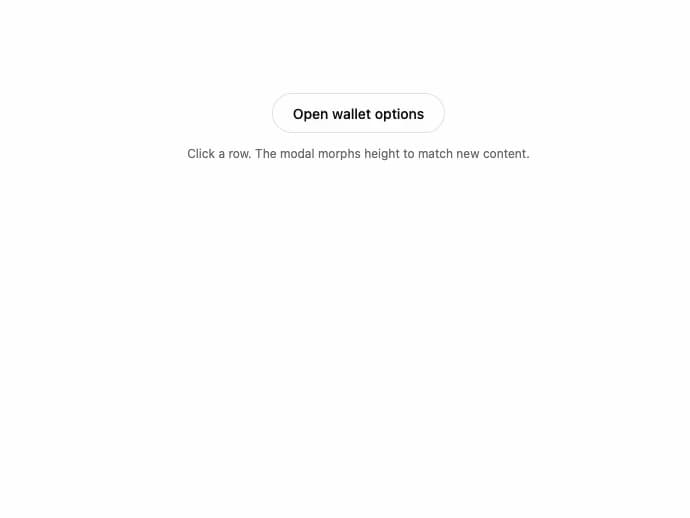
About
An animated modal that morphs its height and content between stacked views (e.g. an options menu drilling into detail screens), built with Framer Motion shared-element transitions.
Built with React and Tailwind. Copy the prompt and paste it into Claude Code, Cursor or Lovable: your agent adds Morphing Modal to your project and fits it to your theme.
Code
How Morphing Modal is used: the demo's code. The component's own source comes with a free account.
Usage.tsx
import { MorphingModal } from "@/components/ui/morphing-modal";
import { useState } from "react";
import {
Ban,
Lock,
ScanFace,
ScrollText,
ShieldCheck,
Trash2,
} from "lucide-react";
type View = "options" | "private-key" | "recovery" | null;
export function MorphingModalPreview() {
const [view, setView] = useState<View>(null);
return (
<div className="flex flex-col items-center gap-3">
<button
type="button"
onClick={() => setView("options")}
className="inline-flex h-10 items-center rounded-full border border-border bg-card px-5 text-sm font-medium text-foreground press hover:border-(--color-border-strong)"
>
Open wallet options
</button>
<p className="text-xs text-muted-foreground">
Click a row. The modal morphs height to match new content.
</p>
<MorphingModal viewId={view} onClose={() => setView(null)}>
{view === "options" ? (
<Options
onPrivateKey={() => setView("private-key")}
onRecovery={() => setView("recovery")}
onClose={() => setView(null)}
/>
) : view === "private-key" ? (
<PrivateKey onBack={() => setView("options")} />
) : view === "recovery" ? (
<Recovery onBack={() => setView("options")} />
) : null}
</MorphingModal>
</div>
);
}
function Header({ title, onClose }: { title: string; onClose: () => void }) {
return (
<div className="mb-4 flex items-center justify-between">
<h2 className="text-base font-semibold text-foreground">{title}</h2>
<button
type="button"
onClick={onClose}
aria-label="Close"
className="inline-flex h-7 w-7 items-center justify-center rounded-full text-muted-foreground hover:bg-foreground/[0.06]"
>
✕
</button>
</div>
);
}
function Row({
icon: Icon,
label,
destructive,
onClick,
}: {
icon: typeof Lock;
label: string;
destructive?: boolean;
onClick: () => void;
}) {
return (
<button
type="button"
onClick={onClick}
className={`flex w-full items-center gap-3 rounded-2xl px-4 py-3 text-sm font-medium transition-colors press ${
destructive
? "bg-destructive/10 text-destructive hover:bg-destructive/15"
: "bg-foreground/[0.04] text-foreground hover:bg-foreground/[0.08]"
}`}
>
<Icon className="h-4 w-4" />
{label}
</button>
);
}
function Options({
onPrivateKey,
onRecovery,
onClose,
}: {
onPrivateKey: () => void;
onRecovery: () => void;
onClose: () => void;
}) {
return (
<div>
<Header title="Options" onClose={onClose} />
<div className="flex flex-col gap-2">
<Row icon={Lock} label="View Private Key" onClick={onPrivateKey} />
<Row
icon={ScrollText}
label="View Recovery Phrase"
onClick={onRecovery}
/>
<Row
icon={Trash2}
label="Remove Wallet"
destructive
onClick={onClose}
/>
</div>
</div>
);
}
function PrivateKey({ onBack }: { onBack: () => void }) {
return (
<div>
<div className="mb-3 flex items-start justify-between">
<Lock className="h-5 w-5 text-foreground" />
<button
type="button"
onClick={onBack}
aria-label="Back"
className="inline-flex h-7 w-7 items-center justify-center rounded-full text-muted-foreground hover:bg-foreground/[0.06]"
>
✕
</button>
</div>
<h2 className="text-xl font-semibold tracking-tight text-foreground">
Private Key
</h2>
<p className="mt-2 text-sm text-muted-foreground">
Your Private Key is the key used to back up your wallet. Keep it secret
and secure at all times.
</p>
<hr className="my-4 border-border" />
<ul className="flex flex-col gap-2.5 text-sm text-muted-foreground">
<li className="flex items-center gap-2.5">
<ShieldCheck className="h-4 w-4" /> Keep your private key safe
</li>
<li className="flex items-center gap-2.5">
<ScrollText className="h-4 w-4" /> Don't share it with anyone
else
</li>
<li className="flex items-center gap-2.5">
<Ban className="h-4 w-4" /> If you lose it, we can't recover it
</li>
</ul>
<div className="mt-5 flex gap-2">
<button
type="button"
onClick={onBack}
className="inline-flex h-10 flex-1 items-center justify-center rounded-full bg-foreground/[0.06] text-sm font-medium text-foreground press"
>
Cancel
</button>
<button
type="button"
onClick={onBack}
className="inline-flex h-10 flex-1 items-center justify-center gap-2 rounded-full bg-foreground text-sm font-medium text-background press"
>
<ScanFace className="h-4 w-4" />
Reveal
</button>
</div>
</div>
);
}
function Recovery({ onBack }: { onBack: () => void }) {
return (
<div>
<div className="mb-3 flex items-start justify-between">
<ScrollText className="h-5 w-5 text-foreground" />
<button
type="button"
onClick={onBack}
aria-label="Back"
className="inline-flex h-7 w-7 items-center justify-center rounded-full text-muted-foreground hover:bg-foreground/[0.06]"
>
✕
</button>
</div>
<h2 className="text-xl font-semibold tracking-tight text-foreground">
Recovery Phrase
</h2>
<p className="mt-2 text-sm text-muted-foreground">
12 words you can use to restore your wallet on any device. Write them
down somewhere safe.
</p>
<div className="mt-4 grid grid-cols-3 gap-2">
{[
"mountain",
"river",
"candle",
"harbor",
"amber",
"violet",
"spring",
"ocean",
"marble",
"thunder",
"willow",
"crystal",
].map((w, i) => (
<div
key={w}
className="rounded-lg border border-border bg-background/40 px-2 py-1.5 text-xs text-foreground"
>
<span className="mr-1 text-muted-foreground">{i + 1}.</span>
{w}
</div>
))}
</div>
<button
type="button"
onClick={onBack}
className="mt-5 inline-flex h-10 w-full items-center justify-center rounded-full bg-foreground text-sm font-medium text-background press"
>
Done
</button>
</div>
);
}
export default MorphingModalPreview;
Dependencies
More by sidiora-labs
View all
Preview Rail
2
Expandable Tabs
1
Not Found

Text Cascade
Smooth Scroll
Swap
Motion Breadcrumb
Wallet Card