
About
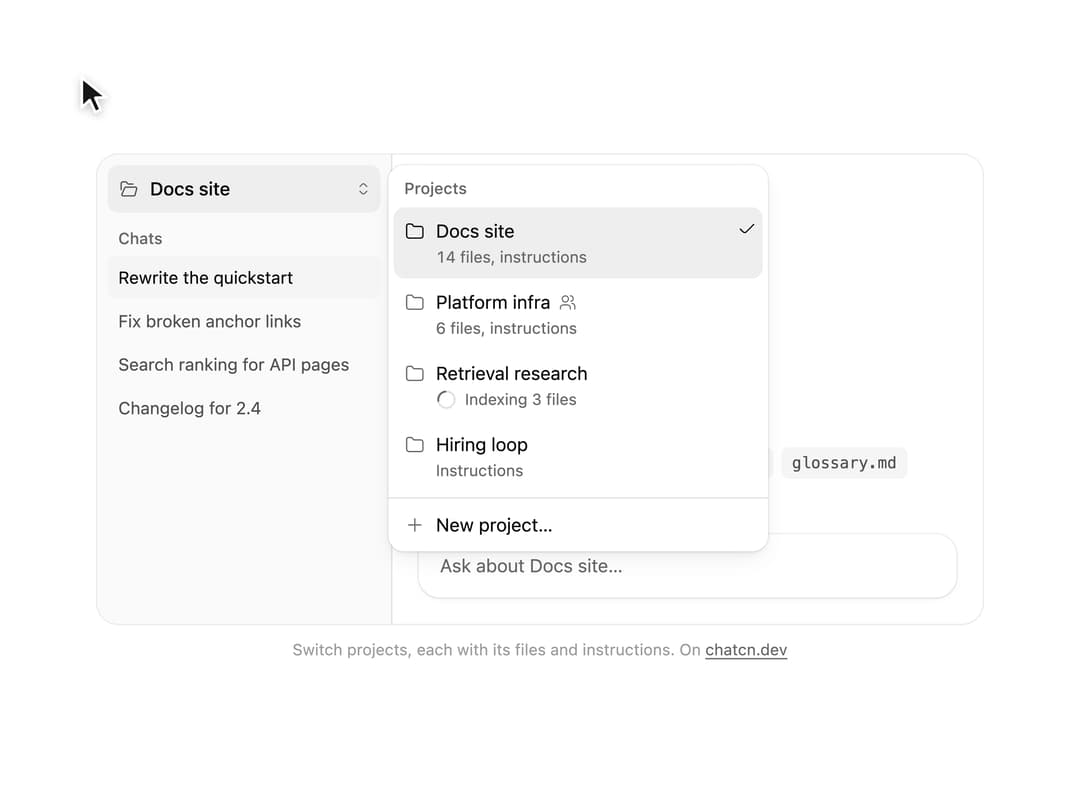
A project switcher for chat apps: each project with its file count and instructions, shared and indexing states, the current one checked, and a way to leave projects altogether.
Built with React and Tailwind. Copy the prompt and paste it into Claude Code, Cursor or Lovable: your agent adds Project Switcher to your project and fits it to your theme.
Code
How Project Switcher is used: the demo's code. The component's own source comes with a free account.
Usage.tsx
"use client"

import * as React from "react"
import { Tooltip as TooltipPrimitive } from "@base-ui/react/tooltip"
import { createPortal } from "react-dom"
import { ChatProject, ProjectSwitcher } from "@/components/ui/project-switcher"

interface GhostState {
  x: number
  y: number
  shown: boolean
  down: boolean
}

/**
 * A pointer that walks a demo through its clicks, so a preview shows what each control does.
 * `stage` is the positioned box the pointer moves in; targets are found inside it. Sizes come
 * from layout boxes, so a scaled FitFrame never throws the aim off.
 */
function useGhost(stage: React.RefObject<HTMLElement | null>) {
  const [ghost, setGhost] = React.useState<GhostState>({ x: 0, y: 0, shown: false, down: false })

  const find = React.useCallback(
    (target: string | HTMLElement) =>
      typeof target === "string"
        ? stage.current?.querySelector<HTMLElement>(target) ?? null
        : target,
    [stage],
  )

  const moveTo = React.useCallback(
    (target: string | HTMLElement, dx = 0.5, dy = 0.6) => {
      const root = stage.current
      const el = find(target)
      if (!root || !el) return null
      const rr = root.getBoundingClientRect()
      const scale = root.offsetWidth ? rr.width / root.offsetWidth : 1
      const er = el.getBoundingClientRect()
      const x = (er.left - rr.left + er.width * dx) / scale
      const y = (er.top - rr.top + er.height * dy) / scale
      // A hidden pointer fades in a short way off its first target instead of flying in from
      // wherever it was last.
      setGhost((g) => (g.shown ? { x, y, shown: true, down: false } : { x: x + 70, y: y + 46, shown: false, down: false }))
      window.requestAnimationFrame(() =>
        window.requestAnimationFrame(() => setGhost({ x, y, shown: true, down: false })),
      )
      return el
    },
    [stage, find],
  )

  const press = React.useCallback((down: boolean) => setGhost((g) => ({ ...g, down })), [])
  const hide = React.useCallback(() => setGhost((g) => ({ ...g, shown: false, down: false })), [])

  return { ghost, moveTo, press, hide, find }
}

/**
 * When the preview is themed by a `.dark` wrapper rather than the root element, carry the theme
 * to the root so portalled menus match.
 */
function useRootTheme(stage: React.RefObject<HTMLElement | null>) {
  React.useEffect(() => {
    const html = document.documentElement
    if (!stage.current?.closest(".dark") || html.classList.contains("dark")) return
    html.classList.add("dark")
    return () => html.classList.remove("dark")
  }, [stage])
}

/**
 * Menus render in a portal on the body, outside the scaled frame. A tour that opens one only
 * runs when the frame shows the demo at full size; smaller frames (the phone, profile cards)
 * show the still scene.
 */
const smallFrame = () => window.innerHeight < 400 || window.innerWidth < 640

/** A click the tour makes, through the same events a pointer sends. */
async function pointerClick(
  g: ReturnType<typeof useGhost>,
  el: HTMLElement | null,
  wait: (ms: number) => Promise<void>,
  scripted: React.RefObject<boolean>,
  travel = 700,
) {
  if (!el) return false
  g.moveTo(el)
  await wait(travel)
  g.press(true)
  await wait(130)
  scripted.current = true
  for (const type of ["pointerdown", "mousedown", "pointerup", "mouseup"]) {
    const Ctor = type.startsWith("pointer") ? PointerEvent : MouseEvent
    el.dispatchEvent(new Ctor(type, { bubbles: true, cancelable: true, button: 0 }))
  }
  el.click()
  scripted.current = false
  g.press(false)
  return true
}

/** Moves the pointer over an element and sends the hover events a menu highlights on. */
async function pointerHover(
  g: ReturnType<typeof useGhost>,
  el: HTMLElement | null,
  wait: (ms: number) => Promise<void>,
  travel = 600,
) {
  if (!el) return
  g.moveTo(el)
  await wait(travel)
  for (const type of ["pointerover", "pointerenter", "pointermove", "mouseover", "mousemove"]) {
    const Ctor = type.startsWith("pointer") ? PointerEvent : MouseEvent
    el.dispatchEvent(new Ctor(type, { bubbles: true, cancelable: true, pointerType: "mouse" } as PointerEventInit))
  }
}

/** Items of the open menu whose text includes `label`. */
const menuItem = (label: string, role = "menuitem") =>
  Array.from(
    document.querySelectorAll<HTMLElement>(`[data-slot="menu-content"] [role="${role}"]`),
  ).find((el) => el.textContent?.includes(label)) ?? null

const reducedMotion = () =>
  typeof window !== "undefined" && window.matchMedia("(prefers-reduced-motion: reduce)").matches

const STOP = Symbol("stop")

/**
 * Runs `script` in a loop with a `wait(ms)` that stops cleanly on unmount or once `active` turns
 * false. Reduced motion never starts it.
 */
function useLoop(
  script: (wait: (ms: number) => Promise<void>) => Promise<void>,
  active = true,
) {
  const ref = React.useRef(script)
  ref.current = script
  React.useEffect(() => {
    if (!active || reducedMotion()) return
    let alive = true
    const timers = new Set<number>()
    const wait = (ms: number) =>
      new Promise<void>((resolve, reject) => {
        const id = window.setTimeout(() => {
          timers.delete(id)
          if (alive) resolve()
          else reject(STOP)
        }, ms)
        timers.add(id)
      })
    ;(async () => {
      try {
        while (alive) await ref.current(wait)
      } catch (error) {
        if (error !== STOP) throw error
      }
    })()
    return () => {
      alive = false
      for (const id of timers) window.clearTimeout(id)
    }
  }, [active])
}

const PROJECTS: ChatProject[] = [
  { id: "docs", name: "Docs site", filesCount: 14, hasInstructions: true },
  { id: "infra", name: "Platform infra", filesCount: 6, hasInstructions: true, shared: true },
  { id: "research", name: "Retrieval research", filesCount: 31, indexingCount: 3 },
  { id: "hiring", name: "Hiring loop", hasInstructions: true },
]

/** The chats each project keeps, so switching shows a different sidebar. */
const CHATS: Record<string, string[]> = {
  docs: ["Rewrite the quickstart", "Fix broken anchor links", "Search ranking for API pages", "Changelog for 2.4"],
  infra: ["Rotate database keys", "Queue backlog alerts", "Cut staging costs"],
  research: ["Chunk size experiments", "Rerank or not", "Eval set for long PDFs"],
  hiring: ["Take home review rubric", "Interview loop for platform"],
}

const FILES: Record<string, string[]> = {
  docs: ["style-guide.md", "api-reference.json", "glossary.md"],
  infra: ["runbook.md", "terraform-notes.md"],
  research: ["chunking-results.csv", "papers.pdf", "eval-set.jsonl"],
  hiring: ["rubric.md"],
}

/**
 * Wrap the app once. After the first tooltip opens, the next ones open instantly, the way
 * native toolbars behave.
 */
function TooltipProvider({
  delay = 500,
  ...props
}: React.ComponentProps<typeof TooltipPrimitive.Provider>) {
  return <TooltipPrimitive.Provider delay={delay} closeDelay={0} {...props} />
}

const FIT_CSS = "html,body{overflow:hidden}[data-fit-small] [data-fit-hide]{display:none!important}"

/**
 * 21st shows a demo in a small frame: about 674 by 421 on a component page, 358 by 224 on a
 * phone and 245 by 139 on a profile card. A demo taller than its frame gets scrollbars, which
 * render white on dark pages. FitFrame fills the frame exactly instead.
 *
 * - "scale": the content shrinks until it fits, centered. For visuals such as orbs.
 * - "crop": the content stays at full size from the top and fades out at the bottom. For text
 *   that streams in, where a changing scale would make the page breathe.
 *
 * `minWidth` lays out a wide demo (a table, a two column panel) at that width and scales it down
 * to the frame, instead of letting it collapse to a narrow layout. The frame centers it, so it
 * shrinks evenly on both sides.
 *
 * Anything marked `data-fit-hide` (state buttons, the chatcn.dev line) drops out in frames
 * shorter than `hideBelow`, so a profile card shows the visual alone.
 */
function FitFrame({
  children,
  mode = "scale",
  hideBelow = 360,
  minWidth,
}: {
  children: React.ReactNode
  mode?: "scale" | "crop"
  hideBelow?: number
  minWidth?: string
}) {
  const content = React.useRef<HTMLDivElement>(null)
  const [cropped, setCropped] = React.useState(false)

  React.useLayoutEffect(() => {
    const el = content.current
    if (!el) return
    const measure = () => {
      const vw = window.innerWidth
      const vh = window.innerHeight
      el.toggleAttribute("data-fit-small", vh < hideBelow)
      // Layout sizes ignore the transform, so measuring never feeds back.
      const w = Math.max(el.offsetWidth, el.scrollWidth)
      const h = Math.max(el.offsetHeight, el.scrollHeight)
      const scale = mode === "scale" ? Math.min(1, vw / w, vh / h) : 1
      el.style.transform = scale < 1 ? `scale(${scale})` : ""
      setCropped(mode === "crop" && h > vh + 1)
    }
    measure()
    const observer = new ResizeObserver(measure)
    observer.observe(el)
    // Content that changes inside a fixed width box (a headline that cycles words) never resizes
    // the box itself, so changes below it measure again on the next frame.
    let frame = 0
    const mutations = new MutationObserver(() => {
      cancelAnimationFrame(frame)
      frame = requestAnimationFrame(measure)
    })
    mutations.observe(el, { subtree: true, childList: true, characterData: true })
    window.addEventListener("resize", measure)
    return () => {
      observer.disconnect()
      mutations.disconnect()
      cancelAnimationFrame(frame)
      window.removeEventListener("resize", measure)
    }
  }, [mode, hideBelow])

  const fade = "linear-gradient(to bottom, #000 calc(100% - 40px), transparent)"
  return (
    <div
      className="flex w-full justify-center overflow-hidden"
      style={{
        height: "100dvh",
        alignItems: mode === "crop" ? "flex-start" : "center",
        maskImage: cropped ? fade : undefined,
        WebkitMaskImage: cropped ? fade : undefined,
      }}
    >
      <style>{FIT_CSS}</style>
      <div
        ref={content}
        className="w-full shrink-0"
        style={{ transformOrigin: mode === "crop" ? "top center" : "center", minWidth }}
      >
        {children}
      </div>
    </div>
  )
}

/** The line under each 21st demo that points back to the kit. */
function MoreOn({ slug, children }: { slug: string; children: React.ReactNode }) {
  return (
    <p data-fit-hide className="text-[0.75rem]/[1rem] text-(color:--chatcn-fg-faint) text-center text-balance">
      {children}{" "}
      <a
        href={`https://chatcn.dev/docs/components/${slug}`}
        target="_blank"
        rel="noopener"
        className="text-(color:--chatcn-fg-subtle) hover:text-(color:--chatcn-fg) underline underline-offset-2"
      >
        chatcn.dev
      </a>
    </p>
  )
}

/** The pointer itself. Put it last inside the stage, which must be `relative`. */
function Ghost({ ghost }: { ghost: GhostState }) {
  return (
    <div
      aria-hidden
      className="pointer-events-none absolute top-0 left-0 z-20"
      style={{
        transform: `translate(${ghost.x}px, ${ghost.y}px)`,
        opacity: ghost.shown ? 1 : 0,
        // Hidden, it jumps; shown, it glides.
        transition: ghost.shown
          ? "transform 620ms cubic-bezier(0.4, 0, 0.2, 1), opacity 220ms ease-out"
          : "opacity 220ms ease-out",
      }}
    >
      <svg
        width="18"
        height="20"
        viewBox="0 0 18 20"
        className="drop-shadow-[0_1px_2px_rgb(0_0_0/0.25)]"
        style={{
          transform: ghost.down ? "scale(0.86)" : "scale(1)",
          transformOrigin: "2px 2px",
          transition: "transform 120ms ease-out",
        }}
      >
        <path
          d="M2 1.5 L2 16 L5.9 12.4 L8.6 18.3 L11.2 17.1 L8.6 11.3 L13.9 11.1 Z"
          className="fill-[oklch(0.2_0_0)] stroke-white dark:fill-white dark:stroke-[oklch(0.2_0_0)]"
          strokeWidth="1.3"
          strokeLinejoin="round"
        />
      </svg>
    </div>
  )
}

/** The pointer drawn above portalled menus, lined up with the stage on the page. */
function PortalGhost({
  stage,
  ghost,
}: {
  stage: React.RefObject<HTMLElement | null>
  ghost: ReturnType<typeof useGhost>["ghost"]
}) {
  const [, rerender] = React.useState(0)
  React.useEffect(() => {
    rerender(1)
    const on = () => rerender((n) => n + 1)
    window.addEventListener("resize", on)
    return () => window.removeEventListener("resize", on)
  }, [])
  const rect = stage.current?.getBoundingClientRect()
  if (!rect || !stage.current) return null
  const scale = stage.current.offsetWidth ? rect.width / stage.current.offsetWidth : 1
  return createPortal(
    <div
      className="pointer-events-none fixed z-[60] origin-top-left"
      style={{
        left: rect.left,
        top: rect.top,
        width: stage.current.offsetWidth,
        height: stage.current.offsetHeight,
        transform: scale !== 1 ? `scale(${scale})` : undefined,
      }}
    >
      <Ghost ghost={ghost} />
    </div>,
    document.body,
  )
}

/**
 * A chat app's sidebar switches projects. The pointer opens the switcher, where each project
 * says what context it brings (its files, its instructions, files still indexing), and picks
 * one: the chat list and the new chat's context follow. Loops. Click anything to take over.
 */
export default function ProjectSwitcherPreview() {
  const stage = React.useRef<HTMLDivElement>(null)
  const g = useGhost(stage)
  const scripted = React.useRef(false)
  const [touring, setTouring] = React.useState(true)
  const [value, setValue] = React.useState<string | null>("docs")
  useRootTheme(stage)
  React.useEffect(() => {
    if (smallFrame()) setTouring(false)
  }, [])

  const close = async (wait: (ms: number) => Promise<void>) => {
    const menu = document.querySelector<HTMLElement>('[data-slot="menu-content"]')
    menu?.dispatchEvent(new KeyboardEvent("keydown", { key: "Escape", bubbles: true }))
    // The menu hands focus back to the trigger; a scripted close should not leave a ring.
    for (const ms of [40, 160, 320]) {
      await wait(ms)
      ;(document.activeElement as HTMLElement | null)?.blur()
    }
  }

  const pick = async (wait: (ms: number) => Promise<void>, name: string, hover: string[]) => {
    await pointerClick(g, stage.current?.querySelector('[data-slot="project-switcher-trigger"]') ?? null, wait, scripted)
    await wait(1100)
    for (const h of hover) await pointerHover(g, menuItem(h, "menuitemradio"), wait, 520)
    await pointerClick(g, menuItem(name, "menuitemradio"), wait, scripted, 520)
    await wait(200)
    if (document.querySelector('[data-slot="menu-content"]')) await close(wait)
    else
      for (const ms of [40, 160, 320]) {
        await wait(ms)
        ;(document.activeElement as HTMLElement | null)?.blur()
      }
    g.hide()
  }

  useLoop(async (wait) => {
    await wait(1200)
    await pick(wait, "Retrieval research", ["Platform infra"])
    await wait(2800)
    await pick(wait, "Platform infra", ["Hiring loop"])
    await wait(2800)
    await pick(wait, "Docs site", [])
    await wait(2400)
  }, touring)

  const project = PROJECTS.find((p) => p.id === value)
  const chats = value ? (CHATS[value] ?? []) : []
  const files = value ? (FILES[value] ?? []) : []

  return (
    <TooltipProvider>
      <FitFrame minWidth="38rem">
        <div className="flex h-[26.25rem] w-full flex-col items-center gap-3 px-5 pt-5 pb-4">
          <div
            ref={stage}
            className="bg-(color:--chatcn-bg) rounded-(--chatcn-radius-xl) shadow-(--chatcn-shadow-border) relative flex w-full max-w-2xl flex-1 overflow-hidden"
            onPointerDownCapture={() => {
              if (scripted.current || !touring) return
              setTouring(false)
              g.hide()
            }}
          >
            <aside className="bg-(color:--chatcn-bg-subtle) border-(color:--chatcn-border) flex w-56 shrink-0 flex-col gap-3 border-e p-2">
              <ProjectSwitcher
                projects={PROJECTS}
                value={value}
                onValueChange={setValue}
                onCreate={() => {}}
                allowNone={false}
                side="inline-end"
                align="start"
              />
              <div className="flex flex-col gap-px">
                <span className="text-[0.75rem]/[1rem] text-(color:--chatcn-fg-subtle) px-2 pb-1 font-medium">Chats</span>
                {chats.map((chat, i) => (
                  <span
                    key={chat}
                    data-active={i === 0 ? "" : undefined}
                    className="text-[0.8125rem]/[1.25rem] rounded-(--chatcn-radius-sm) text-(color:--chatcn-fg-muted) data-[active]:bg-(color:--chatcn-fill) data-[active]:text-(color:--chatcn-fg) truncate px-2 py-1.5"
                  >
                    {chat}
                  </span>
                ))}
              </div>
            </aside>
            <section className="flex min-w-0 flex-1 flex-col justify-between p-5">
              <div className="flex flex-col gap-1">
                <span className="text-[0.75rem]/[1rem] text-(color:--chatcn-fg-subtle)">New chat in</span>
                <span className="text-[1.125rem]/[1.625rem] tracking-[-0.015em] text-(color:--chatcn-fg) font-semibold tracking-tight">{project?.name}</span>
              </div>
              <div className="flex flex-col gap-3">
                <span className="text-[0.75rem]/[1rem] text-(color:--chatcn-fg-subtle)">This chat starts with</span>
                <div className="flex flex-wrap gap-1.5">
                  {files.map((f) => (
                    <span
                      key={f}
                      className="text-[0.75rem]/[1rem] bg-(color:--chatcn-fill) text-(color:--chatcn-fg-muted) rounded-(--chatcn-radius-sm) px-2 py-1 font-mono"
                    >
                      {f}
                    </span>
                  ))}
                  {project?.hasInstructions ? (
                    <span className="text-[0.75rem]/[1rem] bg-(color:--chatcn-fill) text-(color:--chatcn-fg-muted) rounded-(--chatcn-radius-sm) px-2 py-1">
                      Project instructions
                    </span>
                  ) : null}
                  {project?.indexingCount ? (
                    <span className="text-[0.75rem]/[1rem] text-(color:--chatcn-fg-subtle) px-1 py-1">
                      {project.indexingCount} more files indexing
                    </span>
                  ) : null}
                </div>
                <div className="bg-(color:--chatcn-card) rounded-(--chatcn-radius-xl) shadow-(--chatcn-shadow-sm) text-[0.875rem]/[1.25rem] tracking-[-0.003em] text-(color:--chatcn-fg-subtle) flex h-12 items-center px-4">
                  Ask about {project?.name ?? "this project"}…
                </div>
              </div>
            </section>
          </div>
          <MoreOn slug="project-switcher">Switch projects, each with its files and instructions. On</MoreOn>
          {touring ? <PortalGhost stage={stage} ghost={g.ghost} /> : null}
        </div>
      </FitFrame>
    </TooltipProvider>
  )
}
Dependencies
More by Aadi
View all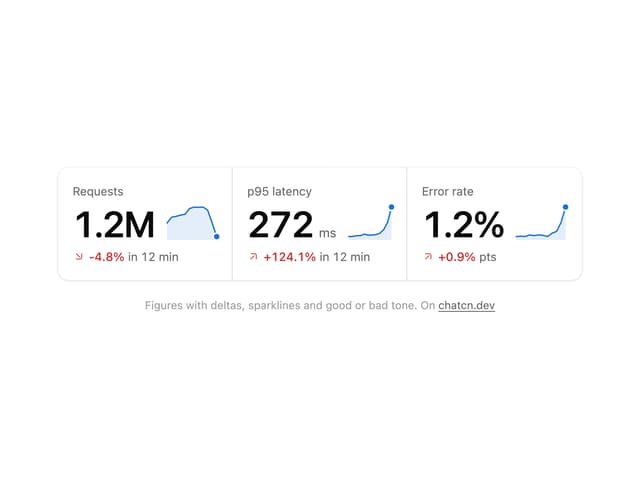
Stat Card
45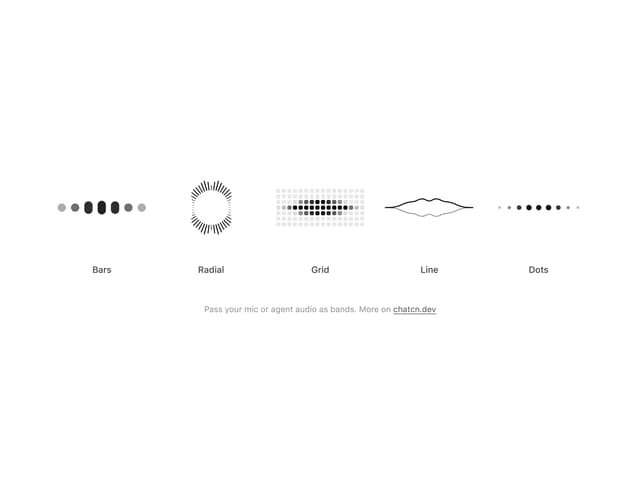
Audio Visualizer
32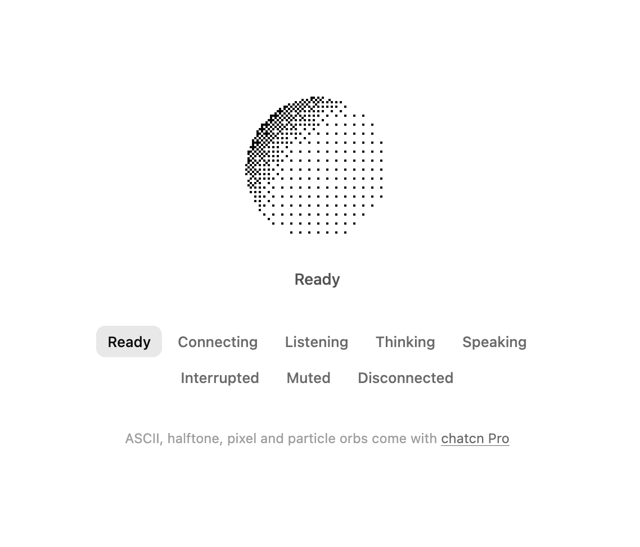
Dither Orb
23
Voice Orb
19
Waveform
15
Weather Card
15
Ticker Card
14
Message Feedback
13