
About
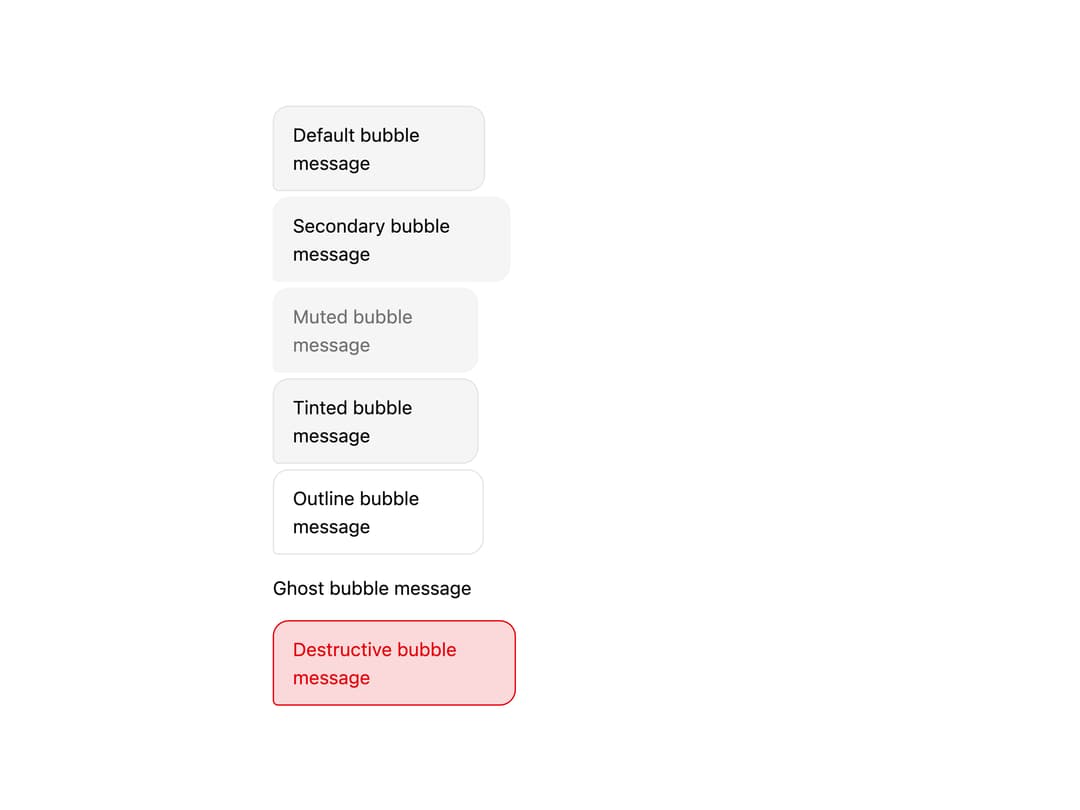
A chat message bubble with directional speech-tail styling, variant colors (default, secondary, muted, tinted, outline, ghost, destructive) and an optional reactions row, used to build chat/messaging conversation UIs.
Built with React and Tailwind. Copy the prompt and paste it into Claude Code, Cursor or Lovable: your agent adds Bubble to your project and fits it to your theme.
Code
How Bubble is used: the demo's code. The component's own source comes with a free account.
Usage.tsx
import * as React from "react";
import { Bubble, BubbleContent, BubbleGroup } from "@/components/ui/bubble";

const variants = [
  { variant: "default" as const, label: "Default bubble message" },
  { variant: "secondary" as const, label: "Secondary bubble message" },
  { variant: "muted" as const, label: "Muted bubble message" },
  { variant: "tinted" as const, label: "Tinted bubble message" },
  { variant: "outline" as const, label: "Outline bubble message" },
  { variant: "ghost" as const, label: "Ghost bubble message" },
  { variant: "destructive" as const, label: "Destructive bubble message" },
];

export default function BubbleVariantsDemo() {
  return (
    <div className="flex w-full max-w-md flex-col gap-6 bg-background p-6 text-foreground">
      <BubbleGroup align="start">
        {variants.map((item) => (
          <Bubble key={item.variant} variant={item.variant} align="start">
            <BubbleContent>{item.label}</BubbleContent>
          </Bubble>
        ))}
      </BubbleGroup>
    </div>
  );
}
Dependencies
More by russellbloxwich
View all
Switch
Meter
Field
Chart
Code Block
Layer Card
Direction Provider
Toast Notifications