
About
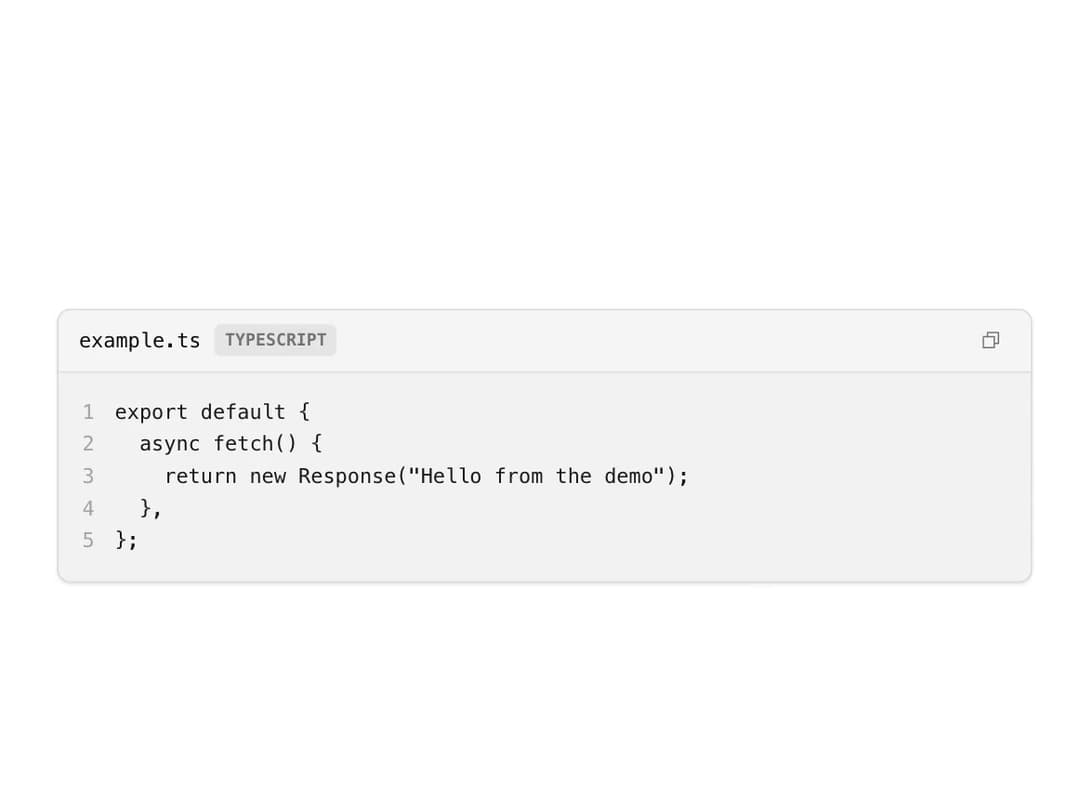
A compound code block with a filename/language header, a copy-to-clipboard button, and optional line numbers for displaying code snippets.
Built with React and Tailwind. Copy the prompt and paste it into Claude Code, Cursor or Lovable: your agent adds Code Block to your project and fits it to your theme.
Code
How Code Block is used: the demo's code. The component's own source comes with a free account.
Usage.tsx
import Code from "@/components/ui/code-block";

export default function CodeBlockDemo() {
  return (
    <div
      className="cfui-theme flex min-h-screen w-full items-center justify-center p-8"
      style={{ background: "var(--background)" }}
    >
      <div className="w-full max-w-xl">
        <Code
          filename="example.ts"
          language="typescript"
          showLineNumbers
          code={
            'export default {\n  async fetch() {\n    return new Response("Hello from the demo");\n  },\n};'
          }
        />
      </div>
    </div>
  );
}
Dependencies
More by russellbloxwich
View all
Switch
Bubble
Meter
Field
Chart
Layer Card
Direction Provider
Toast Notifications