
About
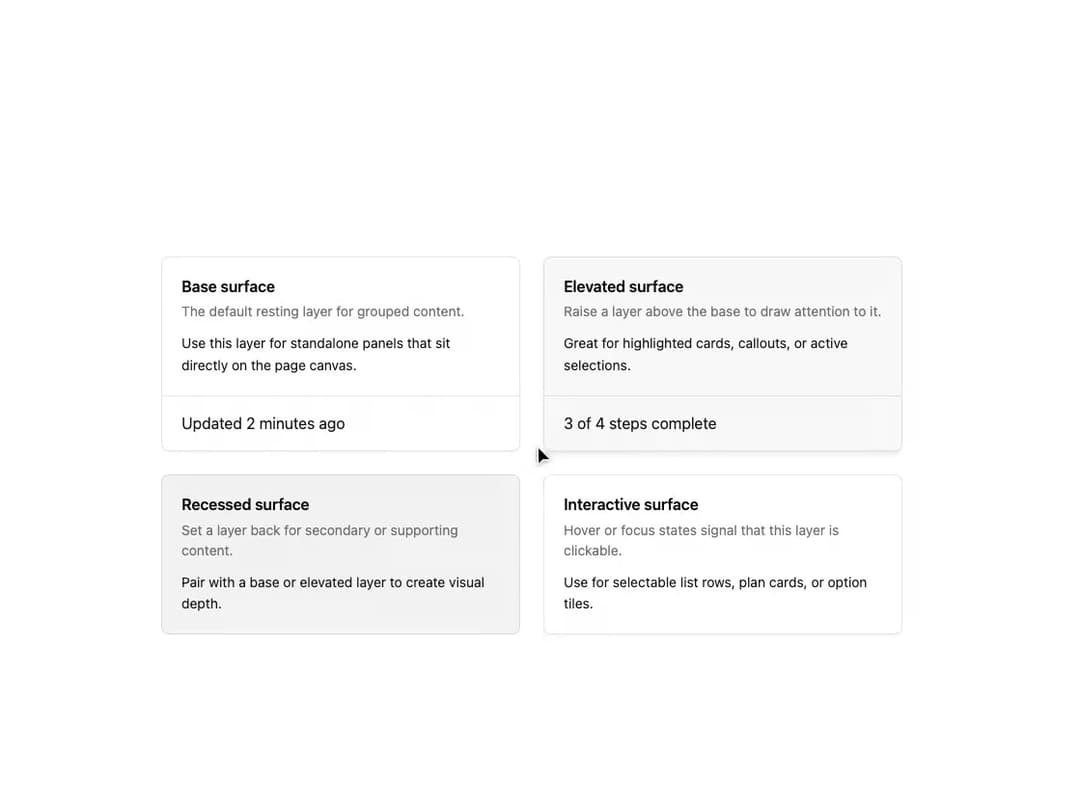
A composable card surface with selectable elevation levels (base, elevated, recessed, canvas, overlay, interactive) for grouping header, body and footer content in a dashboard.
Built with React and Tailwind. Copy the prompt and paste it into Claude Code, Cursor or Lovable: your agent adds Layer Card to your project and fits it to your theme.
Code
How Layer Card is used: the demo's code. The component's own source comes with a free account.
Usage.tsx
import {
  LayerCard,
  LayerCardHeader,
  LayerCardTitle,
  LayerCardDescription,
  LayerCardContent,
  LayerCardFooter,
} from "@/components/ui/layer-card";

export default function LayerCardDemo() {
  return (
    <div className="w-full bg-background p-6">
      <div className="mx-auto grid max-w-3xl grid-cols-1 gap-6 sm:grid-cols-2">
        <LayerCard elevation="base">
          <LayerCardHeader>
            <LayerCardTitle>Base surface</LayerCardTitle>
            <LayerCardDescription>
              The default resting layer for grouped content.
            </LayerCardDescription>
          </LayerCardHeader>
          <LayerCardContent>
            Use this layer for standalone panels that sit directly on the page
            canvas.
          </LayerCardContent>
          <LayerCardFooter>
            <span>Updated 2 minutes ago</span>
          </LayerCardFooter>
        </LayerCard>

        <LayerCard elevation="elevated">
          <LayerCardHeader>
            <LayerCardTitle>Elevated surface</LayerCardTitle>
            <LayerCardDescription>
              Raise a layer above the base to draw attention to it.
            </LayerCardDescription>
          </LayerCardHeader>
          <LayerCardContent>
            Great for highlighted cards, callouts, or active selections.
          </LayerCardContent>
          <LayerCardFooter>
            <span>3 of 4 steps complete</span>
          </LayerCardFooter>
        </LayerCard>

        <LayerCard elevation="recessed">
          <LayerCardHeader>
            <LayerCardTitle>Recessed surface</LayerCardTitle>
            <LayerCardDescription>
              Set a layer back for secondary or supporting content.
            </LayerCardDescription>
          </LayerCardHeader>
          <LayerCardContent>
            Pair with a base or elevated layer to create visual depth.
          </LayerCardContent>
        </LayerCard>

        <LayerCard elevation="interactive">
          <LayerCardHeader>
            <LayerCardTitle>Interactive surface</LayerCardTitle>
            <LayerCardDescription>
              Hover or focus states signal that this layer is clickable.
            </LayerCardDescription>
          </LayerCardHeader>
          <LayerCardContent>
            Use for selectable list rows, plan cards, or option tiles.
          </LayerCardContent>
        </LayerCard>
      </div>
    </div>
  );
}
More by russellbloxwich
View all
Switch
Bubble
Meter
Field
Chart
Code Block
Direction Provider
Toast Notifications
More in Cards
View all

Statistics Card 10
264

Course Design Cards
1.1K
Statistics Card 2
264
Stats cards with links
33
Card
70

Card
17

Card Studio
9
The Item one
3
